11
Operating the Luxor
®
ZD/ZDC
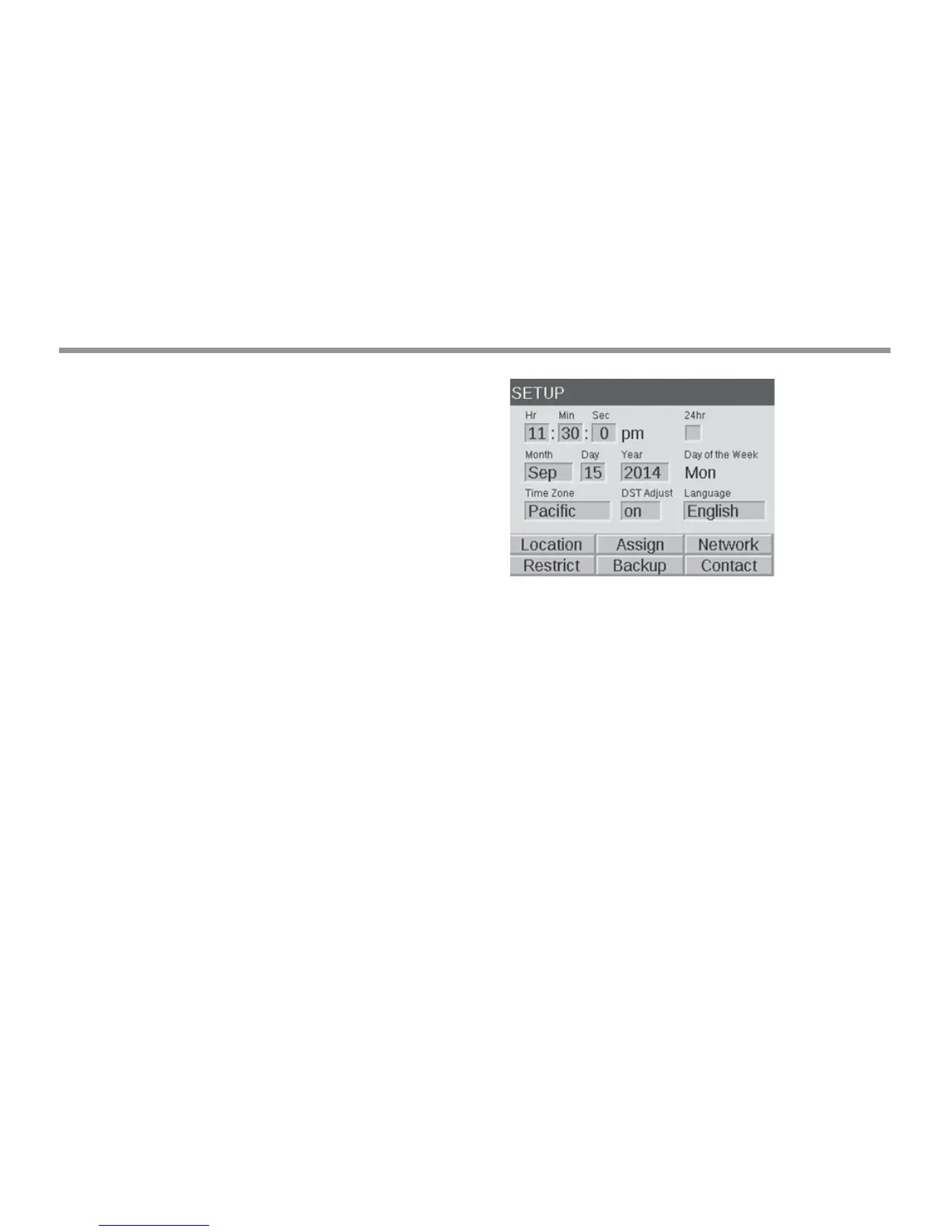
SETUP Screen
All background tools and settings (except color) are accessible
in the SETUP screen. Scroll through the various options to set up
the controller.
Time/Date
• Set the three time categories (Hr:Min:Sec) to the current time
settings by pushing the scroll wheel when the appropriate eld is
highlighted, scrolling through the numeric options, and pressing
the scroll wheel again to nalize the selection.
• Turn past 12 on the hour (“Hr”) setting to adjust AM and PM,
as displayed next to the seconds (“Sec”).
• To convert clock to 24-hour convention, select the “24 Hour”
selection box.
• Set the three date categories (Month, Day, Year) to the current
date by pushing the scroll wheel when the appropriate eld is
highlighted, scrolling through the options, and pressing the scroll
wheel again to nalize the selection.
• Setting the month, day and year automatically sets the day of the
week which appears to the right of the year.
• Daylight savings time (DST), when activated, will adjust time
forward or backward by 1 hour at the appropriate dates each year.
To initiate it, select ON. To deactivate it, select OFF.
Figure 4: Setup Screenshot


 To Next Page