Version 2.06 February 2017
Page 23 of 44
5 Working with the NANO
3
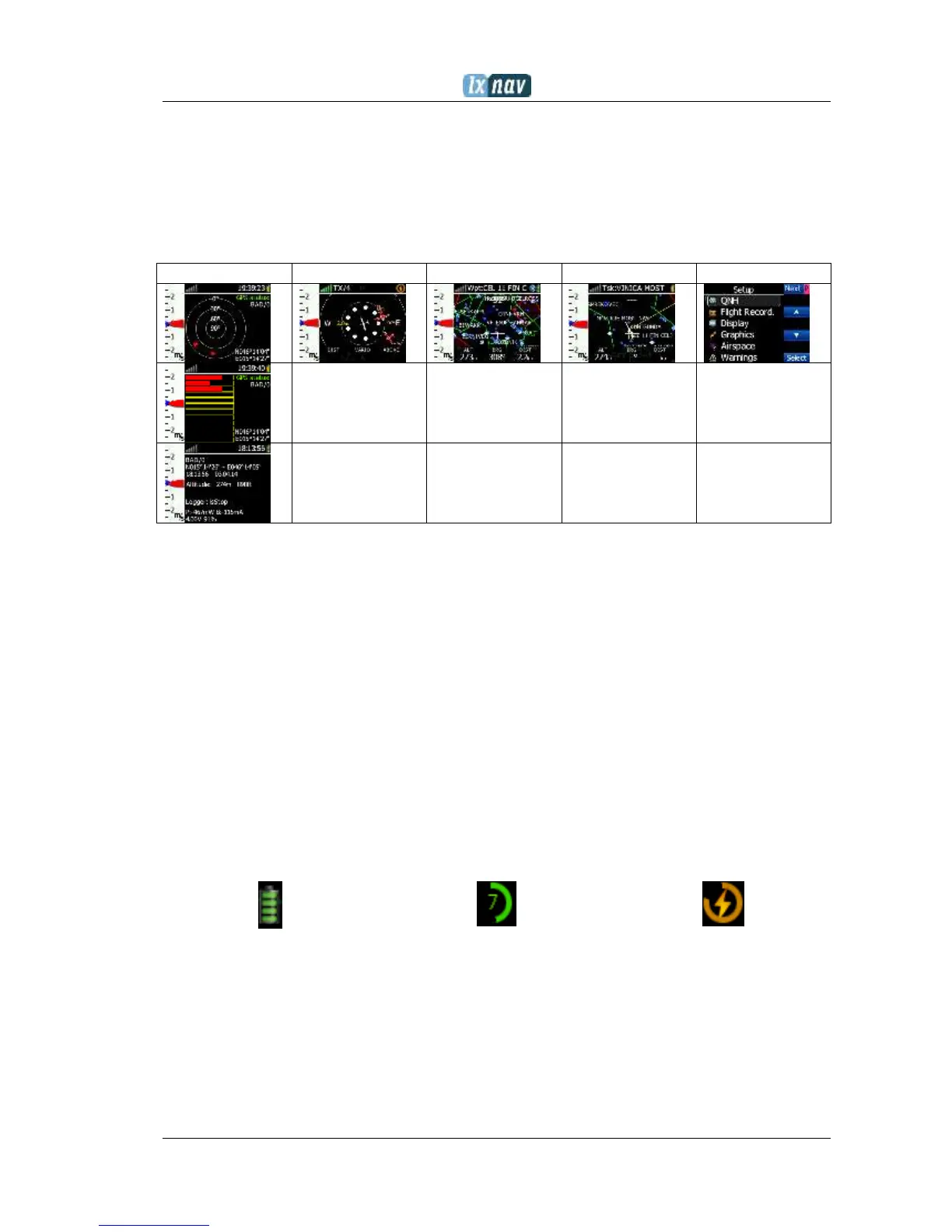
5.1 Tree structure
The NANO
3
has four modes, info, Waypoint, Task and Setup mode. Info mode has two
subpages, where you will find all the necessary information about the status of the NANO
3
.
5.2 Main navigation screen description
The main navigation screen consists of a map with coloured airspace, waypoints with names
or task (depends on which page you are looking at), vario tape on the left and status bar on
the top. The vario tape and vario dynamics can be configured in the Setup-Hardware-Vario
menu. If you don’t want to see the vario tape, you can switch it off. The status line indicates
the status of the GPS, indicates the chosen waypoint that you are navigating to, the status of
the Bluetooth device and the battery level. Menu buttons appears, when you press any one
of the buttons. Each button has its own function which is described on the button label. The
functions of buttons are mostly related to the page where you are (waypoint, task, flarm,
info, setup). If there is no label on the button, this button has no function.
Battery level can be displayed in two ways, with the classic battery level indicator or round
progress with number inside, which indicates remaining hours. Outside progress indicates
percent of the battery level. When the remaining time is calculated to be less than 1 hour,
the indication becomes red and the inside number means remaining minutes, the outer ring
is progress for last hour (60 minutes).
When the battery is charging the indication is as follows:. Inside symbol indicate charging,
outer ring is percent of charge.
The accuracy of battery life measurement depends on how accurate the battery capacity has
been measured More about battery calibration can be read in chapter:4.4. In the centre top
of the map is the “off course” indicator, which helps the pilot fly in the right direction. At the
bottom of the map screen are three nav boxes, showing bearing, distance to the target and
the pressure altitude.


 To Next Page