Version 2.06 February 2017
Page 28 of 44
Start: orientates the sector always towards the start.
If the Line checkbox is checked the sector will become a line type of observation zone. The
Radius 1 parameter describes half of width of line length. Use the UP/DOWN arrow buttons
to increase or decrease radius for step 0.1. Long press will increase/decrease for 5.0.
If Line is not checked the Angle1 parameter will define the basic shape of the observation
zone. A value of 180° means that the zone is a cylinder and 45° is the classical FAI sector.
Use Up/Down buttons to select right angle.
Angle2 and Radius2 are used for more complex observation zone setups.
When changing observation zone parameters the screen is automatically updated to display
the new zone.
5.7.7 Hardware
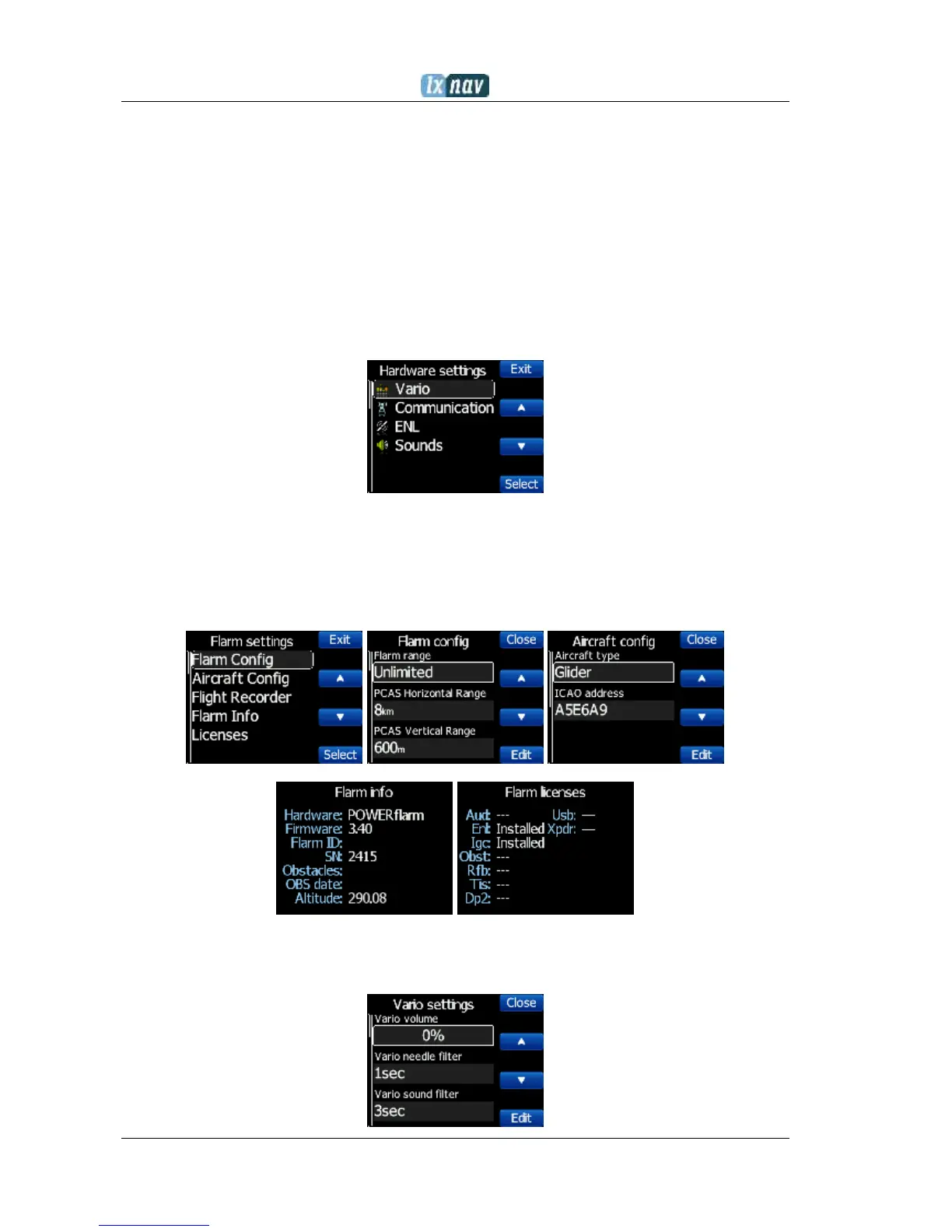
In the Hardware menu there are four sub items:
5.7.7.1 Flarm
If a flarm is detected, the user can make some configuration setting changes on the flarm
and get some flarm status information .
5.7.7.2 Vario


 To Next Page