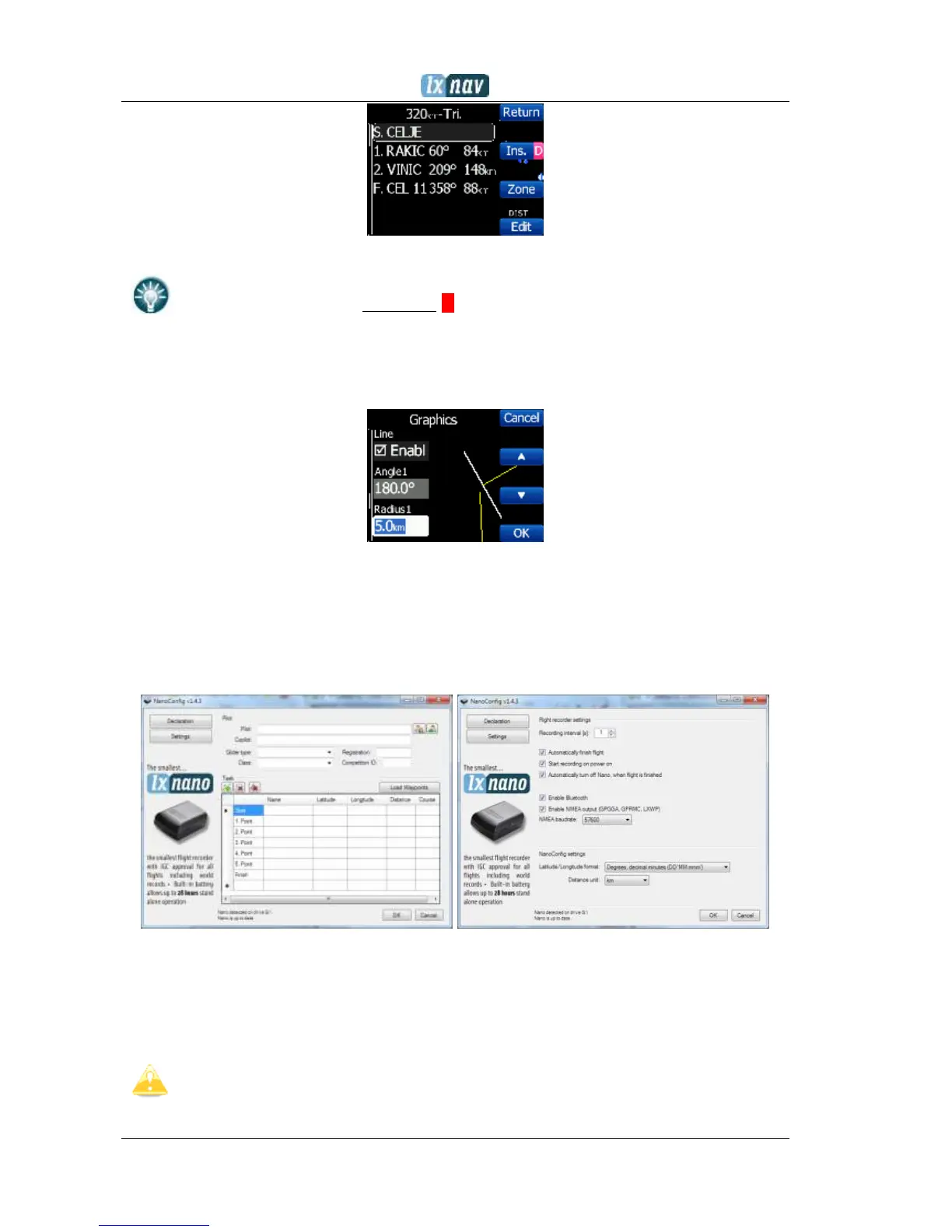
To
insert
a waypoint you make a quick press on the Ins. and to
delete
a
waypoint you press and hold down D for about (not more than) a second
Each waypoint can have a custom zone or area applied. These areas can be modified by
pressing to Zone button.
7.2 On a PC with NanoConfig for Windows
Use the NanoConfig program to configure the NANO
3
. A flight declaration can be uploaded or
various parameters can be modified using this program. The NanoConfig program consists of
two major screens. A flight declaration screen and a settings screen.
You may toggle between these two screens by pressing the Declaration or Settings
button in the upper left corner of the NanoConfig program.
Press the OK button to confirm changes and exit from the program. Press Cancel to
abandon changes and exit without saving data.
It is important to run the NanoConfig program directly from the NANO
3
. Do not
copy the NanoConfig program to another location as the settings and declarations
will not be written properly to the NANO
3
.


 To Next Page