5 Programming
16 MAGNETEK HPV1000 AC Elevator Drive Technical Manual
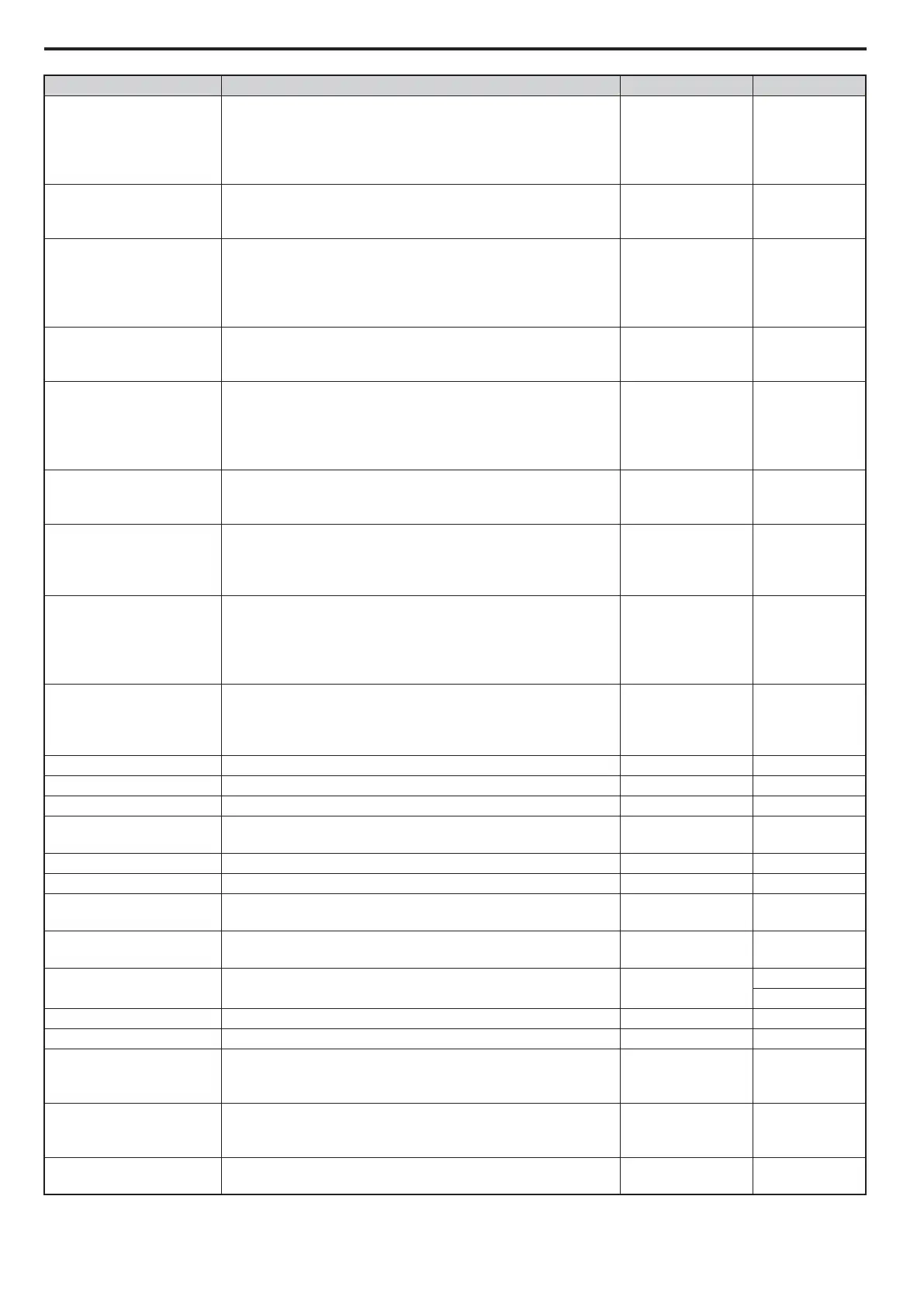
Spd Dev Low Lvl <3>, <4>
When the difference between the speed reference and the speed
feedback value exceeds this setting for the time set in Dev Low Time
(A1), the Speed Deviation Low digital output is open.
Setting of 0.0 disables this feature (aka. output will always be closed).
% <3>, <4> 10.0 <3>, <4>
Spd Dev Low Time <3>, <4>
When the difference between the speed reference and the speed
feedback value exceeds the level in Dev Low Level (A1) for this time
setting, the Speed Deviation Low digital output will open.
Sec <3>, <4> 0.50 <3>, <4>
Speed Dev Alm Lvl <3>, <4>
When the difference between the speed reference and the speed
feedback value exceeds this setting for the time set in Alarm Time
(A1), a Speed Dev alarm is generated.
A setting of 0.0 disables this feature.
%
<3>, <4> 15.0 <3>, <4>
Spd Dev Alm Time <3>, <4>
Defines the time the Speed Feedback (D1) signals needs to be in the
range of Speed Reference (D1) before a Speed Dev alarm is declared.
The range is defined by Spd Dev Alm Lvl (A1).
Sec
<3>, <4> 00.10 <3>, <4>
Spd Dev Flt Lvl <3>, <4>
When the difference between the speed reference and the speed
feedback value exceeds this setting for the time set in Fault Time
(A1), a Speed Dev fault is generated.
A setting of 0.0 disables this feature.
%
<3>, <4> 25.0 <3>, <4>
Spd Dev Flt Time <3>, <4>
Defines the time the Speed Feedback (D1) signals needs to be in the
range of Speed Reference (D1) before a Speed Dev Fault is declared.
The range is defined by Spd Dev Flt Lvl (A1).
Sec <3>, <4> 00.50 <3>, <4>
PreTrq Time <3>, <4>
Sets a time constant for the torque reference to reach 300%. Enabled
by setting an analog terminal for torque compensation.
Effective only when Trq Comp Type (C1) is set to Pre-torque.
ms
<3>, <4> 500 <3>, <4>
PreTrq Dec Freq <3>, <4>
Sets the speed level for torque compensation to diminish.
A setting of 0.0 disables this function.
Effective only when Trq Comp Type (C1) is set to Pre-torque.
Hz <3>, <4> 0.0 <3>, <4>
PreTrq Dec Time <3>, <4>
Sets the time for torque compensation to diminish once motor speed
reaches the level set in TrqCmpFadeoutSpd (A1).
Effective only when Trq Comp Type (C1) is set to Pre-torque.
ms
<3>, <4> 1000 <3>, <4>
Slip Comp Gain M <1>, <2> Slip compensation for leveling speed in the motoring region. - 0.7 <1>, <2>
Slip Comp Gain R <1>, <2> Slip compensation for leveling speed in the regenerative region. - 1.0 <1>, <2>
Trq Det Dly Time <1>, <2> Sets a delay time before detecting torque for slip compensation. ms <1>, <2> 1000 <1>, <2>
Trq Det FltrTime <1>, <2>
Sets the filter time constant applied to the torque signal used for the
slip compensation value calculation.
ms
<1>, <2> 500 <1>, <2>
Slip Comp Gain <2>, <3> Sets the gain for the motor slip compensation function. - 1.0 <2>, <3>
Slip Comp Time <2> Adjusts the slip compensation function delay time. ms <2> 2000 <2>
Slip Comp Limit <2>
Sets an upper limit for the slip compensation function as a percentage
of motor rated slip.
%
<2> 200 <2>
Torq Comp Gain <1>, <2>
Sets the gain for the automatic torque (voltage) compensation
function and helps to produce better starting torque.
-1.00
<1>, <2>
Torq Comp Time <1>, <2> Sets the torque compensation filter time. ms <1>, <2>
200 <1>
50 <2>
Zero Speed Level Sets the detection level for Zero Speed output. % 80.0
Zero Speed Width Sets the width for Zero Speed output. % 4.0
SpdAgreeLvl +/-
Sets the speed detection level for digital output functions SpdRef /Out
Agr (C3), SpdRef /Set Agr (C3), Spd Detection 3 (C3), and Spd
Detection 4 (C3).
%0.0
SpdAgreeWdth +/-
Sets the range of the speed detection for digital outputs SpdRef /Out
Agr (C3), SpdRef /Set Agr (C3), Spd Detection 3 (C3), and Spd
Detection 4 (C3).
%4.0
Run Delay Time
Sets the time that must pass after the Up/Down command is entered
until the drive internal Run command is set and the ride is started.
Sec 0.00
A1 Parameter Name Description
Units Default



 To Next Page