Chapter 1 - Basic info
68
Chapter 6 - Exposure Modes
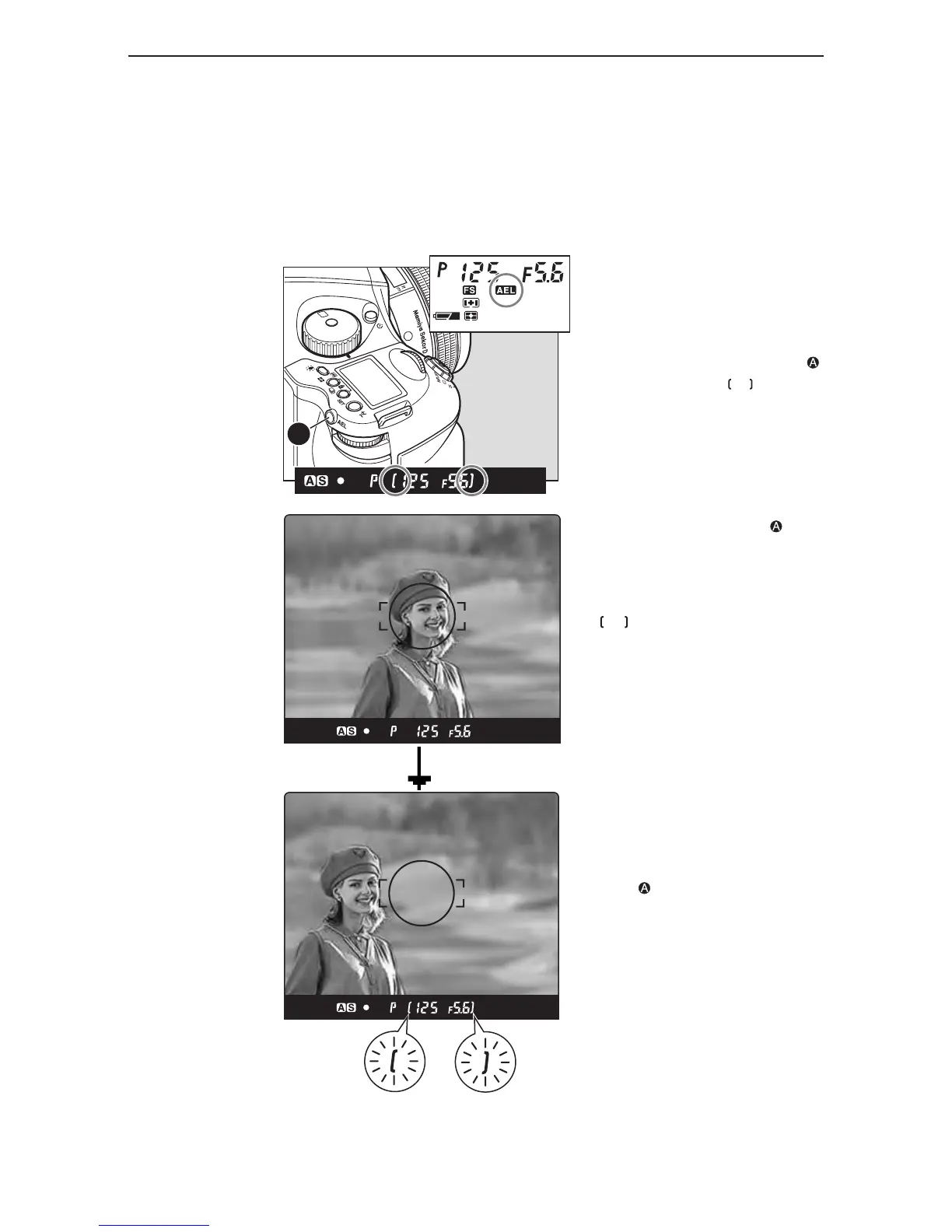
ae lock mode
Shooting with the AE lock function is useful in cases where the desired focal point differs from
where the focal point is usually measured, or when it is necessary to measure the exposure using
spot metering in order to bring the desired subject into focus.
The AEL button will lock the Auto-exposure value as the photo is being recomposed.
on the viewfinder LCD blinks to
indicate the exposure is locked, when
continuing to take the next picture in the
AE lock mode.
When the shutter release mode selector
lever is turned to the “L” (power OFF)
position, or after a lapse of one hour,
the AE lock mode will automatically be
cancelled.
In the Manual “M” exposure mode, the
AE lock function cannot be used.
When the exposure metering value
difference display appears, press AEL
button for about 1 second. The one-
push shift function is now activated to
shift to the shutter speed based on the
metered result.
1. Turn the exposure mode setting dial
and select “P”, “Av” or “T”.
2. Focus on the subject for metering
exposure, and press the AEL button
on the rear of the grip. will appear
on the viewfinder LCD, indicating that
the exposure value is locked.
3. Move the camera to recompose the
shot, then take the picture.
4. By pressing the AEL button , AE
lock will be cancelled.



 To Next Page