EasyManua.ls Logo

Mamiya RB67 - Attaching and Removing Lenses; Attaching the Lens; Removing the Lens

Mamiya RB67
52 pages
Print Icon
To Next Page IconTo Next Page
To Previous Page IconTo Previous Page
Loading...
Attachi09
and
Removin9
Lenses
Attaching tbe Lens
10
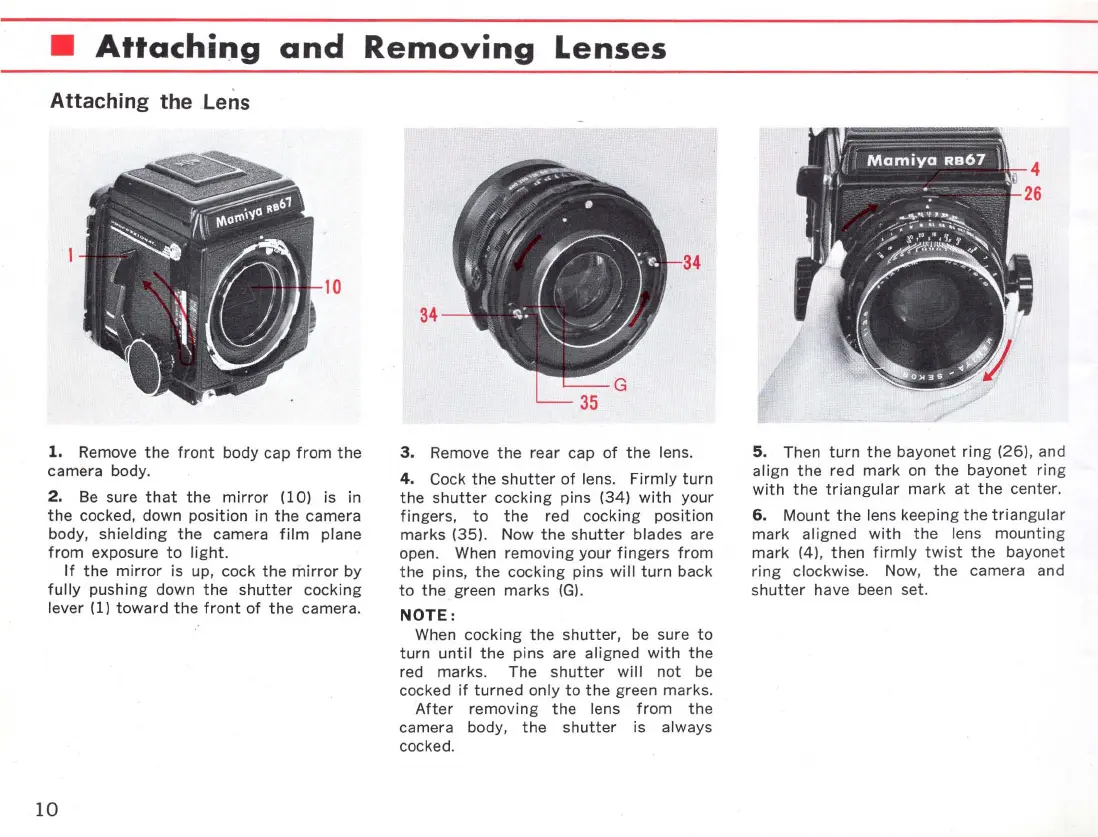
1. Remove
the
front
body cap
from
the
camera body.
2.
Be
sure
that
the
mirror
(10)
is in
the
cocked, down
position
in
the
camera
body,
shielding
the
camera
film
plane
from
exposure
to
light.
If
the
mirror
is up, cock
the
mirror
by
fully
pushing down
the
shutter
cocking
lever (1)
toward
the
front
of
the
camera.
10
34
34
3.
Remove
the
rear cap
of
the
lens.
4.
Cock
the
shutter
of
lens.
Firmly
turn
the
shutter
cocking
pins (34)
with
your
fingers,
to
the
red
cocking
position
marks (35). Now
the
shutter
blades are
open. When removi
ng
your
fingers
from
the
pins,
the
cocking
pins
will
turn
back
to
the
green marks
(G)
.
NOTE:
When
cocking
the
shutter
, be sure
to
turn
until
the
pins are aligned wi
th
the
red
marks
. The
shutter
will
not
be
cocked
if
turned
only
to
the
green
marks
.
After
removing
the
lens
from
the
camera body,
the
shutter
is always
cocked.
5.
Then
turn
the
bayonet
ring
(26), and
align
the
red
mark
on
the
bayonet ring
with
the
triangular
mark
at
the
center
.
6.
Mount
the
lens keeping
the
triangular
mark
aligned
with
the
lens
mountin
g
mark
(4),
then
firmly
twist
the
bayonet
ring
clockwise. Now,
the
camera and
shutter
have been set.

Related product manuals