EasyManua.ls Logo

Mamiya RB67 - Attaching and Detaching the Roll Film Holder; Attaching the Roll Film Holder; Detaching the Roll Film Holder

Mamiya RB67
52 pages
Print Icon
To Next Page IconTo Next Page
To Previous Page IconTo Previous Page
Loading...
Attaching
and
Detaching
the
Roll
Film
Holder
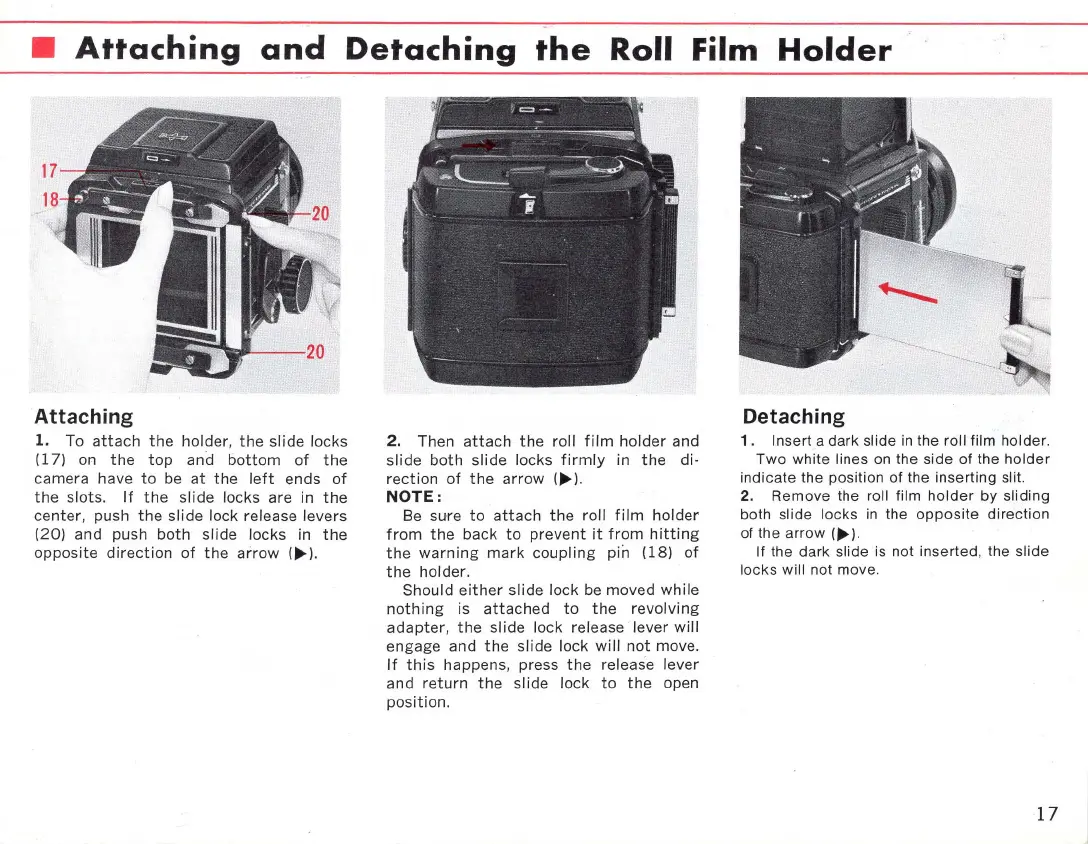
Attaching
1.
To
attach
the
holder,
the
slide
locks
(17)
on
the top
and
bottom
of
the
camera
have
to
be
at
the
left
ends
of
the
slots.
If
the
slide
locks are in
the
center,
push
the
slide
lock release
levers
(20)
and
push
both
slide
locks in
the
opposite
direction
of
the
arrow
(~)
.
2.
Then
attach
the
roll
film
holder
and
slide
both
slide
locks
firmly
in
the
di·
rection
of
the
arrow
(~).
NOTE:
Be sure
to
attach
the
roll
film
holder
from
the
back
to
prevent
it
from
hitting
the
warning
mark
coupling
pin
(18)
of
the
holder
.
Should
either
slide
lock be
moved
while
nothing
is
attached
to
the
revolving
adapter,
the
slide
lock release
lever
will
engage
and
the
slide
lock
will
not
move.
If
this
happens, press
the
release
lever
and
return
the
slide
lock
to
the
open
position.
Detaching
1. Insert a dark slide
in
the roll lilm holder.
Two white
lines
on
the side
01
the holder
indicate the position
01
the inserting slit.
2. Remove the roll
lilm
holder
by sliding
both
slide locks
in
the
opposite
direction
01
the arrow
(~).
II the dark slide is not inserted, the slide
locks will
not move.
17

Related product manuals