EasyManua.ls Logo

Mamiya RB67 - 13

Mamiya RB67
52 pages
Print Icon
To Next Page IconTo Next Page
To Previous Page IconTo Previous Page
Loading...
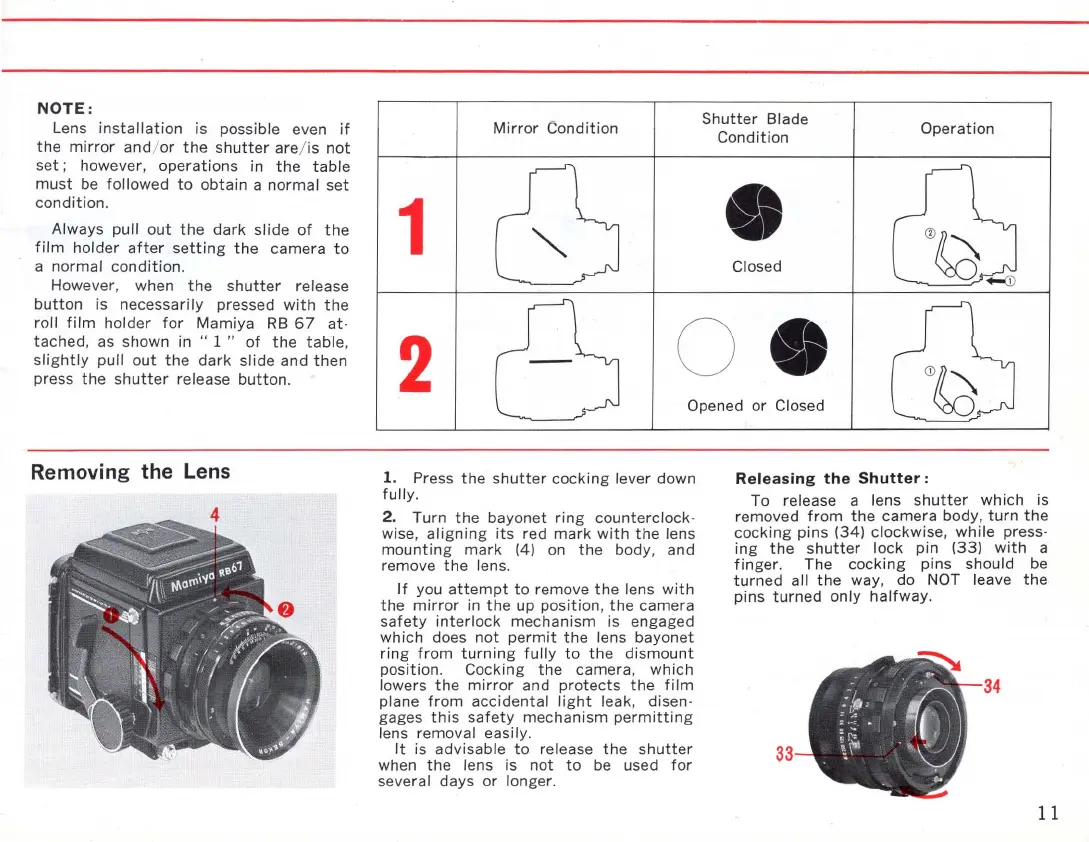
NOTE:
Lens
installation
is possible even
if
the
mirror
and/
or
the
shutter
are/ is
not
set;
however,
operations
in
the
table
must
be
followed
to
obtain
a
normal
set
condition.
Always pull
out
the
dark
slide
of
the
film
holder
after
setting
the
camera
to
anormal
condition.
However, when
the
shutter
release
button
is
necessarily
pressed
with
the
roll
film
holder
for
Mamiya
RB
67
at·
tached,
as shown in "
1"
of
the
table,
slightly
pull
out
the
dark
slide
and
then
press
the
shutter
release
button.
Removing the
Lens
Mirror
Condition
1
Shutter
Blade
Condition
Closed
Operation
2
o
Opened
or
Closed
1.
Press
the
shutter
cocking
lever down
fully.
2.
Turn
the
bayonet
ring
counterclock-
wise,
aligning
its
red
mark
with
the
lens
mounting
mark
(4) on
the
body, and
remove
the
lens.
If
you
attempt
to
remove
the
lens
with
the
mirror
in
the
up
position,
the
camera
safety
interlock
mechanism
is engaged
which
does
not
permit
the
lens
bayonet
ring
from
turning
fully
to
the
dismount
position. Cocking
the
camera,
which
lowers
the
mirror
and
protects
the
film
plane
fram
accidental
light
leak, disen-
gages
this
safety
mechanism
permitting
lens removal easily.
It
is
advisable
to
release
the
shutter
when
the
lens is
not
to
be used
for
several days or longer.
Releasing
the
Shutter:
To release a lens
shutter
which
is
removed
from
the
camera body,
turn
the
cocking
pins (34) clockwise,
while
press-
ing
the
shutter
lock
pin
(33)
with
a
finger
. The
cocking
pins should be
turned
all
the
way, do NOT leave
the
pins
turned
only
halfway
.
3
11

Related product manuals