EasyManua.ls Logo

Mamiya RB67 - Special Pointers in Using the Mamiya RB 67; Condition: Shutter release button will not release; Condition: Lens cannot be removed; Condition: Roll film holder cannot be removed

Mamiya RB67
52 pages
Print Icon
To Next Page IconTo Next Page
To Previous Page IconTo Previous Page
Loading...
Special
Pointers
in
Using
the
Mamiya
RB
67
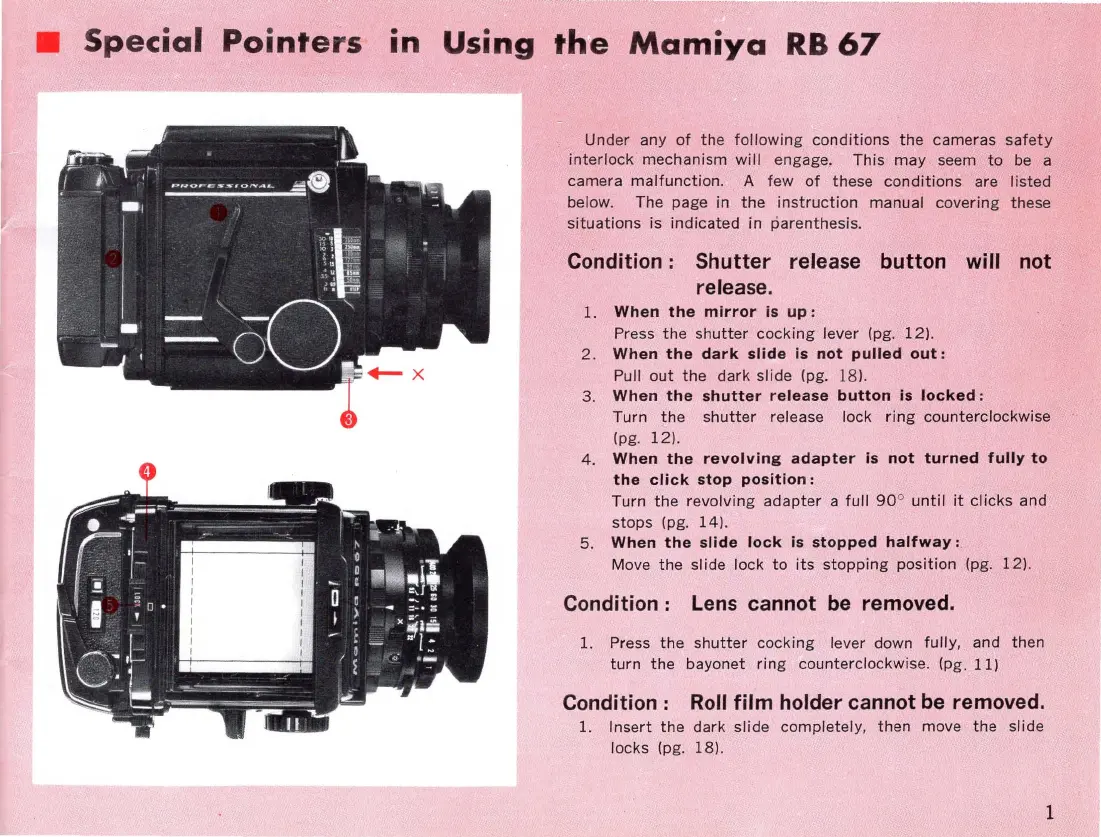
Under any
of
the
following
conditions
the
cameras
safety
interlock
mechanism
will
engage.
This
may
seem
to
be
a
ca me ra
malfunction
. A few
of
these
conditions
are listed
below.
The page in
the
instruction
manual covering these
situations
is
indicated
in parenthesis.
Condition: Shutter release button will not
release.
1.
When
the
mirror
is
up:
Press
the
shutter
cocking
lever (pg.
12).
2 .
When
the
dark
slide
is
not
pulled
out:
Pull
out
the
dark
slide
(pg. 18
).
3.
When
the
shutter
release
button
is
locked:
Turn
the
shutter
release lock
ring
counterclockwise
(pg.
12).
4. When
the
revolving
adapter
is
not
turned
fully
to
the
click
stop
position:
Turn
the
revolving
adapter
a full
90
°
until
it
clicks
and
stops (pg.
14)
.
5.
When
the
slide
lock
is
stopped
halfway:
.
Move
the
slide lock
to
its
stopping
position (pg. 12).
Condition:
Lens
cannot
be
removed.
1. Press
the
shutter
cocking lever down fully, and then
turn
the
bayonet
ring
counterclockwise. (pg.
11)
Condition:
Roll
film holder cannot
be
removed.
1.
Insert
the
dark
slide
completely
,
then
move
the
slide
locks
(pg. 18).
1

Related product manuals