EasyManua.ls Logo

Mamiya RB67 - Flash Photography; Connecting Flash and M-X Selection; Synchronization Table and Aperture Setting

Mamiya RB67
52 pages
Print Icon
To Next Page IconTo Next Page
To Previous Page IconTo Previous Page
Loading...
Flash
Photography
Flash Synchronization
Table
Contact
Bulb
1
-'-
2
M
M
clas
s
0 0
Ele
c
troni
c
flash
0 0
X F
class
0
0
M
class
0 0
Combinations with the 0 mark synchronize.
Combinations
with the x mark do not synchronize
Shutter
speed
-'-
_L
-'-
-"--
-'-
--.L
--.L
4iö
4 8
15
30
60
125
250
0
0
0
0
0
0
0 0
0 0 0 0 0
0 0 0
0
0
0 0
0
X X X
0 0
0
0
X X X X
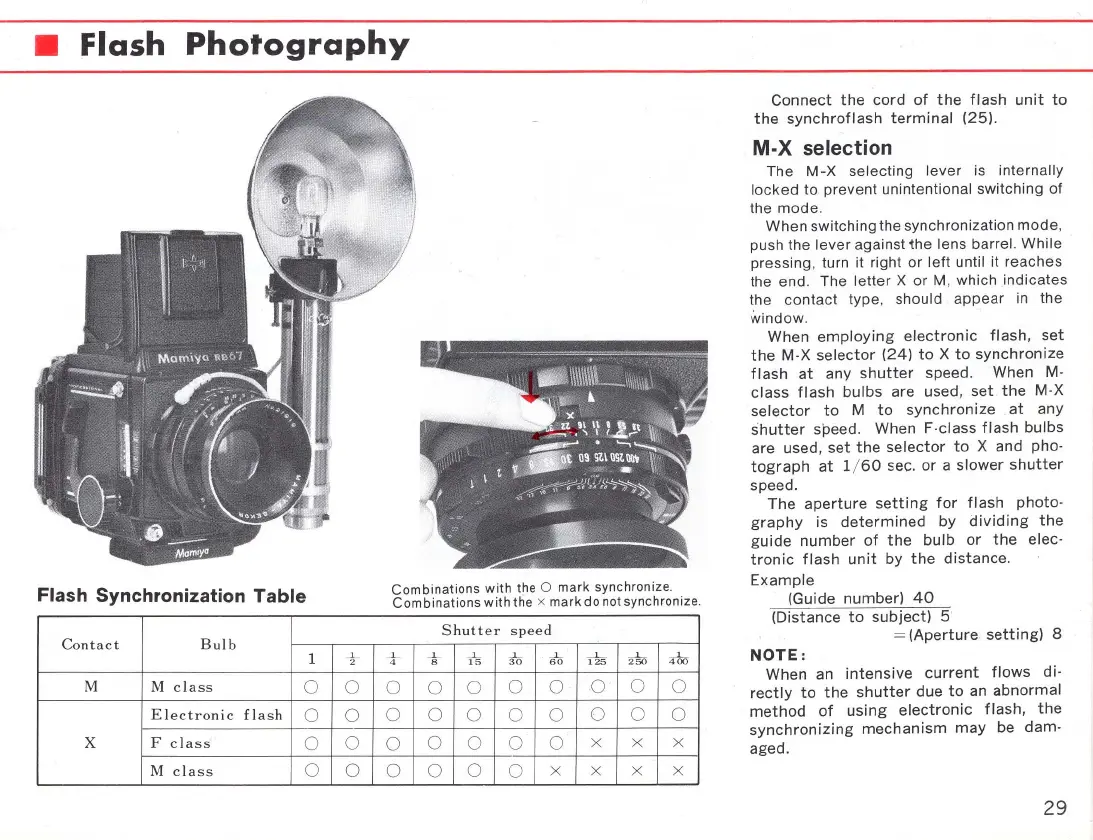
Connect
the
cord
of
the
flash
unit
to
the
synchroflash
terminal
(25)
.
M·X
selection
The
M-X
selecting
lever
is internally
locked
to prevent unintentional switching of
the mode.
When
switehing the synehronization mode,
push the
lever
against
the
lens barrel.
While
pressing, turn it right
or
left
until it reaehes
the end. The
letter
X
or
M, whieh indieates
the eontaet type, should
appear
in
the
window.
When
employing
eleetronie
flash,
set
the
M-X
seleetor
(24)
to
X
to
synchronize
flash
at
any
shutter
speed. When M-
elass
flash
bulbs
are used,
set
.
the
M-X
selector
to
M
to
synchronize
at
any
shutter
speed. When F-class
flash
bulbs
are used,
set
the
selector
to
X and pho-
tograph
at
1/
60
sec.
or
a
slower
shutter
speed.
The
aperture
setting
for
flash
photo-
graphy
is
determined
by
dividing
the
guide
number
of
the
bulb
or
the
elec-
tronic
flash
unit
by
the
distance.
Example
(Guide
number)
40
(Distance
to
subject)
5
=
(Aperture
setting)
8
NOTE:
When an
intensive
current
flows
di-
rectly
to
the
shutter
due
to
an
abnormal
method
of
using
electronic
flash,
the
synchronizing
mechanism
may
be
dam-
aged.
29

Related product manuals