EasyManua.ls Logo

Mamiya RB67 - Focusing Screen and Revolving Adapter; Focusing and Viewing; Changing Picture Format with Revolving Adapter

Mamiya RB67
52 pages
Print Icon
To Next Page IconTo Next Page
To Previous Page IconTo Previous Page
Loading...
Focusing
Screen
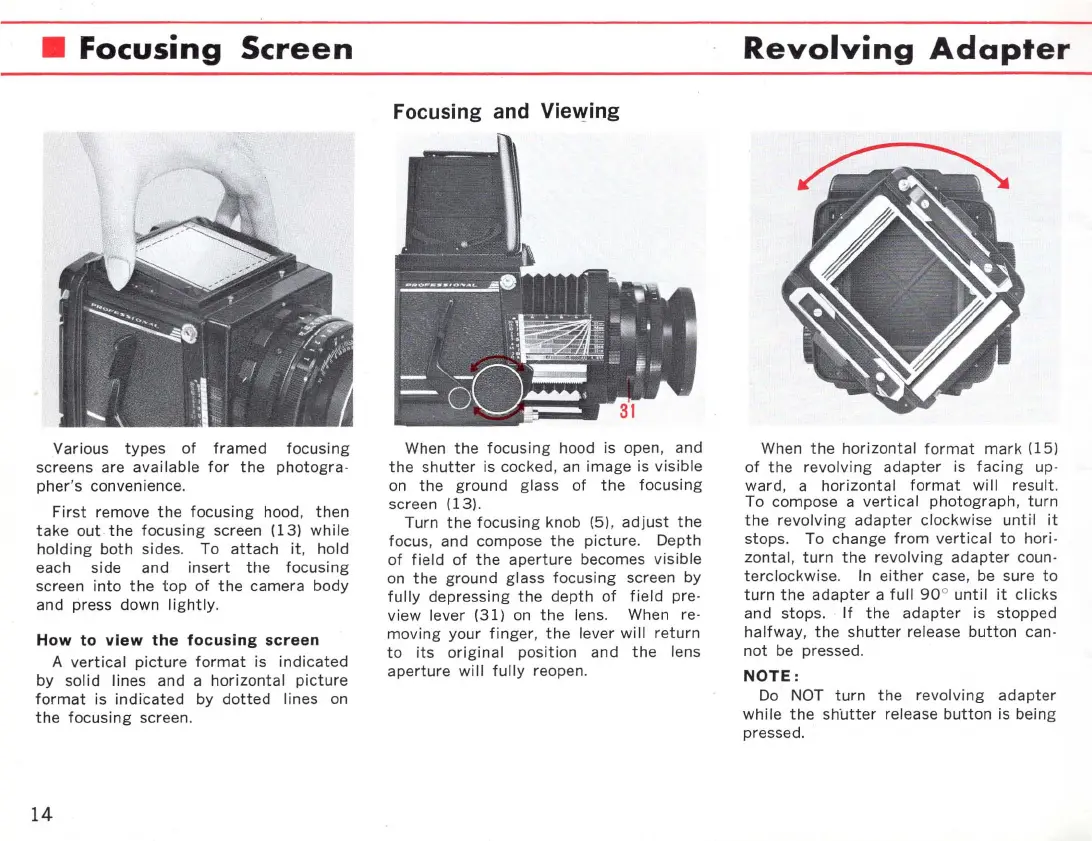
Various
types
of
framed
focusing
screens are
available
for
the
photogra-
pher's
convenience.
First
remove
the
focusing
hood,
then
take
out
the
focusing
screen
(13)
while
holding
both
si des. To
attach
it
, hold
each side and
insert
the
focusing
screen
into
the
top
of
the
camera
body
and press down
lightly.
How
to
view the
focusing
screen
A
vertical
picture
format
is
indicated
by
solid
lines and a
horizontal
picture
format
is
indicated
by
dotted
lines on
the
focusing
screen.
14
Focusing and
Vie~ing
When
the
focusing
hood is open, and
the
shutter
is cocked,
an
image is
visible
on
the
ground glass
of
the
focusing
screen (13).
Turn
the
focusing
knob (5),
adjust
the
focus, and compose
the
picture.
Oepth
of
field
of
the
aperture
becomes
visible
on
the
ground
gl ass
focusing
screen by
fully
depressing
the
depth
of
field
pre-
view
lever
(31)
on
the
lens. When re-
moving
your
finger
,
the
lever
will
return
to
its
original
position
and
the
lens
aperture
will
fully
reopen.
Revolving
Adapter
When
the
horizontal
format
mark
(15)
of
the
revolving
adapter
is
facing
up -
ward, a
horizontal
format
will
result.
To compose a
vertical
photograph
,
turn
the
revolving
adapter
clockwise
until
it
stops
. To
change
fram
vertical
to
hori-
zontal,
turn
the
revolving
adapter
coun-
terclockwise.
In
either
case, be sure
to
turn
the
adapter
a
full
90
°
until
it
clicks
and stops.
If
the
adapter
is
stopped
halfway
,
the
shutter
release
button
can-
not
be pressed.
NOTE:
00
NOT
turn
the
revolving
adapter
while
the
sh'
utter
release
button
is being
pressed.

Related product manuals