EasyManua.ls Logo

Mamiya RB67 - 18

Mamiya RB67
52 pages
Print Icon
To Next Page IconTo Next Page
To Previous Page IconTo Previous Page
Loading...
How
to
Use
the
Lens
Hood
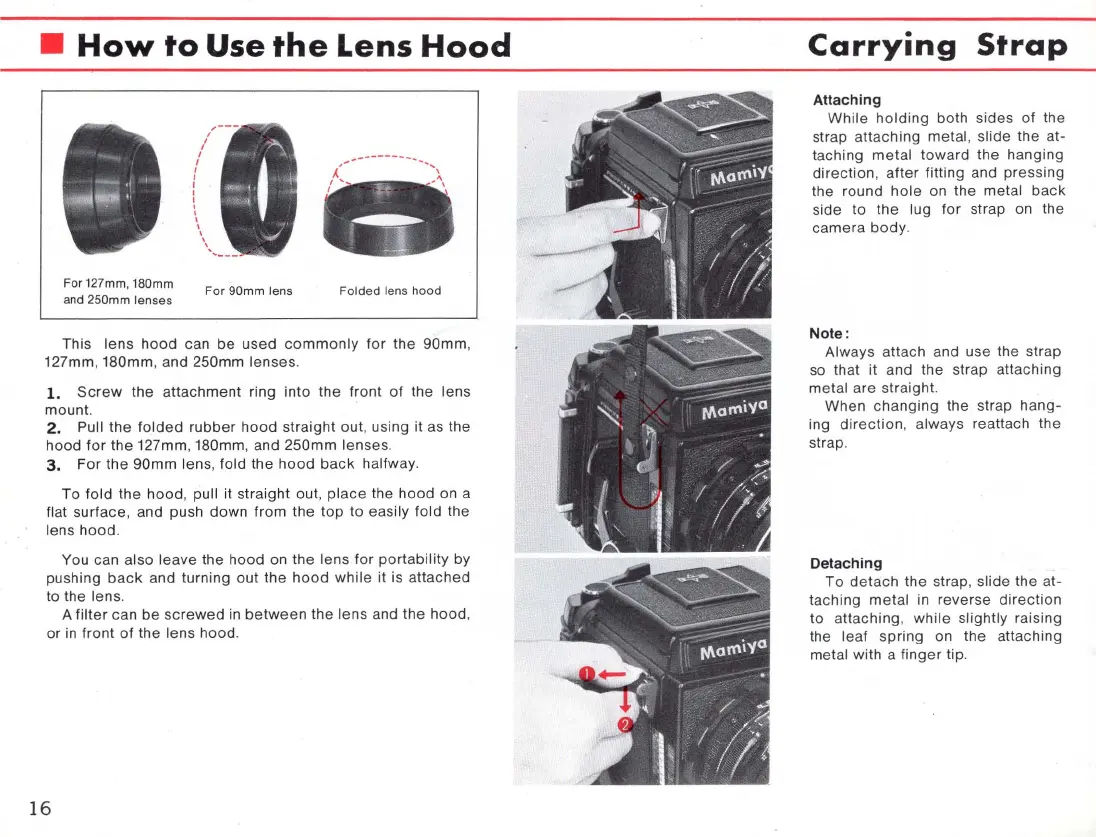
Far 127mm, 180mm
and 250mm lenses
Far 90mm lens
Falded
le
ns
hood
This
lens
hood
can
be
used
commonly
for
the
90mm
,
127mm,
180mm
, and 250mm
lenses
.
1.
Screw
the
attachment
ring
into
the
front
of
the
lens
mount.
2.
Pull
the
folded
rubber
hood
straight
out, using it as the
hood
for
the
127mm, 180mm, and
250mm
lenses
.
3.
For
the
90mm
lens, fold
the
hood
back
halfway.
To
fold
the
hood, pull it
straight
out,
place
the
hood
on a
flat surface, and push
down
from
the
top
to
easily
fold
the
lens
hood
.
You can
also
leave
the hood on
the
lens
for
portability
by
pushing
back
and turning
out
the
hood
while
it is
attached
to the lens.
A
filter
can
be
screwed
in
between
the
lens
and
the
hood
,
or in
front
of
the
lens hood.
16
Carrying
Strap
Attaching
While
holding
both sides
of
the
strap
attaching
metal, slide
the
at-
taching
metal
toward
the
hanging
direction,
after
fitting and
pressing
the
round
hole
on the metal
back
side
to
the
lug
for
strap on
the
camera
body.
Note :
Always attach and use
the
strap
so that it and
the
strap attaching
met
al are straight.
When
changi
ng
the
strap
hang-
ing
direction
, always reattach th e
strap.
Detaching
To
detach
the
strap, slide
the
at-
taching
metal
in reverse
direction
to
attaching
,
while
slightly raising
the
leaf
spring
on
the
attaching
metal with a
finger
tip.

Related product manuals