EasyManua.ls Logo

Mamiya RB67 - Loading Film; Opening Holder and Inserting Film; Winding Film and Aligning Starting Mark

Mamiya RB67
52 pages
Print Icon
To Next Page IconTo Next Page
To Previous Page IconTo Previous Page
Loading...
Loading
Film
2
R10
5
20
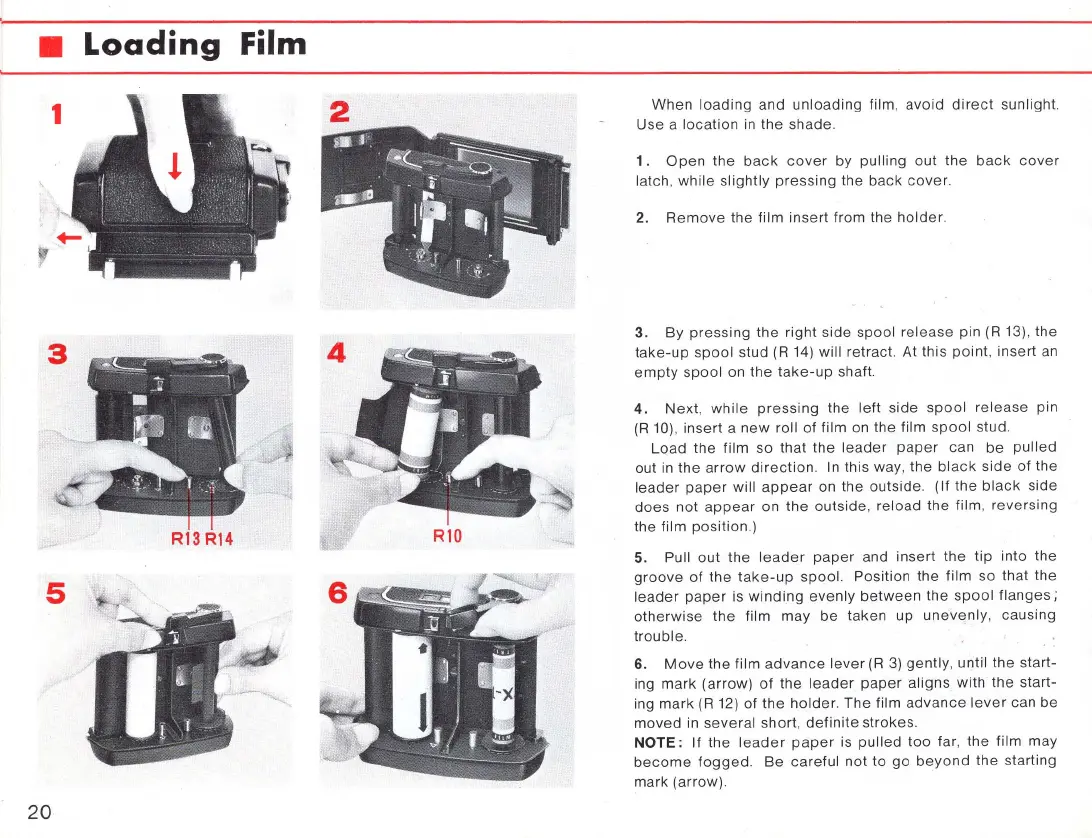
When
loading
and
unloading
film,
avoid
direct
sunlight.
Use
a
location
in
the
shade.
1.
Open
the
back
cover
by
pulling
out
the
back
cover
latch,
while
slightly
pressing
the
back
cover.
2.
Remove
the
film
insert
from
the
holder
.
3.
By
pressing
the
right
side
spool
release
pin
(R
13), the
take-up
spool
stud (R 14) will retract. At
this
point
,
insert
an
empty
spool
on the
take-up
shaft.
4.
Next,
while
pressing
the
lell
side
spool
release
pin
(R
10),
insert
a
new
roll
of
film
on the film
spool
stud.
Load
the
film
so
that
the
leader
paper
can
be
pulled
out in
the
arrow
direction.
In this
way
,
the
black
side
of
the
leader
paper
will
appear
on the outside.
(If
the
black
side
does
not
appear
on
the
outside
,
reload
the
film,
reversing
the film
position.)
5. Pull
out
the
leader
paper
and
insert
the
tip
into the
groove
of
the
take-up
spool.
Position
the
film
so
that
the
leader
paper
is
winding
evenly
between
the
spool
flanges;
otherwise
the
film
may
be
taken
up
unevenly
,
causing
trouble.
6.
Move
the
film
advance
lever
(R
3)
gently, until
the
start-
ing
mark
(arrow)
of
the
leader
paper
aligns
with
the
start-
ing
mark
(R 12) of
the
holder.
The
film
advance
lever
can
be
moved
in
severa
l short,
definite
strokes.
NOTE:
If
the
leader
paper
is
pulled
too
far,
the
film
may
become
fogged.
Be
careful
not
10
go
beyond
the
starling
mark
(arrow)
.

Related product manuals