ADD-ONUNITS
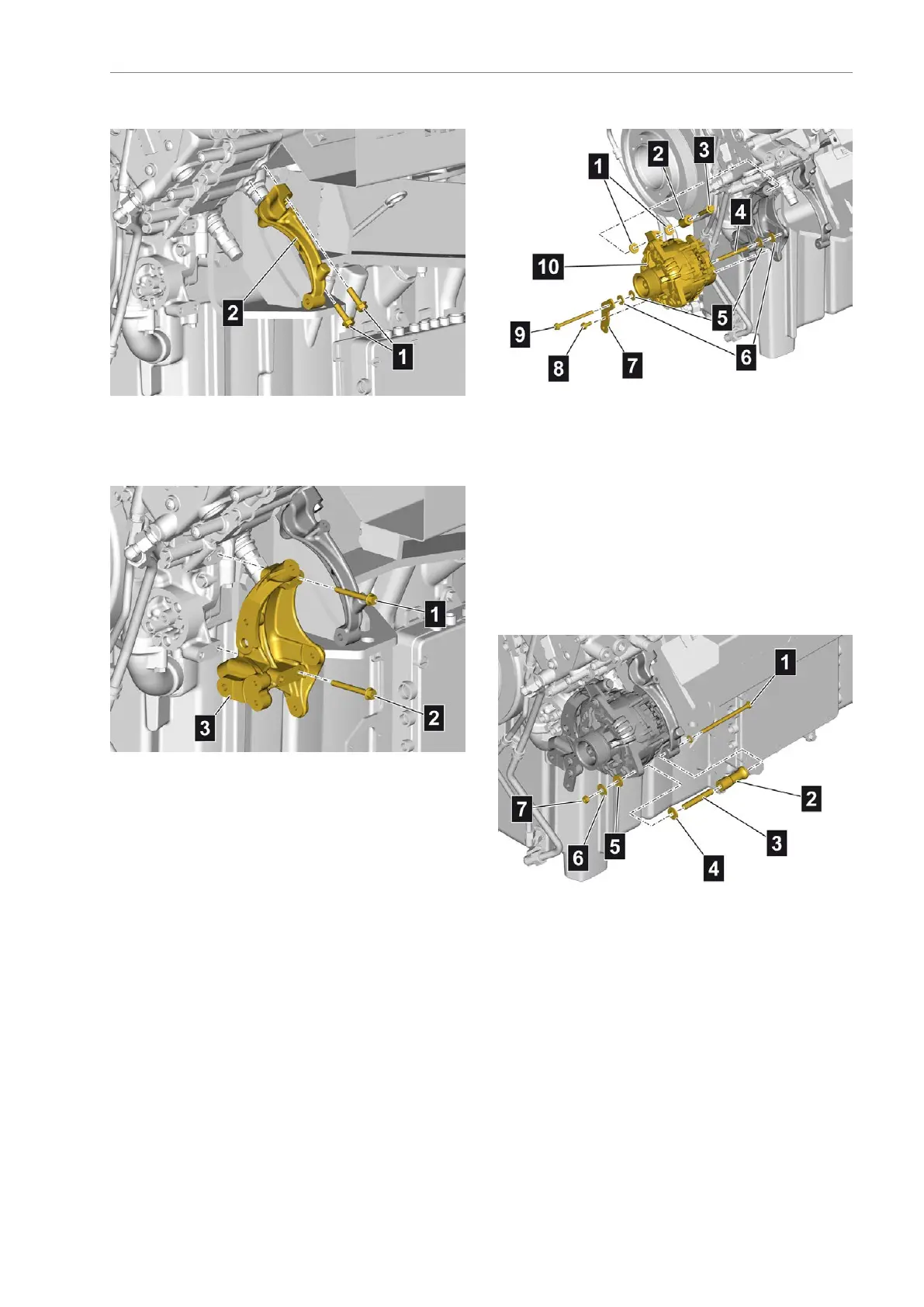
Attachingtheholder
•Positiontheholder(2)
•Screwinandtightenthemountingbolts(1)
Attachingtheholder
•Positiontheholder(3)
•Screwinandtightenthemountingbolts(1)and
(2)asmarked
Attachingthealternator
•Positionthealternator(10)
•Positiontheinsulatingwashers(1)andthebush
(2)
•Screwinthemountingbolt(3)andtightenituntil
nger-tight
•Positiontheholder(7)withinsulatingwashers(6),
washers(5)andinsulatingsleeve(4)
•Screwinandtightenthemountingbolts(8)and
(9)asmarked
•Tightenthemountingbolt(3)
Attachingthealternatormounting
•Positionthebush(2)withinsulatingsleeve(3)and
insulatingwasher(4)
•Insertthemountingbolt(1)withwasher
•Positionthewasher(5)andinsulatingwasher(6)
•Screwonandtightenthemountingnut(7)
AE63stedition103


 To Next Page
 Loading...