mangOH Yellow User Guide
Rev 2 10/21/19 10 41113427
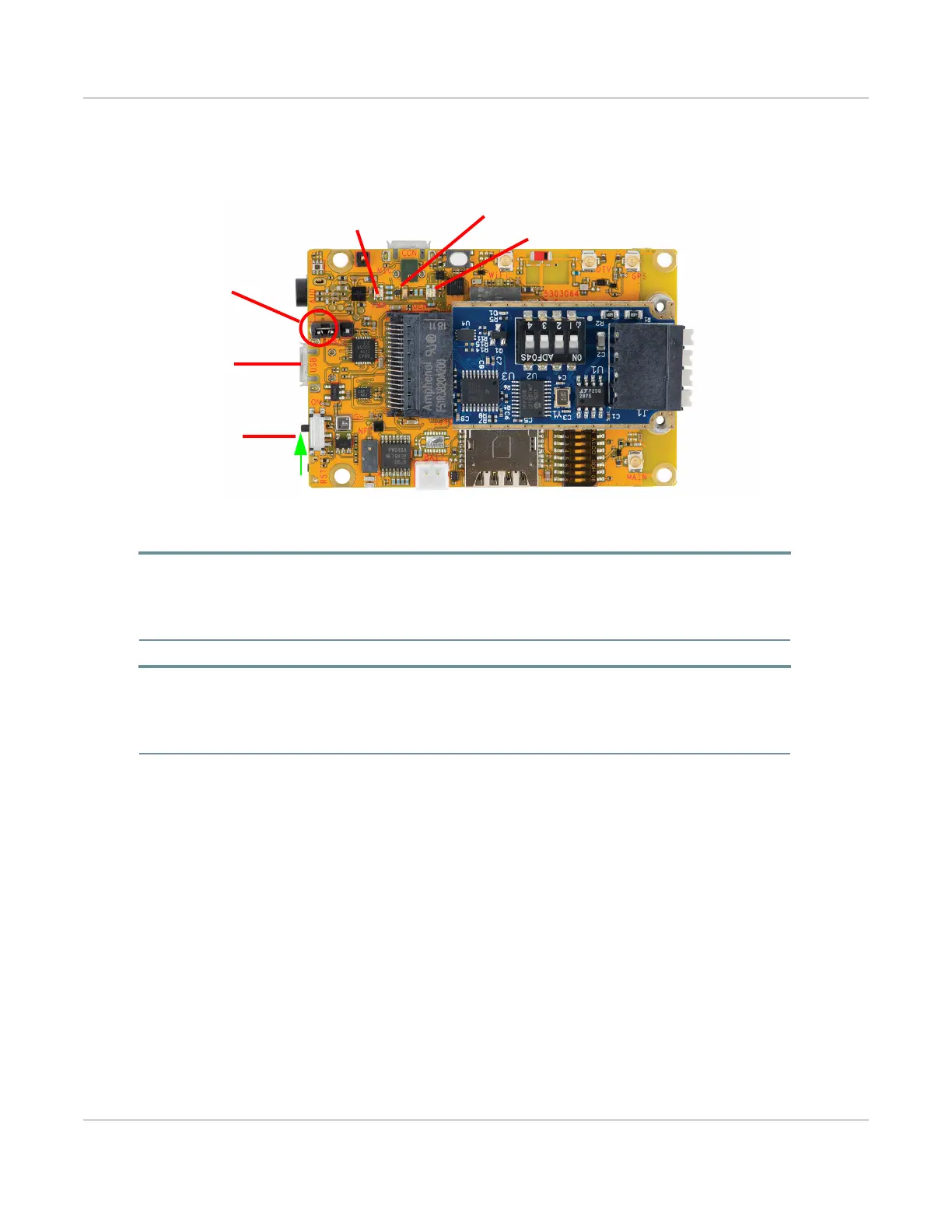
When the mangOH Yellow is powered, the Power/Network/Cloud LED turns solid green, then turns yellow
(when the cellular radio powers on), and then the generic LEDs begin blinking in sequence when the module
has finished booting up.
Figure 2-7: LEDs
Tip: If the Power LED does not turn on:
• Make sure the USB cable is securely connected to the correct micro-B connector (as shown in Figure 2-7).
• Make sure the jumper block is on the correct pins (as shown in Figure 2-7).
• Make sure the power switch is in the ON position (toward the center of the board.
Important: If LTE-M coverage is not available, the mangOH Yellow’s WP7702 module will fall back to 2G,
which consumes up to 2 A of current for short bursts. In this case, USB power is insufficient (500 mA) and
the module may repeatedly brown out and reboot. Use a battery (Connect Battery Backup on page 14) to
supply sufficient power.
Generic tri-color LED
Generic green LED
Power/Network/Cloud
(tri-color) LED
and
The cable must be
plugged in *this*
The jumper must
be on these pins
For this getting started
procedure:
and
connector ("USB").
The power switch
must be toward the
center of the board.


 To Next Page