User Manual Trikombin Page 19 © 2019 Mannayan GmbH + Co KG
7. Operating Modes
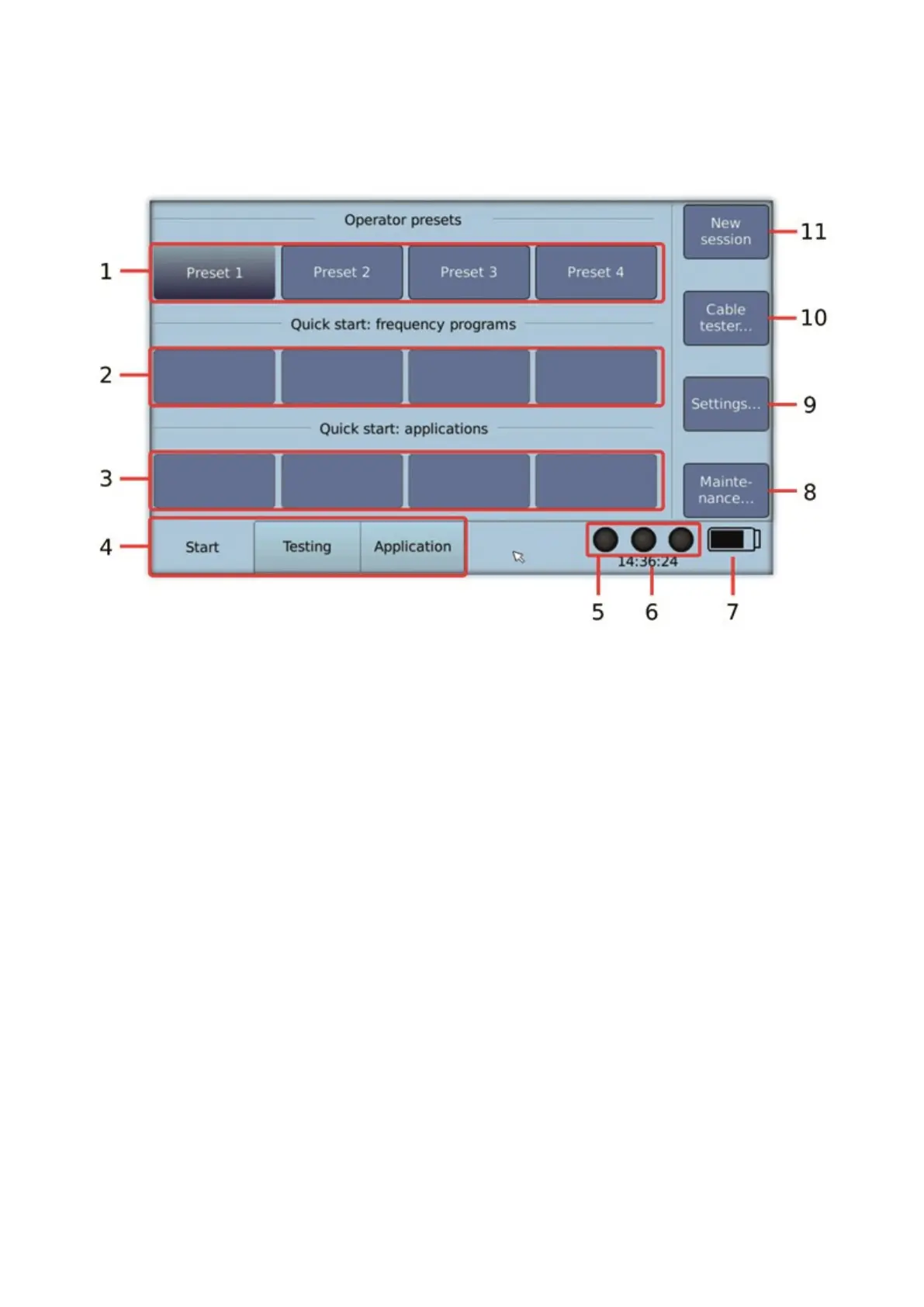
7.1 Start Mode
1. Buttons to switch between users (presets)
2. Quick start buttons for frequency programs
A frequency program can be assigned to each of the buttons. When pressing the
button, the frequency program is loaded and the system changes into the Testing
Mode.
The assignment is made in the Testing Mode: Press the button “More...” and then
press “Assign to quick start...”.
3. Quick start buttons for applications
An application list can be assigned to each of the buttons. When pressing the
button, the corresponding applications are loaded and the system changes into the
Application Mode.
The assignment is made in the Application Mode: Press the button “More…” and
then press “Assign to quick start…”
4. Tabs to select the main modes Start, Testing and Application.
5. Activity state of the generators (on or off)
o On: all three lamps of the touchscreen flash green
o Off: all three lamps of the touchscreen are black
6. Time display
7. Battery charge state


 To Next Page