User Manual Trikombin Page 37 © 2019 Mannayan GmbH + Co KG
7.3.5 Selecting a Frequency Program
When the execution is stopped, frequency programs can be selected as follows:
• tap on the corresponding line in the list or
• use the rotary encoder
If there are more entries in the list than can be displayed on the screen, you may have to
scroll the list. This will be done automatically if the rotary encoder is used.
To scroll, you can also tap the dark blue area of the scroll bar.
7.3.6 Execution of the Application List
The frequency programs in the application list are executed in the order they are displayed.
The first frequency program, which will be executed, is the one which is currently selected
(the line with the blue background).
By pressing the “On” key (keypad, top far left) the execution will be started or stopped.
When the execution is stopped, the frequency program which was executed last, is
displayed in red letters. If the execution is started again and this frequency program is still
selected, only the remaining execution time of the program will be used.
No changes to the application list can be done while the list is being executed.
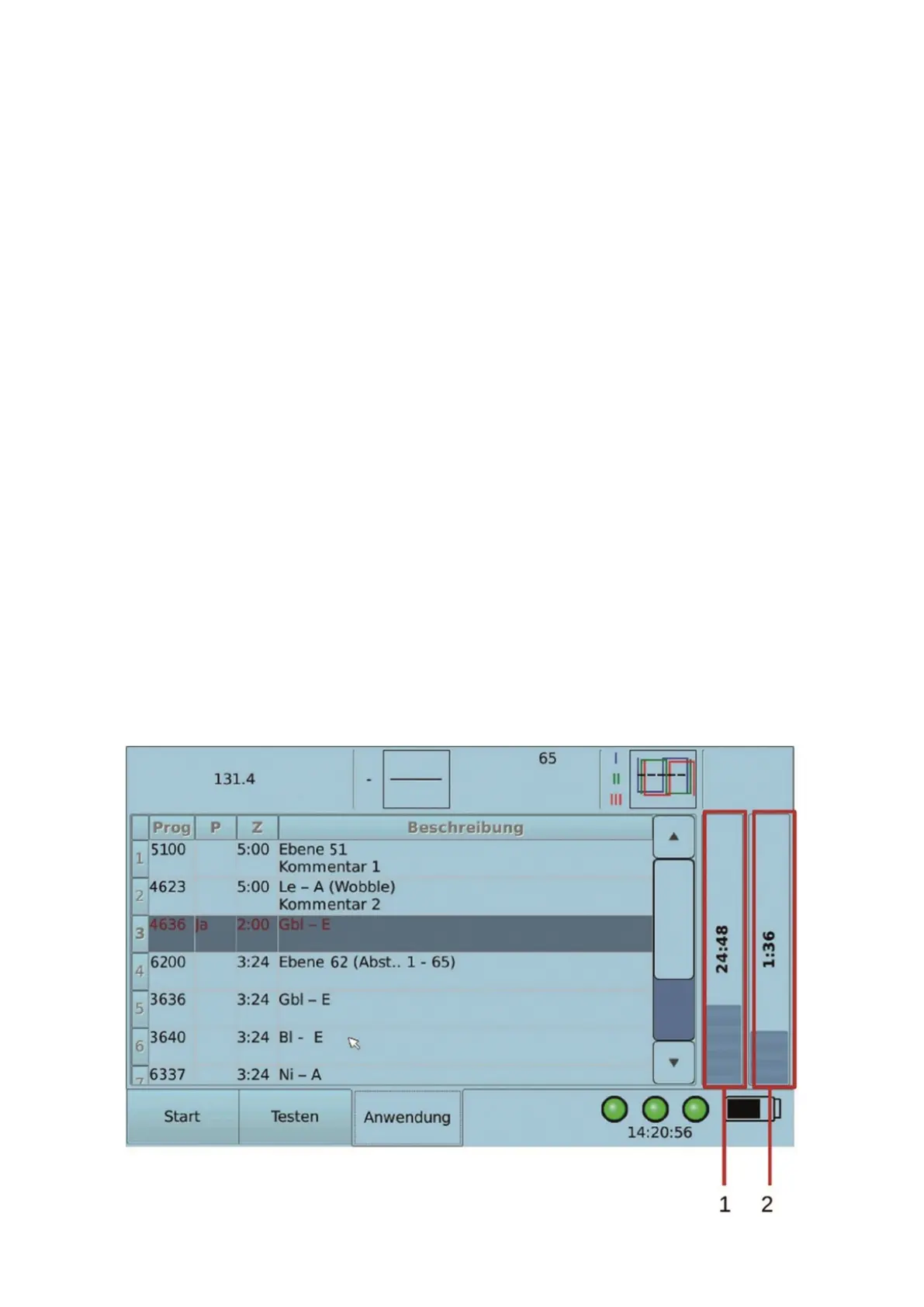
During execution, the device displays the remaining total execution time (1 in the illustration
below) and the remaining execution time of the current frequency program (2 in the
illustration below).
When a frequency program was completely executed, the device switches automatically to
the next frequency program.


 To Next Page