User Manual Trikombin Page 35 © 2019 Mannayan GmbH + Co KG
7.3 Application Mode
Please note: this mode is disabled, when the device is being charged. Therefore, charging
must be interrupted by pressing the charging key.
The Application Mode can be activated by pressing the corresponding tab at the bottom of
the screen.
7.3.1 Overview
Completely configured frequency programs are collected in the application list. Frequency
programs are added to the application list either via the Testing Mode or directly by entering
their number.
• The Application-screen allows to change the list (e.g. delete or move entries).
• The frequency programs in the application list can be executed automatically.
• Once an application list is created it can be saved and used again at a later time.
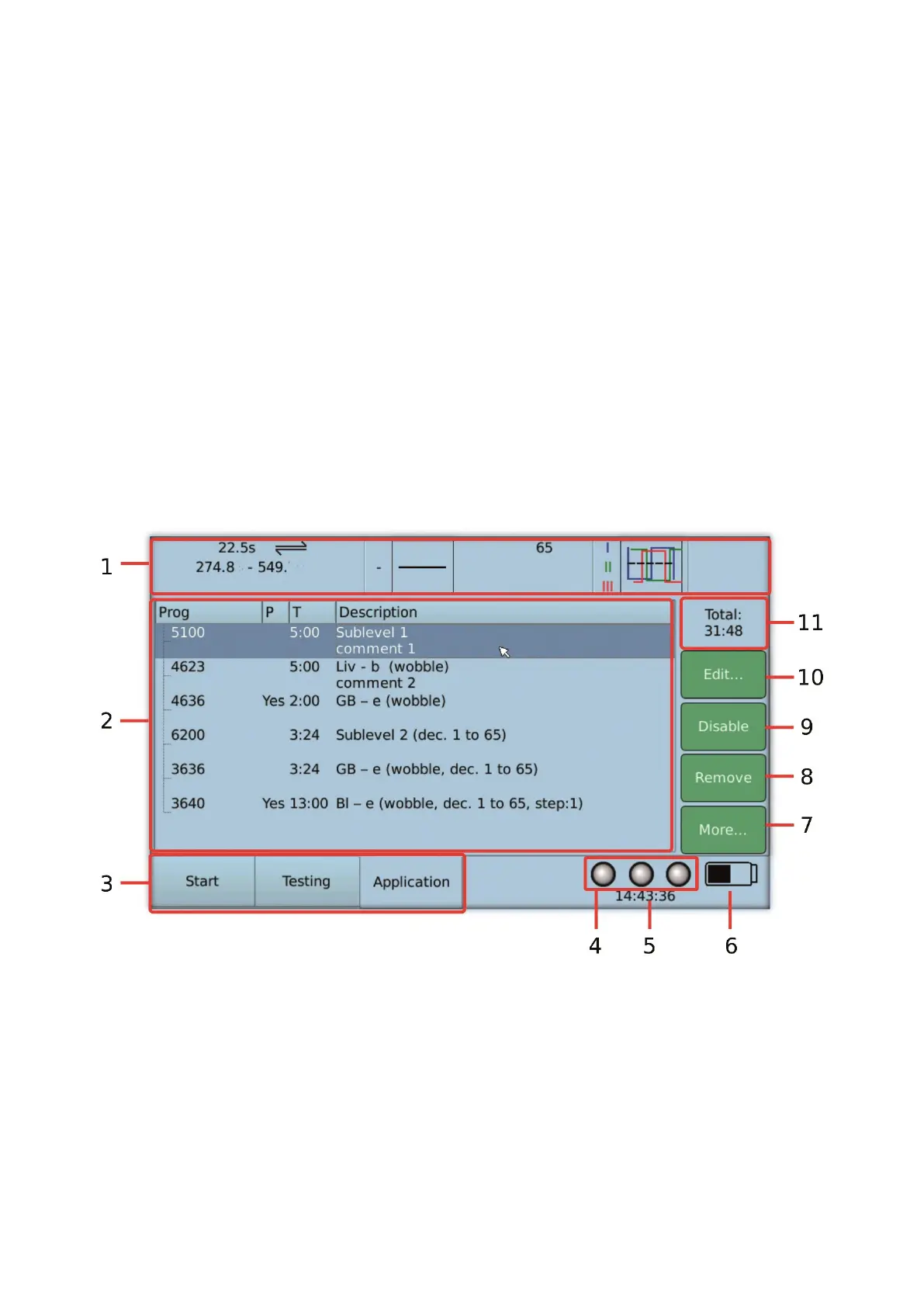
7.3.2 Important Elements of the Application Mode
1. Overview bar: displays the settings of the current frequency
2. List of the frequency programs (application list)
3. Tabs to select the main operating modes Start, Testing and Application
4. Indication of the state of the outputs (generators) (on or off)
5. Time display
6. Indication of the battery charge state
7. Button to display the menu with additional functions
8. Button to remove the selected frequency program


 To Next Page