© 2019 Mannayan GmbH + Co KG Page 28 User Manual Trikombin
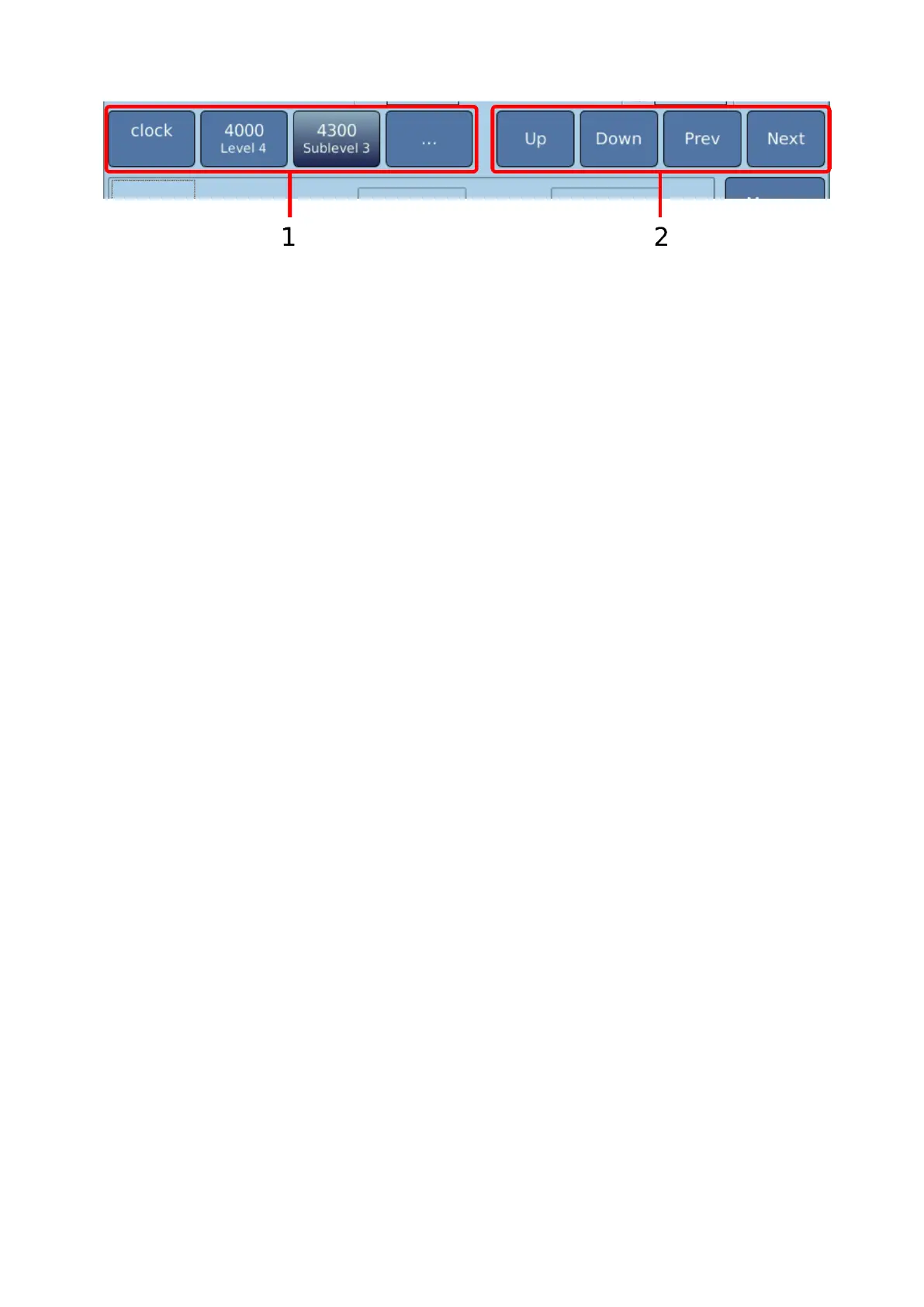
1: The left area is used to directly navigate the hierarchy of the frequency programs. By
tapping on one of the buttons, all frequencies belonging to this hierarchy level are
displayed. This enables a quick selection of the desired frequency program.
2: The right area is used to gradually navigate. “Up” and “Down” changes the hierarchy level,
the arrows change within a level.
If the Database key is activated, the four arrows keys can be used to navigate. The right and
left arrows switch between programs, the up and down keys switch between the hierarchy
levels. If the database key is inactive, the arrows switch between the screens “Frequency”,
“Intensity” and “Output”.
7.2.4 Options for Directly Loading a Frequency Program
If the number of a frequency program is known, it can be loaded directly via the dialogue
“Loading frequency program”. This dialogue can be cued via the following options:
Option 1: User Key
1. Press the “User” key (key located above “Enter”).
2. Pressing the key again selects the user-defined frequency programs.
Option 2: Database Mode
1. Activate the function key “Database”. The lamp of the key must be lit.
2. Enter the number of the frequency program via the keypad. “Loading frequency
program” appears in the touchscreen. The function of this key is only activated in the
Testing Mode.
3. Press the “Enter” key or tap on the corresponding button of the dialogue.
While the key “Database” is activated, the numeric keypad can only be used for program
numbers. The four arrow keys of the keypad can be used to select a program while the
“Database” key is activated.
Option 3: Call via Menu
1. Tap the button “More…” (right side of the screen). The corresponding menu appears
on the touchscreen.
2. Tap “Loading frequency program…”.
Option 4: Call via Application Mode
In the Application Mode, a frequency program can always be directly selected by entering
a number via the keypad.


 To Next Page