© 2019 Mannayan GmbH + Co KG Page 24 User Manual Trikombin
7.2 Testing Mode
Please note, this operating mode is deactivated while the device is being charged.
Therefore, the charging process must be interrupted.
The Testing Mode can be activated by tapping the tab “Testing”.
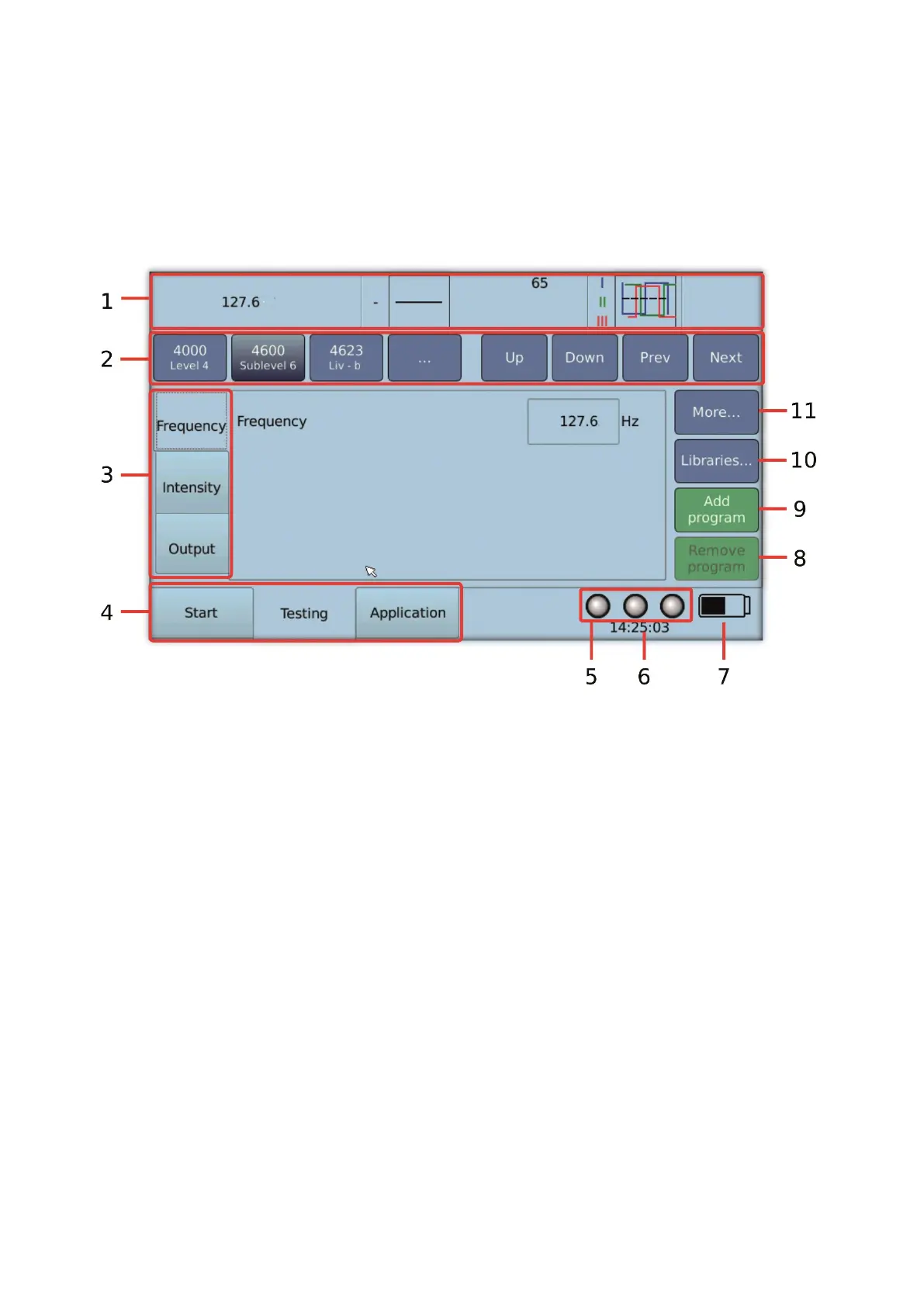
7.2.1 Important Elements of the Testing Screen
1. Overview bar: displays the current settings
2. Navigation bar: for quickly switching between stored frequency programs
Mode buttons An (anatomical) / Clock (meridian clock) / BR (bioresonance)
3. Tabs for frequency settings enable you to choose what is displayed in the central screen
4. Tabs for selecting the operating modes Start, Testing and Application
5. Indication of the state of the generators (on or off)
6. Time display
7. Battery charge state
8. Button to remove the current frequency program from the application list
9. Button to add the current frequency program with the current settings to the application
list
10. Button for the library feature. This is only available, if a library and the corresponding
license is installed.
11. Button to activate additional functions of the frequency programs


 To Next Page