EasyManua.ls Logo

Marantz MR2020 - Top Panel (View When: Open) Wisccnsnccccctosssocersesssncecnsnnatunsencnevacnstssnseseenssnscuancesnedsvansenttnnassdnauteeduntaxsaseuadasanadinnseesasisenieees

Marantz MR2020
68 pages
Print Icon
To Next Page IconTo Next Page
To Previous Page IconTo Previous Page
Loading...
Top
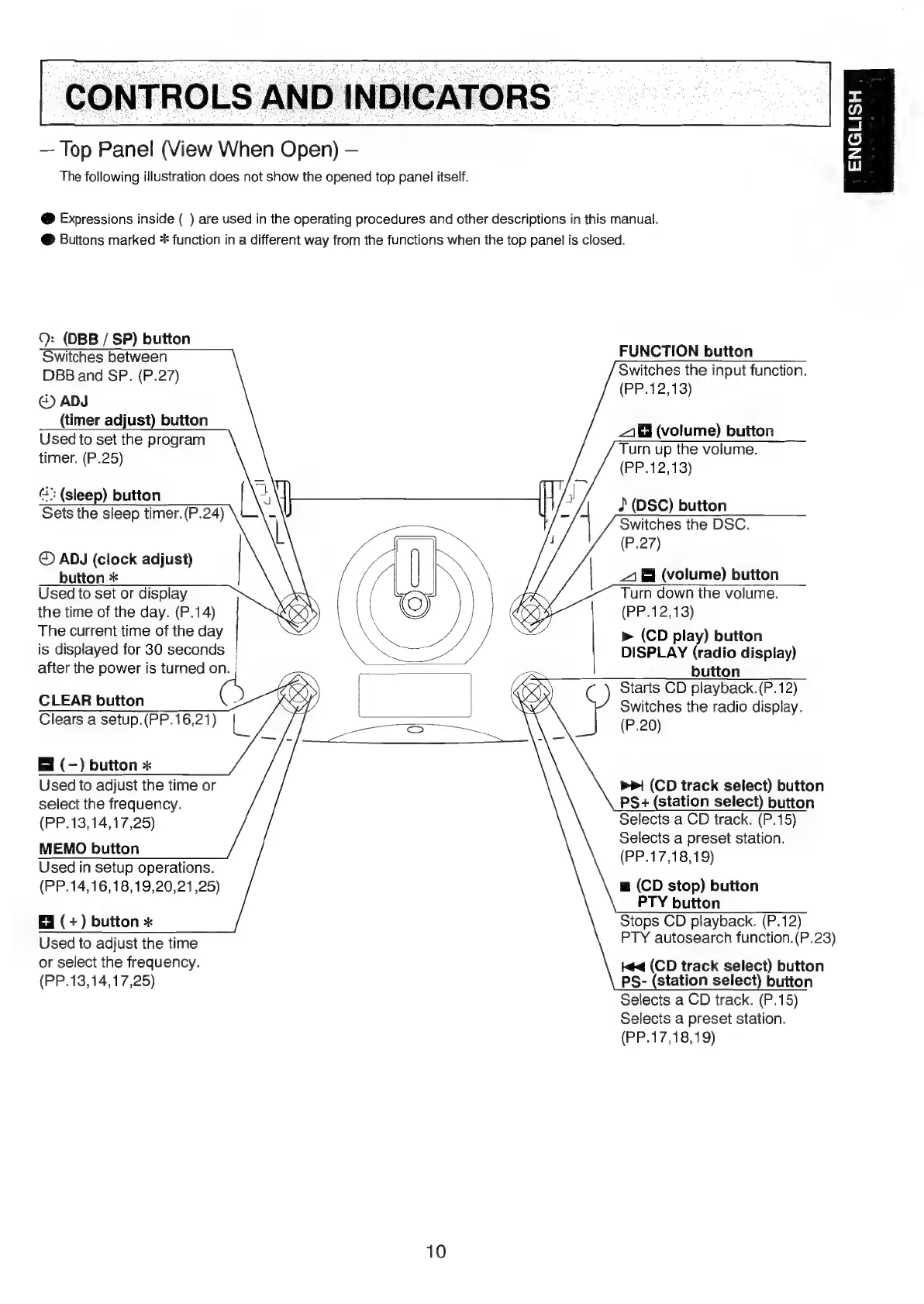
Panel
(View
When
Open)
The
following
illustration
does
not
show
the
opened
top
panel
itself.
ENGLISH
@
Expressions
inside
(
)
are
used
in
the
operating
procedures
and
other
descriptions
in
this
manual.
@
Buttons
marked
*
function
in
a
different
way
from
the
functions
when
the
top
panel
is
closed.
9:
(DBB
/
SP)
button
Switches
between
DBB
and
SP.
(P.27)
@)
ADJ
(timer
adjust)
button
Used
to
set
the
program
timer.
(P.25)
FUNCTION
button
Switches
the
input
function.
(PP.12,13)
1
(volume)
button
Turn
up
the
volume.
(PP.12,13)
4"
(sleep)
button
Sets
the
sleep
timer.(P.24)
(DSC)
button
Switches
the
DSC.
(P.27)
©
ADJ
(clock
adjust)
button
*
Used
to
set
or
display
the
time
of
the
day.
(P.14)
The
current
time
of
the
day
is
displayed
for
30
seconds
after
the
power
is
turned
on.
1
&
(volume)
button
Turn
down
the
volume.
(PP.12,13)
|
»
(CD
play)
button
DISPLAY
(radio
display)
button
Starts
CD
playback.(P.12)
Switches
the
radio
display.
(P.20)
CLEAR
button
5
Clears
a
setup.(PP.16,21)
g
El
(-)
button
«
Used
to
adjust
the
time
or
select
the
frequency.
(PP.13,14,17,25)
MEMO
button
Used
in
setup
operations.
(PP.14,16,18,19,20,21
,25)
>>!
(CD
track
select)
button
PS
+
(station
select)
button
Selects
a
CD
track.
(P.15)
Selects
a
preset
station.
(PP.17,18,19)
m
(CD
stop)
button
PTY
button
Stops
CD
playback.
(P.12)
PTY
autosearch
function.
(P.23)
(+)
button
«
Used
to
adjust
the
time
or
select
the
frequency.
(PP.13,14,17,25)
tq
(CD
track
select)
button
PS-
(station
select)
button
Selects
a
CD
track.
(P.15)
Selects
a
preset
station.
(PP.17,18,19)
10

Table of Contents

Other manuals for Marantz MR2020

Related product manuals