EasyManua.ls Logo

Marantz MR2020 - Clock and Timer Operations; Clock Adjustment

Marantz MR2020
68 pages
Print Icon
To Next Page IconTo Next Page
To Previous Page IconTo Previous Page
Loading...
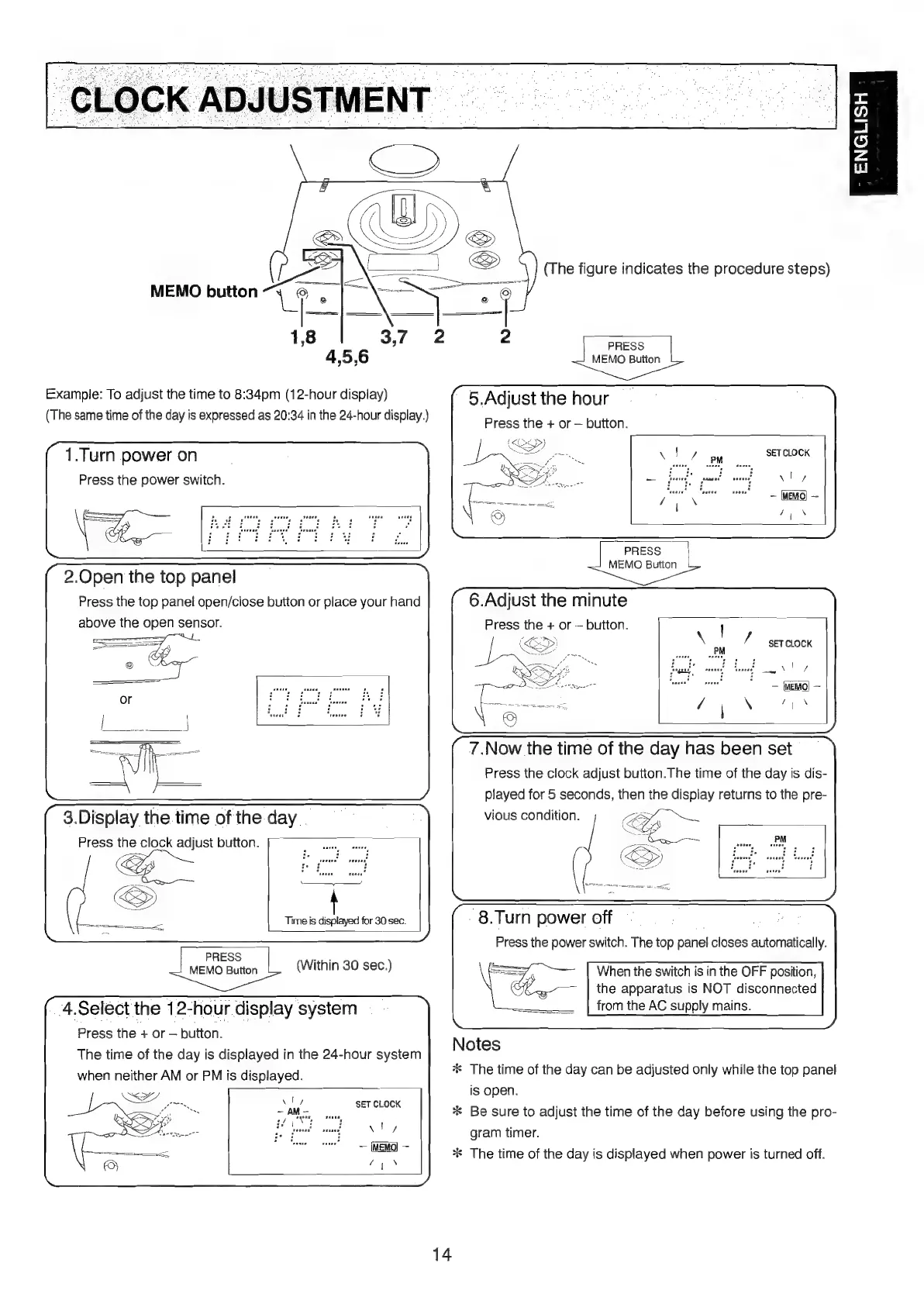
MEMO
button
ENGLISH
(The
figure
indicates
the
procedure
steps)
Example:
To
adjust
the
time
to
8:34pm
(12-hour
display)
(The
same
time
of
the
day
is
expressed
as
20:34
in
the
24-hour
display.)
1.Turn
power
on
Press
the
power
switch.
2.Open
the
top
panel
Press
the
top
panel
open/close
button
or
place
your
hand
above
the
open
sensor.
3.Display
the
time
of
the
day
Press
the
clock
adjust
button.
Time
is
displayed
for
30
sec.
PRESS
+
MEMO
Button
4.Select
the
12-hour
display
system
Press
the
+
or
button.
The
time
of
the
day
is
displayed
in
the
24-hour
system
when
neither
AM
or
PM
is
displayed.
(Within
30
sec.)
PRESS
MEMO
Button
5.Adjust
the
hour
Press
the
+
or
button.
SET
CLOCK
PRESS
|
MEMO
Button
6.Adjust
the
minute
Press
the
+
or
button.
SET
CLOCK
(aeRO)
-
7,
N
7.Now
the
time
of
the
day
has
been
set
Press
the
clock
adjust
button.The
time
of
the
day
is
dis-
played
for
5
seconds,
then
the
display
returns
to
the
pre-
vious
condition.
S
(BD
-
8.Turn
power
off
Press
the
power
switch.
The
top
panel
closes
automatically.
When
the
switch
is
in
the
OFF
position,
the
apparatus
is
NOT
disconnected
from
the
AC
supply
mains.
Notes
*
The
time
of
the
day
can
be
adjusted
only
while
the
top
panel
is
open.
*
Be
sure
to
adjust
the
time
of
the
day
before
using
the
pro-
gram
timer.
**
The
time
of
the
day
is
displayed
when
power
is
turned
off.
14

Table of Contents

Other manuals for Marantz MR2020

Related product manuals