EasyManua.ls Logo

Marantz MR2020 - CD Playback Basics

Marantz MR2020
68 pages
Print Icon
To Next Page IconTo Next Page
To Previous Page IconTo Previous Page
Loading...
ul
z
Q)
ae
7)
x
Basic
Operations
Main
unit
(
>/i
rd
14-4
GOD
>
9
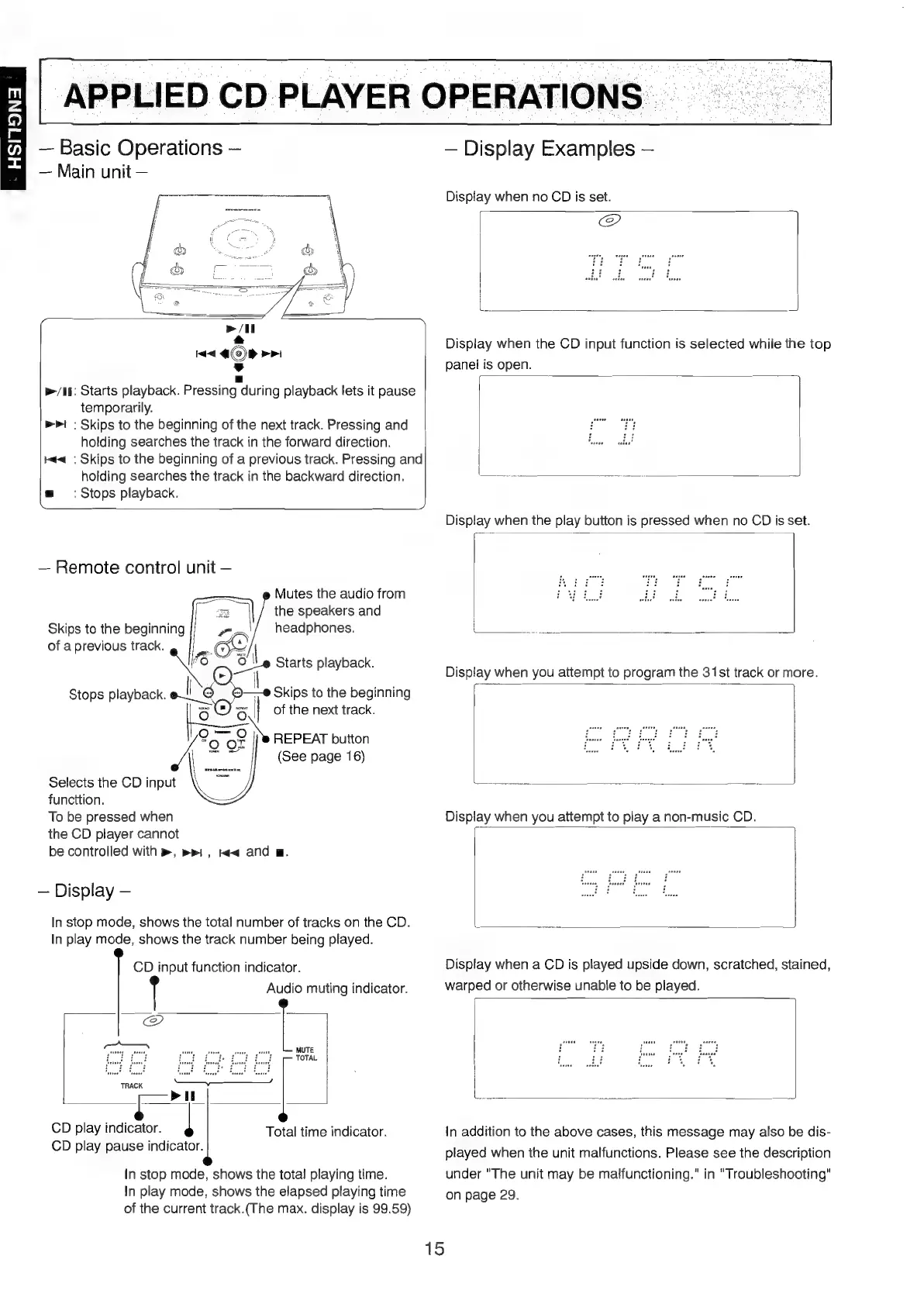
p>/if:
Starts
playback.
Pressing
during
playback
lets
it
pause
temporarily.
:
Skips
to
the
beginning
of
the
next
track.
Pressing
and
holding
searches
the
track
in
the
forward
direction.
:
Skips
to
the
beginning
of
a
previous
track.
Pressing
and
holding
searches
the
track
in
the
backward
direction.
gm
:
Stops
playback.
da!
dq
Remote
control
unit
Pm
s
Mutes
the
audio
from
the
speakers
and
headphones.
Skips
to
the
beginning
of
a
previous
track.
Or
1S
3
\
Starts
playback
_*
Play’
:
|
Stops
playback.
©O—-@
Skips
to
the
beginning
[os
|
of
the
next
track.
o=
oy
A
“Q
OF
Selects
the
CD
input
\
functtion.
To
be
pressed
when
the
CD
player
cannot
be
controlled
with
>,
mri,
w<and
m.
REPEAT
button
(See
page
16)
Display
In
stop
mode,
shows
the
total
number
of
tracks
on
the
CD.
In
play
mode,
shows
the
track
number
being
played.
CD
input
function
indicator.
Audio
muting
indicator.
MUTE
TOTAL
TRACK
CD
play
indicator.
|
CD
play
pause
indicator.
Total
time
indicator.
In
stop
mode,
shows
the
total
playing
time.
In
play
mode,
shows
the
elapsed
playing
time
of
the
current
track.(The
max.
display
is
99.59)
APPLIED
CD
PLAYER
OPERATIONS
Display
Examples
Display
when
no
CD
is
set.
|
@
Display
when
the
CD
input
function
is
selected
while
the
top
panel
is
open.
;
ae
Display
when
a
CD
is
played
upside
down,
scratched,
stained,
warped
or
otherwise
unable
to
be
played.
In
addition
to
the
above
cases,
this
message
may
also
be
dis-
played
when
ihe
unit
malfunctions.
Please
see
the
description
under
"The
unit
may
be
malfunctioning.”
in
"Troubleshooting"
on
page
29.
15

Table of Contents

Other manuals for Marantz MR2020

Related product manuals