EasyManua.ls Logo

Marantz MR2020 - Automatic Station Presets

Marantz MR2020
68 pages
Print Icon
To Next Page IconTo Next Page
To Previous Page IconTo Previous Page
Loading...
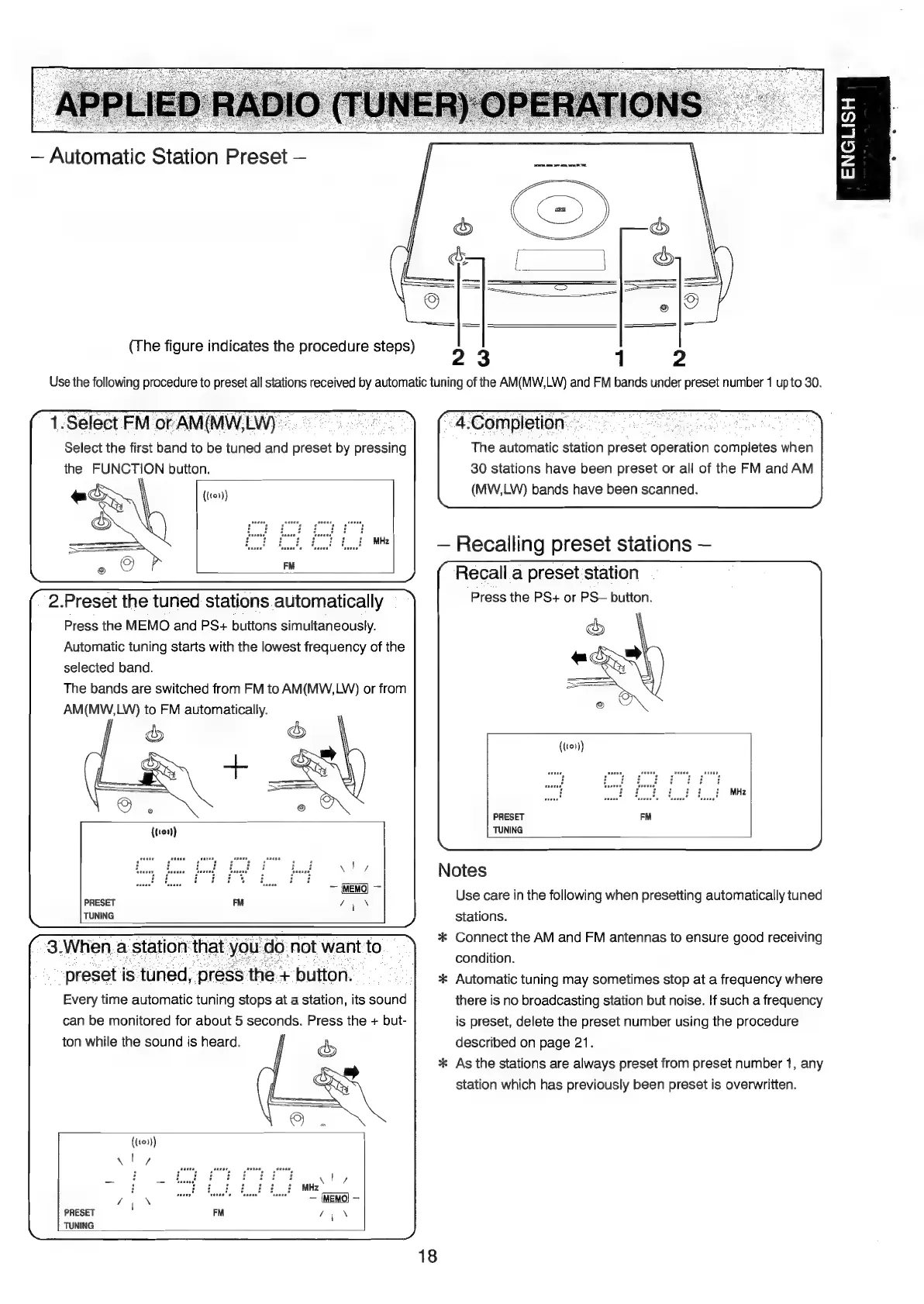
Automatic
Station
Preset
(The
figure
indicates
the
procedure
steps)
23
Use
the
following
procedure
to
preset
all
stations
received
by
automatic
tuning
of
the
AM(MW,LW)
and
FM
bands
under
preset
number
1
upto
30.
1.
Select
FM
of
AM(MW,LW)
~
;
Select
the
first
band
to
be
tuned
and
preset
by
pressing
the
FUNCTION
button.
((101))
2.Preset
the
tuned
stations
automatically
Press
the
MEMO
and
PS+
buttons
simultaneously.
Automatic
tuning
starts
with
the
lowest
frequency
of
the
selected
band.
The
bands
are
switched
from
FM
to
AM(MW,LW)
or
from
AM(MW,LW)
to
FM
automatically.
PRESET
TUNING
ene
is
“tuned:
‘pre
Every
time
automatic
tuning
dope
at
a
station,
its
Sound
can
be
monitored
for
about
5
seconds.
Press
the
+
but-
ton
while
the
sound
is
heard.
i
((109))
PRESET
TUNING
4.
-Completion:
ee
fae
The
automatic
station
Besa
Aperation
eompléies
when
30
stations
have
been
preset
or
all
of
the
FM
and
AM
(MW,LW)
bands
have
been
scanned.
Recalling
preset
stations
Recall
a
preset
station
Press
the
PS+
or
PS—
button.
PRESET
TUNING
Notes
Use
care
in
the
following
when
presetting
automatically
tuned
stations.
*
Connect
the
AM
and
FM
antennas
to
ensure
good
receiving
condition.
*
Automatic
tuning
may
sometimes
stop
at
a
frequency
where
there
is
no
broadcasting
station
but
noise.
If
such
a
frequency
is
preset,
delete
the
preset
number
using
the
procedure
described
on
page
21.
*
As
the
stations
are
always
preset
from
preset
number
1,
any
station
which
has
previously
been
preset
is
overwritten.
ENGLISH

Table of Contents

Other manuals for Marantz MR2020

Related product manuals