EasyManua.ls Logo

Marantz MR2020 - Programmed CD Playback; Repeat Playback Modes

Marantz MR2020
68 pages
Print Icon
To Next Page IconTo Next Page
To Previous Page IconTo Previous Page
Loading...
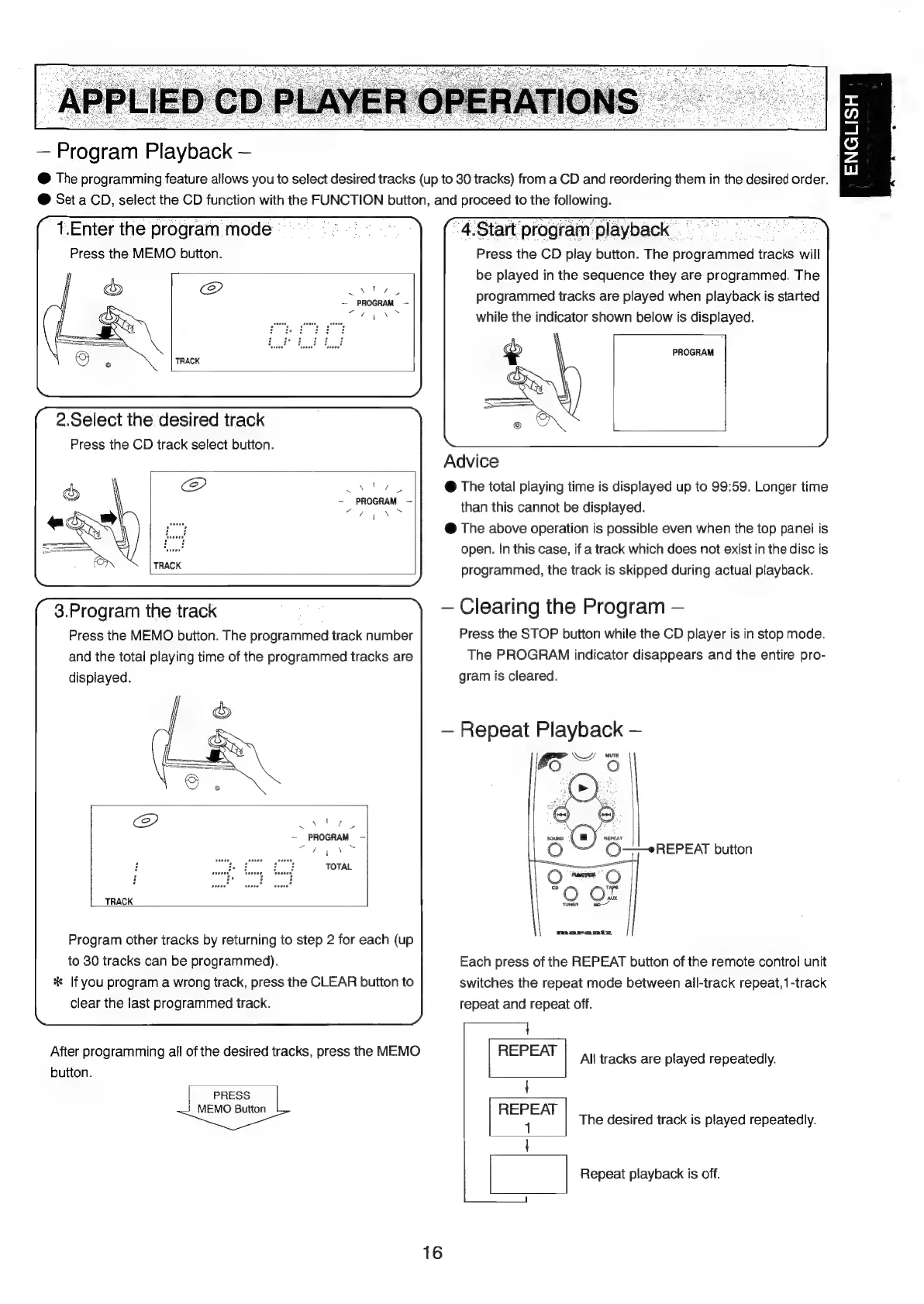
Program
Playback
@
The
programming
feature
allows
you
to
select
desired
tracks
(up
to
30
tracks)
from
a
CD
and
reordering
them
in
the
desired
order.
@
Set
a
CD,
select
the
CD
function
with
the
FUNCTION
button,
and
proceed
to
the
following.
x
@
a
Oo
Zz
ui
4.Start
program
playback
Press
the
CD
play
button.
The
programmed
tracks
will
be
played
in
the
sequence
they
are
programmed.
The
programmed
tracks
are
played
when
playback
is
started
while
the
indicator
shown
below
is
displayed.
1.Enter
the
program
mode
Press
the
MEMO
button.
Vs
~
,
PROGRAM
PROGRAM
2.Select
the
desired
track
Press
the
CD
track
select
button.
Advice
via
@
The
total
playing
time
is
displayed
up
to
99:59.
Longer
time
x
2
re
aes
5
than
this
cannot
be
displayed.
@
The
above
operation
is
possible
even
when
the
top
panel
is
open.
In
this
case,
if
a
track
which
does
not
exist
in
the
disc
is
programmed,
the
track
is
skipped
during
actual
playback.
Clearing
the
Program
Press
the
STOP
button
while
the
CD
player
is
in
stop
mode.
The
PROGRAM
indicator
disappears
and
the
entire
pro-
gram
is
cleared.
3.Program
the
track
Press
the
MEMO
button.
The
programmed
track
number
and
the
total
playing
time
of
the
programmed
tracks
are
displayed.
Repeat
Playback
{
Ls
x
/
va
~
PROGRAM
-
(©——eREPEAT
button
Program
other
tracks
by
returning
to
step
2
for
each
(up
to
30
tracks
can
be
programmed).
*
lf
you
program
a
wrong
track,
press
the
CLEAR
button
to
clear
the
last
programmed
track.
After
programming
all
of
the
desired
tracks,
press
the
MEMO
button.
PRESS
MEMO
Button
Each
press
of
the
REPEAT
button
of
the
remote
control
unit
switches
the
repeat
mode
between
all-track
repeat,
1-track
repeat
and
repeat
off.
REPEAT
All
tracks
are
played
repeatedly.
t
ir
The
desired
track
is
played
repeatedly.
{
|
|
Repeat
playback
is
off.

Table of Contents

Other manuals for Marantz MR2020

Related product manuals