EasyManua.ls Logo

Marantz MR2020 - Sleep Timer Operation

Marantz MR2020
68 pages
Print Icon
To Next Page IconTo Next Page
To Previous Page IconTo Previous Page
Loading...
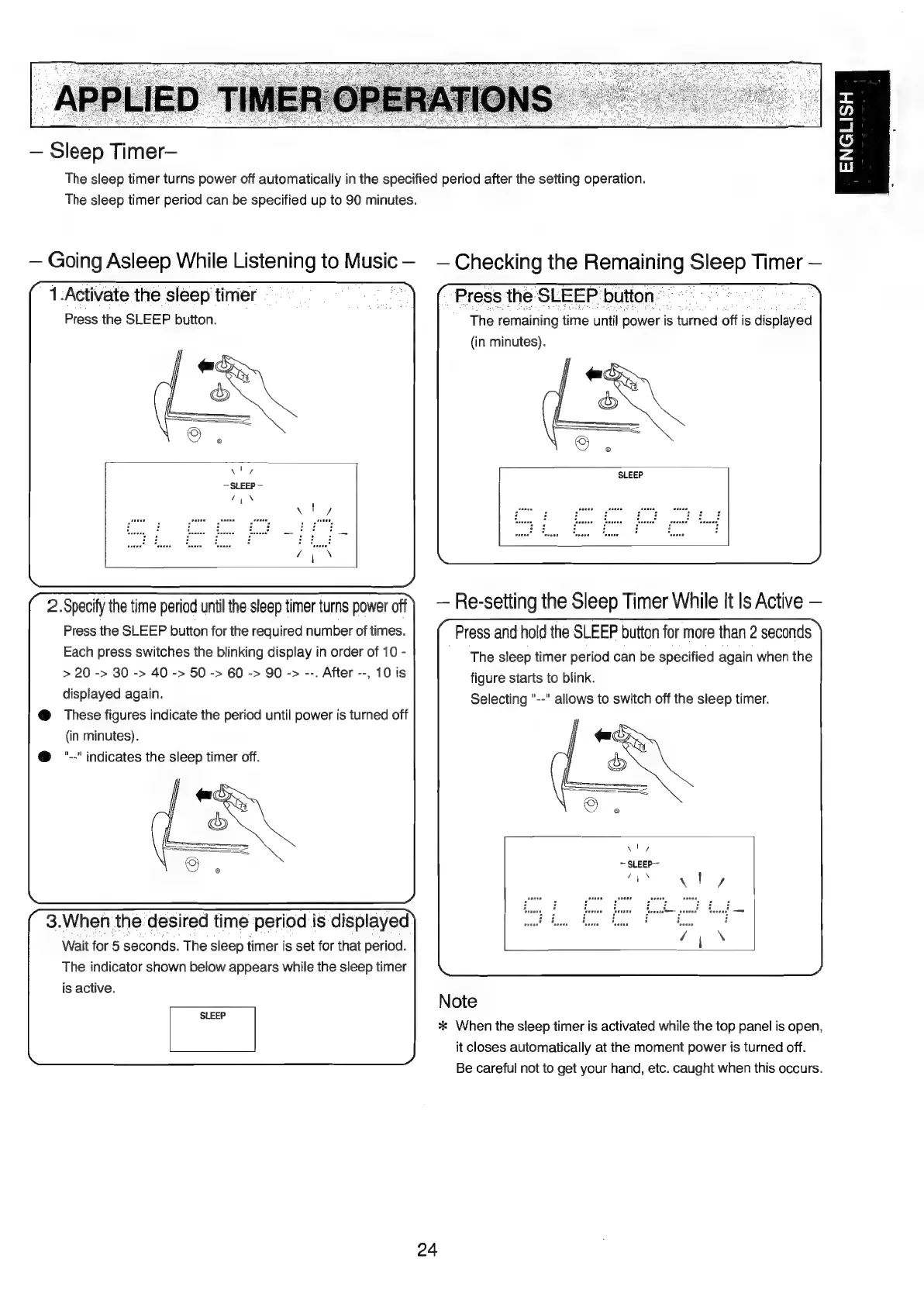
Sleep
Timer—
The
sleep
timer
turns
power
off
automatically
in
the
specified
period
after
the
setting
operation.
The
sleep
timer
period
can
be
specified
up
to
90
minutes.
Going
Asleep
While
Listening
to
Music—
Checking
the
Remaining
Bee
Timer
1.Activate
the
sleep
timer
|
a
“Press
the
SLEEP
button.
ae
Press
the
SLEEP
button.
The
remaining
time
until
power
is
turned
off
is
sdispleyou
(in
minutes).
Re-setting
the
Sleep
Timer
While
It
Is
Active
Press.
and
hold
the
SLEEP
button
for
more
than
2
seconds
The
sleep
timer
period
can
be
specified
again
when
the
figure
starts
to
blink.
Selecting
"--"
allows
to
switch
off
the
sleep
timer.
2.
Specify
the
time
period
until
the
sleep
timer
turns
power
off
Press
the
SLEEP
button
for
the
required
number
of
times.
Each
press
switches
the
blinking
display
in
order
of
10
-
>
20
->
30
->
40
->
50
->
60
->
90
->
--.
After
--,
10
is
displayed
again.
@
These
figures
indicate
the
period
until
power
is
turned
off
(in
minutes).
@
"--"
indicates
the
sleep
timer
off.
seeue
ene
nneeseemen
nee
Pica
a
a
Va
De
|
eee)
Ce,
Sea
TTOtae
Pe
RY
1a
ten
Re
fea
DORR
|
‘onaene
Denney
favenen
faxenre@—
venens
“reeeas!
3.When
the
desired
time
period
is
displayed)
[|
wel
faw
Fane
fw
Finn
Wait
for
5
seconds.
The
sleep
timer
is
set
for
that
period.
The
indicator
shown
below
appears
while
the
sleep
timer
is
active.
Note
SLEEP
'
7 F
:
.
*
When
the
sleep
timer
is
activated
while
the
top
panel
is
open,
it
closes
automatically
at
the
moment
power
is
turned
off.
Be
careful
not
to
get
your
hand,
etc.
caught
when
this
occurs.
24
ENGLISH

Table of Contents

Other manuals for Marantz MR2020

Related product manuals