EasyManua.ls Logo

Marantz MR2020 - Radio Reception Basics

Marantz MR2020
68 pages
Print Icon
To Next Page IconTo Next Page
To Previous Page IconTo Previous Page
Loading...
HSI1SN4
Basic
Operations
@
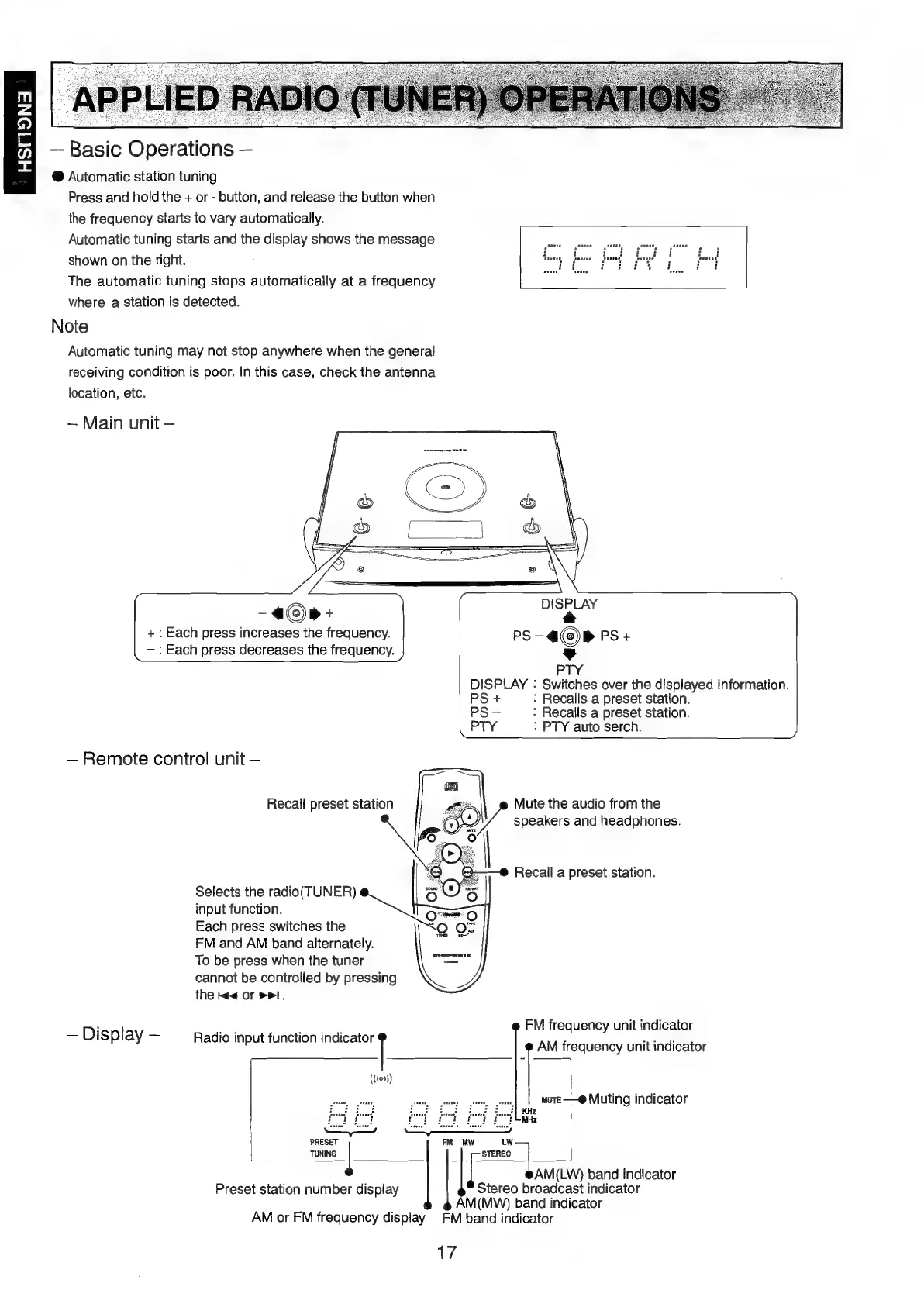
Automatic
station
tuning
Press
and
hold
the
+
or
-
button,
and
release
the
button
when
the
frequency
starts
to
vary
automatically.
Automatic
tuning
starts
and
the
display
shows
the
message
shown
on
the
right.
The
automatic
tuning
stops
automatically
at
a
frequency
where
a
station
is
detected.
Note
Automatic
tuning
may
not
stop
anywhere
when
the
general
receiving
condition
is
poor.
In
this
case,
check
the
antenna
location,
etc.
~
Main
unit
_a®p+
DISBLAY
+:
Each
press
increases
the
frequency.
pS
«©»
PS
+
—:
Each
press
decreases
the
frequency.
PTY
DISPLAY
:
Switches
over
the
displayed
information.
PS
+
:
Recalls
a
preset
station.
PS
-
:
Recalls
a
preset
station.
PTY
:
PTY
auto
serch.
Remote
control
unit
Mute
the
audio
from
the
speakers
and
headphones.
Recall
preset
station
Recall
a
preset
station.
Selects
the
radio(TUNER)
input
function.
Each
press
switches
the
FM
and
AM
band
alternately.
To
be
press
when
the
tuner
cannot
be
controlled
by
pressing
the
Me
or
>I,
FM
frequency
unit
indicator
AM
frequency
unit
indicator
sist
sas
Muting
indicator
ep
pe]
cE
faut
ol
Land
PUP
Pp
ry
wie
eS
PRESET
aia
MW
LW
TUNING
|
STEREO
5
sea
AM(LW)
band
indicator
Display
Radio
input
function
scaly
((10»))
Stereo
proaicatt
indicator
AM
(MW)
band
indicator
AM
or
FM
frequency
display
FM
band
indicator
17
Preset
station
number
display

Table of Contents

Other manuals for Marantz MR2020

Related product manuals