EasyManua.ls Logo

Marantz MR2020 - CD Player Operations

Marantz MR2020
68 pages
Print Icon
To Next Page IconTo Next Page
To Previous Page IconTo Previous Page
Loading...
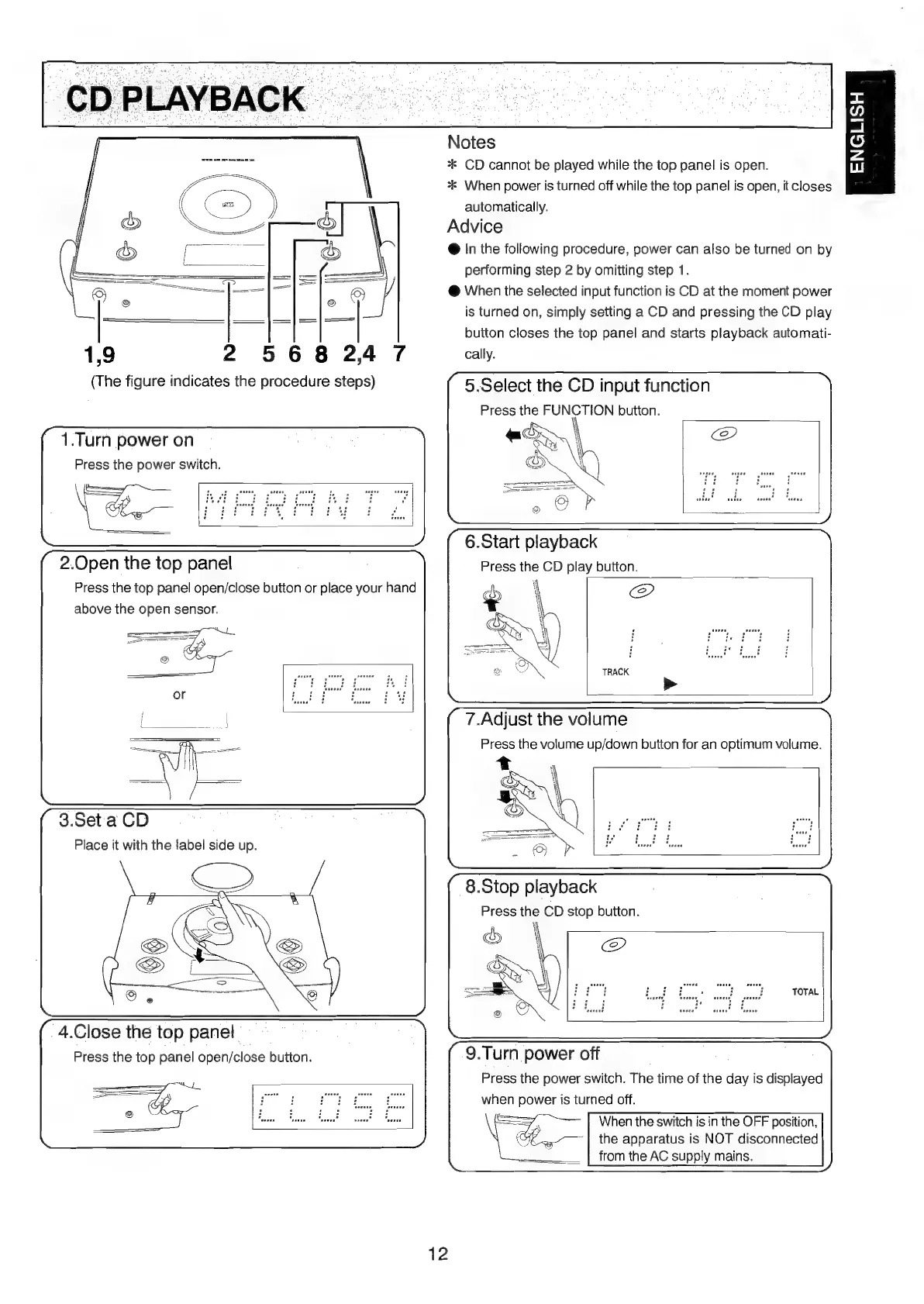
1,9
2568247
(The
figure
indicates
the
procedure
steps)
1.Turn
power
on
Press
the
power
switch.
2.Open
the
top
panel
Press
the
top
panel
open/close
button
or
place
your
hand
above
the
open
sensor.
3.Set
a
CD
Place
it
with
the
label
side
up.
4.Close
the
top
panel
Press
the
top
panel
open/close
button.
Notes
*
CD
cannot
be
played
while
the
top
panel
is
open.
*
When
power
is
turned
off
while
the
top
panel
is
open,
it
closes
automatically.
Advice
@
In
the
following
procedure,
power
can
also
be
turned
on
by
performing
step
2
by
omitting
step
1.
@
When
the
selected
input
function
is
CD
at
the
moment
power
is
turned
on,
simply
setting
a
CD
and
pressing
the
CD
play
button
closes
the
top
panel
and
starts
playback
automati-
cally.
5.Select
the
CD
input
function
Press
the
FUNCTION
button.
\
6.Start
playback
Press
the
CD
play
button.
@
7.Adjust
the
volume
Press
the
volume
up/down
button
for
an
optimum
volume.
8.Stop
playback
Press
the
CD
stop
button.
9.Turn
power
off
Press
the
power
switch.
The
time
of
the
day
is
displayed
when
power
is
turned
off.
When
the
switch
is
in
the
OFF
position,
the
apparatus
is
NOT
disconnected
from
the
AC
supply
mains.
12
ENGLISH

Table of Contents

Other manuals for Marantz MR2020

Related product manuals