EasyManua.ls Logo

Marantz MR2020 - Page 26

Marantz MR2020
68 pages
Print Icon
To Next Page IconTo Next Page
To Previous Page IconTo Previous Page
Loading...
HSITDNA3
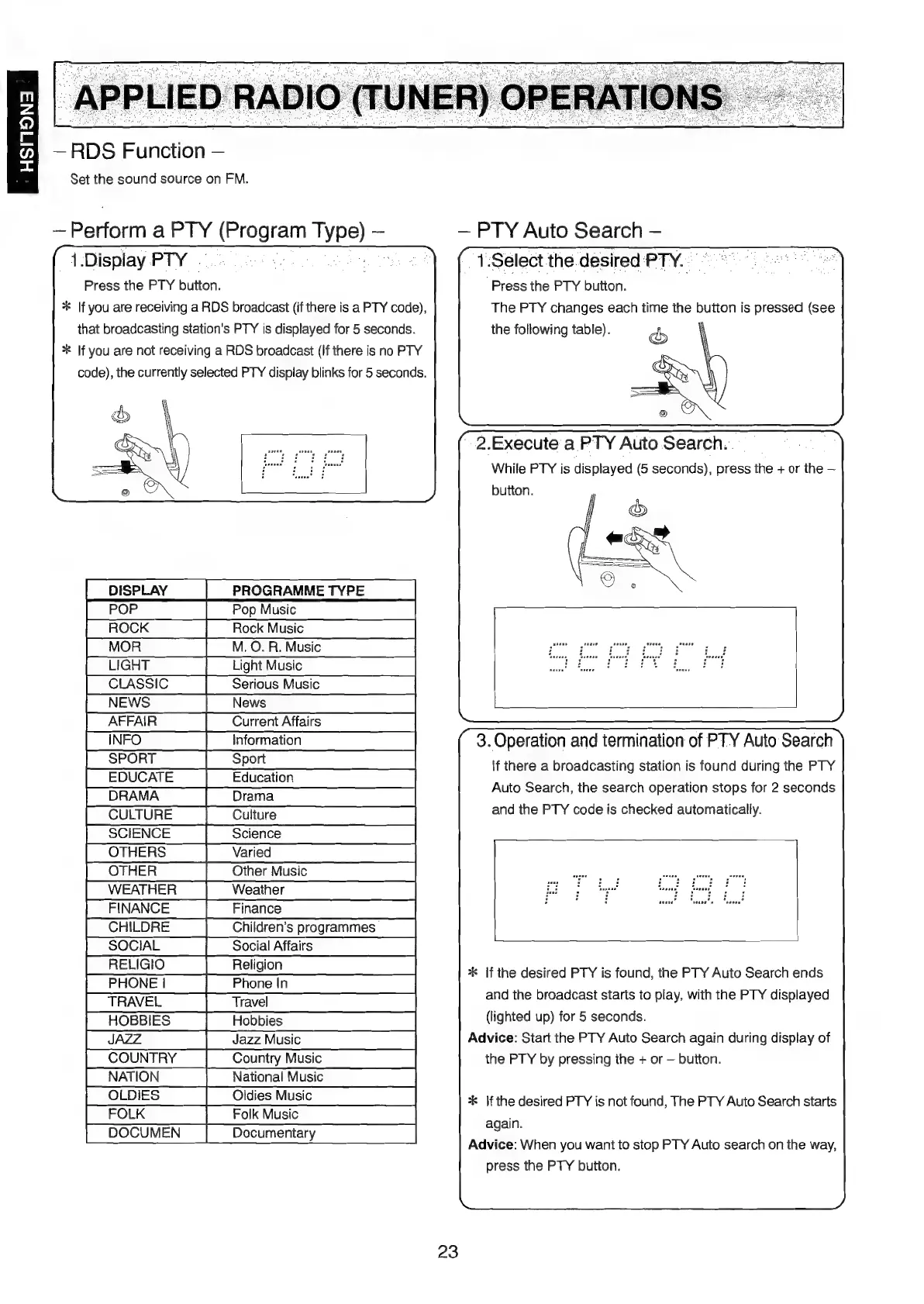
RDS
Function
Set
the
sound
source
on
FM.
Perform
a
PTY
(Program
Typ
1.Display
PTY
|.
ae
Press
the
PTY
button.
*
If
you
are
receiving
a
RDS
broadcast
(if
there
is
a
PTY
code),
that
broadcasting
station's
PTY
is
displayed
for
5
seconds.
**
If
you
are
not
receiving
a
RDS
broadcast
(If
there
is
no
PTY
code),
the
currently
selected
PTY
display
blinks
for
5
seconds.
e)
PTY
Auto
Search
1.Select
the
desired
PTY..
Press
the
PTY
button.
The
PTY
changes
each
time
the
button
is
pressed
(see
the
following
table).
2.Execute
a
PTY
Auto
Search...
While
PTY
is
displayed
(6
seconds),
press
the
+
or
the
DISPLAY
PROGRAMME
TYPE
ROCK
MO.
R.
Music
noone
eneveeuneeaane
enna
en
nie
a
De
LIGHT
LightMusic
fe
ee
OE
CLASSIC
NEWS
AFFAIR
3.
Operation
and
termination
of
PTY
Auto
Search
\f
there
a
broadcasting
station
is
found
during
the
PTY
INFO
SPORT
EDUCATE
Auto
Search,
the
search
operation
stops
for
2
seconds
and
the
PTY
code
is
checked
automatically.
DRAMA
CULTURE
SCIENCE
SOCIAL
RELIGIO
*k
If
the
desired
PTY
is
found,
the
PTY
Auto
Search
ends
and
the
broadcast
starts
to
play,
with
the
PTY
displayed
(lighted
up)
for
5
seconds.
Advice:
Start
the
PTY
Auto
Search
again
during
display
of
the
PTY
by
pressing
ihe
+
or
button.
*k
If
the
desired
PTY
is
not
found,
The
PTY
Auto
Search
starts
again.
Advice:
When
you
want
to
stop
PTY
Auto
search
on
the
way,
press
the
PTY
button.
23

Table of Contents

Other manuals for Marantz MR2020

Related product manuals