ENGLISH
Connecting
the power
cord
Wait
until
all
connections have been completed befo
re
connecting the
power cord.
•n·n•
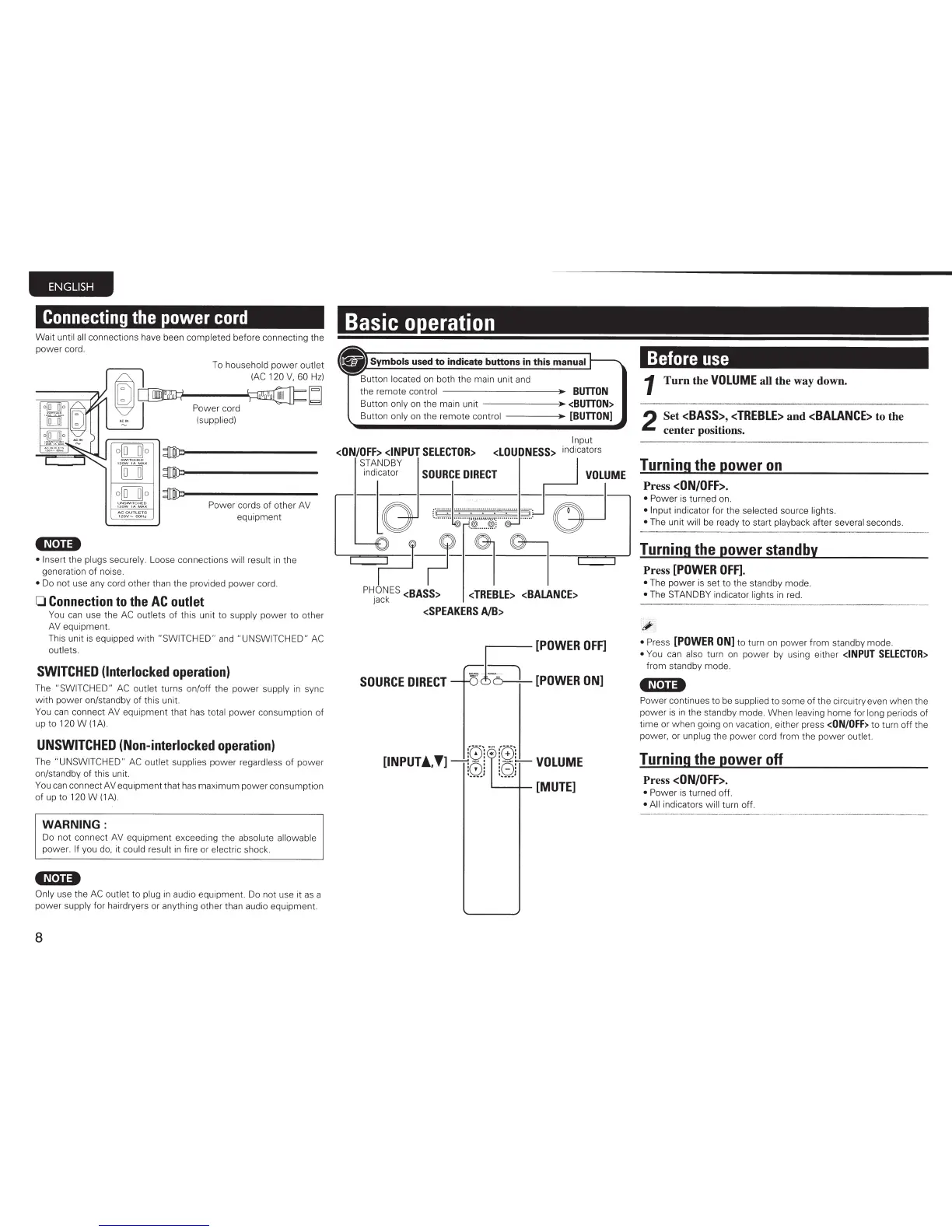
To household
power
out
l
et
(AC
120
V,
60
Hz)
Po
wer
cord
(s
upp
li
ed)
Power cords
of
other AV
equipment
• Insert
the plugs securely. L
oose connections
wi
ll
result
in
the
generation
of
noise.
• Do not u
se
any cord other than the provided
powe
r cord.
0
Connection
to
the
AC
outlet
You
can
use the
AC
outlets of this unit
to
supply power
to
other
AV
equipment
This unit is equipped with
"SWITCHED"
and
"UNSWITCHED"
AC
outlets.
SWITCHED
(Interlocked
operation)
The
"SW
ITCHED "
AC
out
let
turns on/off the power supply in sync
w ith power on/standby
of
this
unit
You
can
connect AV equipment that has total power consumption of
up to
120
W
(1A)
UNSWITCHED
(Non-interlocked
operation)
The "UNSWITCHED"
AC
out
l
et
supplies
power
regardless
of
po
wer
on/standby of this unit.
You can connect AV equi
pment
that has maximum power consumption
of
up
to
120
W
(1
A).
WARNING:
Do not connect AV equipment exceedi
ng
the absolute
allo
wab
le
power.
If
you do, it could result
in
fire or elect
ri
c shock.
•n·n•
Only use the
AC
outlet
to
plug
in
audio
equipment
Do not use it
as
a
power
supply for hairdryers or anything other than audio
equipment
8
Basic o eration
the remote con
tr
ol
BUTTON
Button
only
on the main unit
--
- -
--J»
<BUTTON>
Button
only
on the remote control
[BUTTON]
Input
<ON/OFF>
<INPUT
SELECTOR>
<LOUDNESS>
indicators
STANDBY
indicator
SOURCE
DIRECT
VOLUME
··
· ·
·
······
:····;~::::
;~
r
· · ·
·
:·
··
·
··
·
· ·
·
P-?--l~~
PHONES
<BASS>
<TREBLE>
<BALANCE>
Jack
<SPEAKERS
AlB>
SOURCE
DIRECT
[POWER
OFF]
=
i:..
6 )
[POWER
ON]
:(;):·
;'
:'G)':
[INPUT!
••
]
t 0J
tBJ
VOLUME
'------+-
[MUTE]
Before
use
1
Turn
the
VOLUME
all
the way down.
2
Set
<BASS>
,
<TREBLE>
and
<BALANCE>
to the
center positions.
Turning
the
power
on
Press
<ON/OFF>.
•
Power is turned on.
• Inp
ut
indi
ca
tor
fo
r the selected source li
ght
s.
•
The unit
wi
ll
be r
ea
dy
to
start playback
af
ter several seconds.
Turning
the
power
standby
Press
[POWER
OFF].
• The pow er is set
to
the standby mode.
• The
STANDBY
indic
at
or lights in red.
~
~
•
Press
[POWER
ON
]
to tu
rn
on
powe
r from
st
andby
mo
de.
•
You can
also
turn on pow er by using
either
<INPUT
SELECTOR>
from standby mode.
•n.,••
Po
wer continues to be supplied to some
of
the cir
cu
itry even
when
the
power is
in
the standby mode. When leaving h
ome
for
long periods of
ti
me
or
wh
en going on vacatio
n,
either press
<ON/OFF>
to turn
off
the
power
, or unp
lu
g the
pow
er co
rd
from the
pow
er o
ut
l
et
Turning
the
power off
Press
<ON/OFF>.
• Pow er is turned
off
.
• All
indicators
will
turn
off
.



 To Next Page