Advanced
o
erations
Remote
control
settings
•
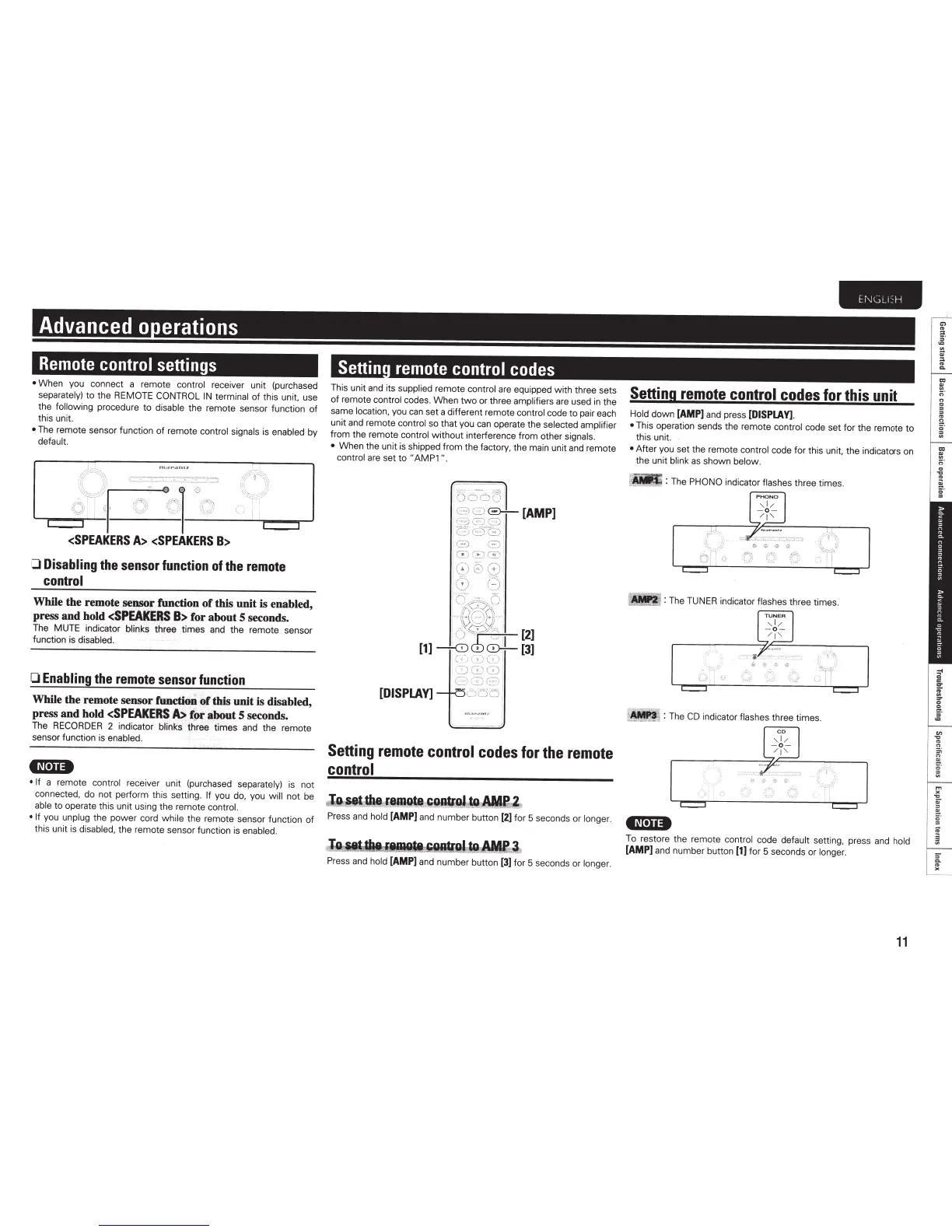
When you connect a remote
control receiver unit (purchased
separately)
to the REMOTE CONTROL
IN
terminal
of this unit. use
the
following
procedure
to
disable
the remote sensor function
of
this unit.
•
The remote sensor function
of
remote
control signals
is
enabled
by
default.
;;+·:·2·~
~
-
~
~
(r.df'".Utll'
~~
1
~~
·
:;
c
~
~-
-~
-
;'1~
-
:-
--~~~
<SPEAKERS
A>
<SPEAKERS
B>
0
Disabling
the
sensor
function
of
the
remote
control
While the remote
.
~nsor
function
of
this unit is enabled,
press and hold
<SPEAKERS
B>
for about 5 seconds.
The MUTE indicator blinks
three times and the remote sensor
function is
disabled.
0
Enabling
the
remote
sensor
function
While the remote sensor
funCtion
of
this
unit
is
disabled,
press.
and hold
<SPEAKER~
,
~
-
/.Pt
~~t
5
seconds~
The
RECORDER
2
1nd1cator
blinks
three
t1mes
and
the remote
sensorfunction is
enabled.
'~'·II•
• If
a remote
control
receiver unit (purchased separately)
is not
connected. do not perform this setting.
If
you
do,
you
will
not be
able
to operate this unit using the
remote controL
• If
you
unplug
the power cord
while the
remote sensor function
of
this unit is
disabled,
the remote sensor function is
enabled.
Settin
remote
control
codes
Th
is unit and its
suppli
ed
remote
control
are
equipped with three sets
of remote
control codes. When
two
or three
amplifiers
are
used
in
the
same
location,
you
can
set a different remote
control
code to pair each
unit
and
remote contr
ol
so
that you
can
operate the
selected
amplifier
from the remote
control
without interference fro
m other
signals.
•
When the unit is shipped from the
factory,
the main unit and remote
control
are
set to
"AMP1
".
[DISPLAY]
Setting
remote
control
codes
for
the
remote
control
~
~r~
-
~~!NPlWiAMU
,
Press
and
hold
[AMP]
and
number button
[2]
fo
r 5 seconds or longe
r.
r
J9AIUka~iiAIIlf~~
Press
and
hold
[AMP]
and
number button
[3)
for 5 seconds or
longer.
E
NGLI:H
Setting
remote
control
codes
for
this
unit
Hold
down
[AMP]
and press
[DISPLAY]
.
•
This operation sends the remote
control
code
se
t
fo
r the remote to
this
unit
•
After you
se
t the rem
ot
e
control
code for this
un
it
, the indicato
rs
on
the unit blink
as
shown below.
_
: The
PHONO
indicator
flashes three times.
:The
TUNER
indicator
flashes
three times.
~
: The
CD
indicator
flashes
three times.
•N·U·
To restore the
re
mote
control
code
default se
tt
in
g,
press
and
hold
[AMP]
and
number button
[1)
for 5 seconds or longe
r.
11
"'
..
..
r;
·
0
..
"
"
..
a.
.
..
iii



 To Next Page