ENGLISH
Advanced
connections
Connectin
the
remote
control
·
acks
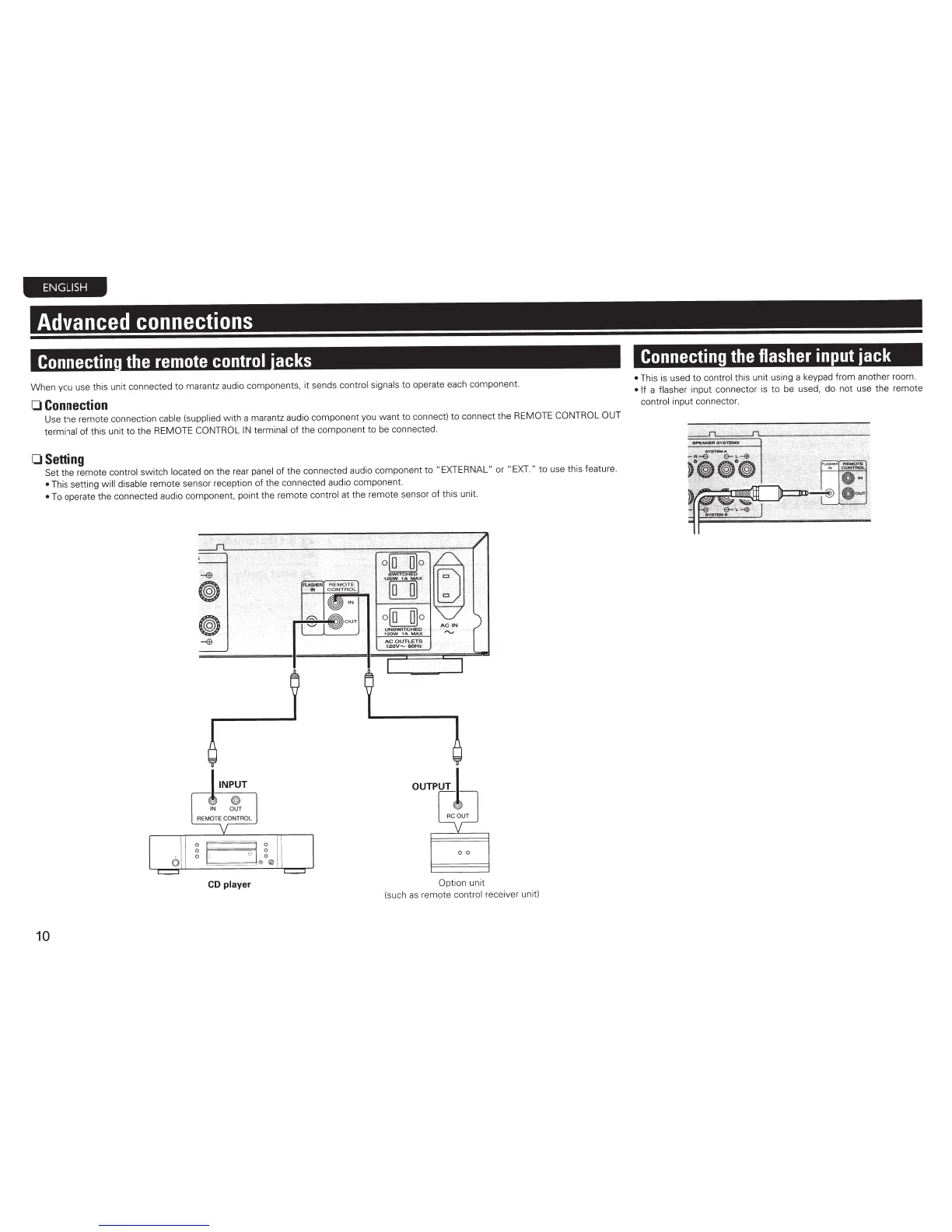
When you use this
un
it connected to marantz audio components, it sends control signals to operate each component.
0
Connection
Use the remote connection
cable
(supplied with a marantz audio component you want to connect)
to
connect the
REMOTE CONTROL OUT
terminal of this unit
to
the
REMOTE CONTROL
IN
terminal of the component to
be
connected.
OSetting
Set
the remote control switch located
on
the
rear
panel
of the connected audio component to
"EXTERNAL"
or
"EXT."
to use this feature.
•
This setting
will
disable remote sensor reception of the connected audio component.
•
To
operate the connected audio component, point the remote control at the remote sensor of this unit.
CD
player
Option
unit
(such
as
remote control receiver unit)
10
Connecting
the
flasher
input
jack
•
This
is
used to control this unit
us
i
ng
a keypad from another room.
• If a flasher input connector
is
to
be
used, do not use the remote
control input connector.



 To Next Page