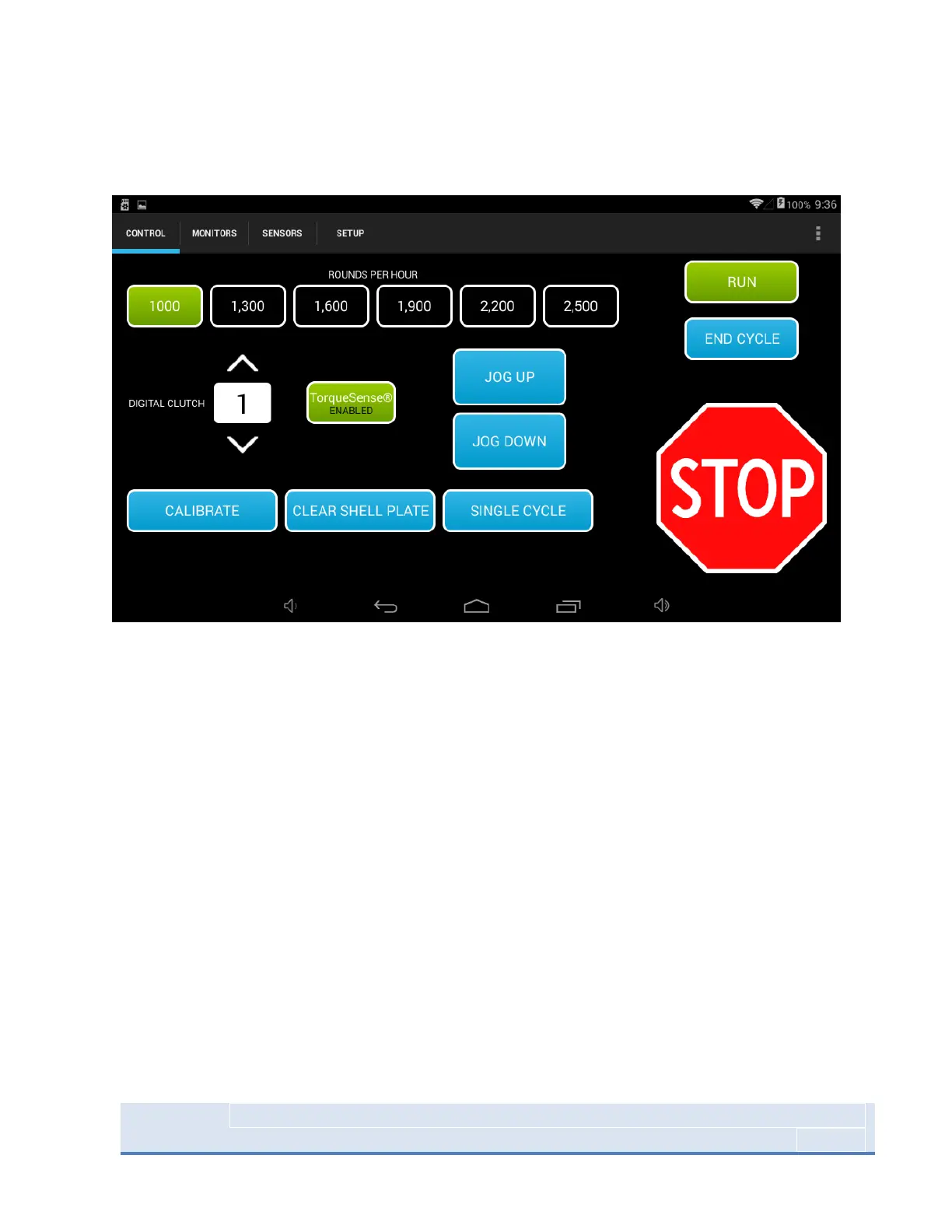
Control Screen
Figure 14: System Control Screen
CALIBRATE - CALIBRATE signals the Mark 7® Autodrive to find the top and bottom of the presses stroke.
Once calibration is completed all Mark 7® Autodrive features can be used. The shellplate must be clear
when calibrating. Calibration takes approximately 10 seconds to complete.
SPEED (Rounds Per Hour) – After Calibration is completed you may select the speed in which to operate
the machine. These can also be changed on the fly while the press is in motion.
RUN - The RUN function signals the Mark 7® Autodrive to begin operation at the settings requested.
ROUNDS PER HOUR - The 100, 1300, 1600, 1900, 2200, 2500 options under ROUNDS PER HOUR give the
operator the ability to choose their desired cycle speed.
CLEAR SHELL PLATE - The CLEAR SHELL PLATE command will lower the Tool Head just enough so the
shellplate can be rotated to clear the brass at any point during loading. This command will only work
when the press in the HOME position at the top of the stoke.
SINGLE CYCLE - The SINGLE CYCLE function allows the operator to run a single cycle. This command will
only work when the press is stopped and in the top position.



 To Next Page