64
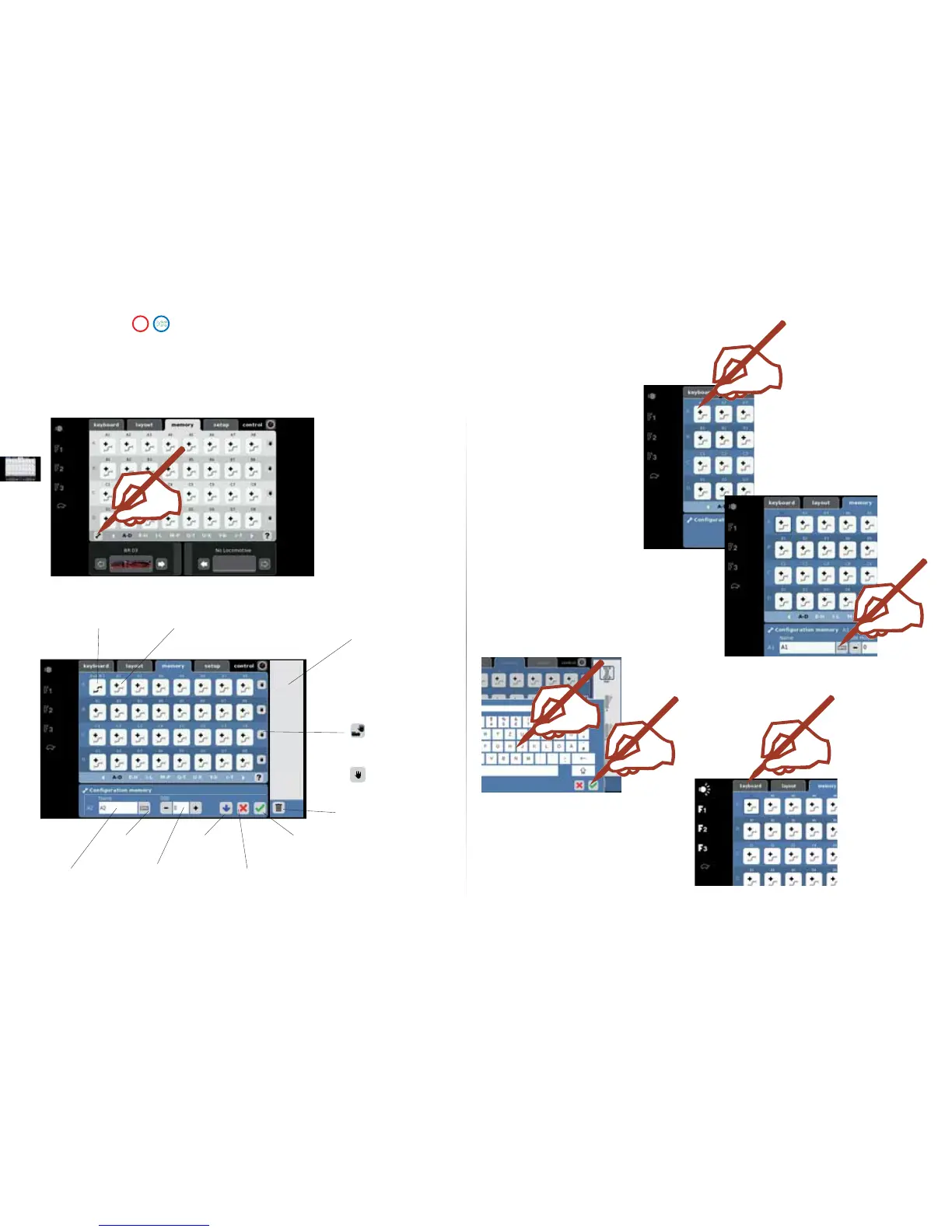
Enter the name of the
route with the keypad.
Tip: Enter clear, short names;
divide your yard or station into
North-South or right-left for
example. These names can only
be used once.
Example:
Exit N1 = Exit North Track 1
Confi rm
Switch to the Keyboard.
Route Set Up
Route Open
Display for
the Turnouts,
Signals, and
Routes Selected.
Delete a selected
element.
Exit
and
Save
Exit
without
Saving
Save
S 88
Contact
Keypad
Route
Designation
Manual and
Automatic Operation
Manual Operation.
or
Setting up a Route.
The “Memory“ part of the Central Station is used to set up and operate routes on a model railroad. Sixteen Memory windows are available for this function.
We recommend that you set up the appropriate items on your Memorys before setting up the Layouts page.
Routes are used so that you can activate several solenoid accessories with the press of a single button. With automatic controls
routes are combined with contacts on a model railroad layout in order to control certain processes on a model railroad automatically.
Examples of this are block controls and staging yard controls. More information about this can be found in the Help function.



 To Next Page