65
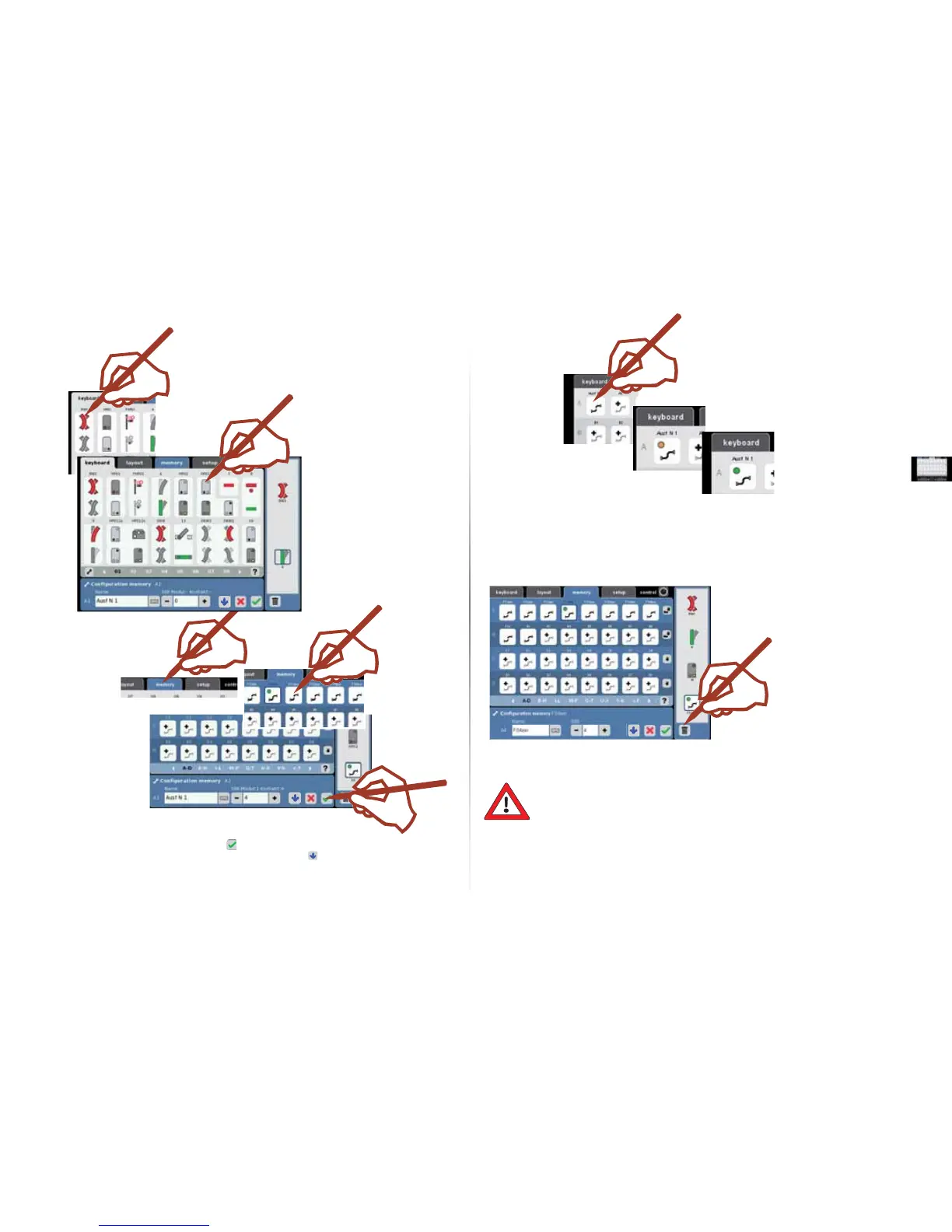
Add a solenoid accessory
to the route.
You can add the solenoid
accessories from different
keyboards to a route.
You do not have to adhere
to an obligatory sequence.
Unclear or in doubt?
Use the “?“, our help function.
Routes can be activated directly by
a train by means of an S 88 decoder.
To do this, the appropriate contact
output must be entered in the fi eld
for the S 88.
The route is now
in operation.
Start the route.
The route is now in the operation mode.
Controlling a Route.
Existing routes can be
integrated into a route.
Deleting a Route.
You can deactivate solenoid accessories
individually or you can deactivate the route
by deleting all of the elements and chang-
ing the name to the basic setting (ex. A5).
Important Note!
Before you turn the Central Station off, perform the function “Shutdown“ in order
to ensure that all data has been saved. Data may be lost, when the Central Station
is suddenly turned off.
End the setting up of the route and
save it or save with and design a new
route.



 To Next Page