37
9.2. Filter replacement
After contact with water, it is necessary to replace the air lter built into the
m
2
multi
device body. The lter serves as a barrier providing protec-
tion against contamination. Never use or store the
m
2
multi
device without a lter. In case the device gets into contact with water, it is necessary
to perform the following:
- Immediately switch o the device and remove it from the parachute kit container.
- Rinse the whole device including the cables several times in clean lukewarm water.
- Dry the device, and hang it by its metal body (4).
- Let the cables (3 and 5) hang loose and allow the device to dry completely in the air.
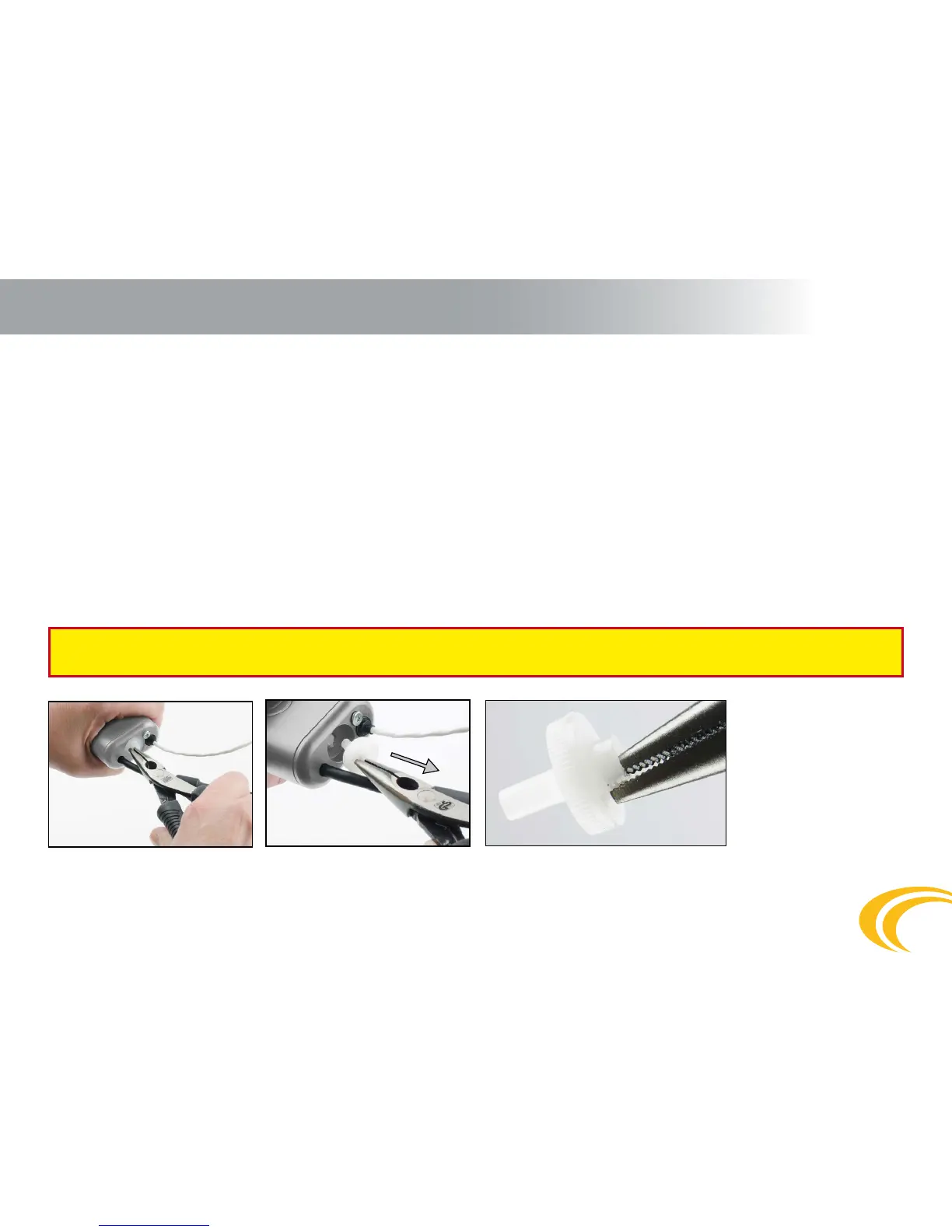
- Remove the old plastic lter (6), use a small screwdriver or pliers. Insert the screwdriver directly into the center of the lter (6) and regardless
of any damage to the lter, pull the old lter (6) out of the device body (4).
- Check the lter are (6) for impurities, and if clean insert a new lter (6). It is necessary to insert the lter (6) completely - apply great pressure
to hide the lter body inside the
m
2
multi
device body (4). Only the lter intake tube can protrude outside the device body.
- Switch on the device and check its function.
- Dispose of the used lter in common waste or recycle it together with plastic waste.
After any contact of the m
2
multi device with water (or any other liquid), it is always necessary to replace the lter even though
the device appears to be functioning properly when dry.
9. Maintenance


 To Next Page