MTS600 Instruction Manual
4.1.2 Horizontal angle setting
The horizontal angle can be set to any required angle
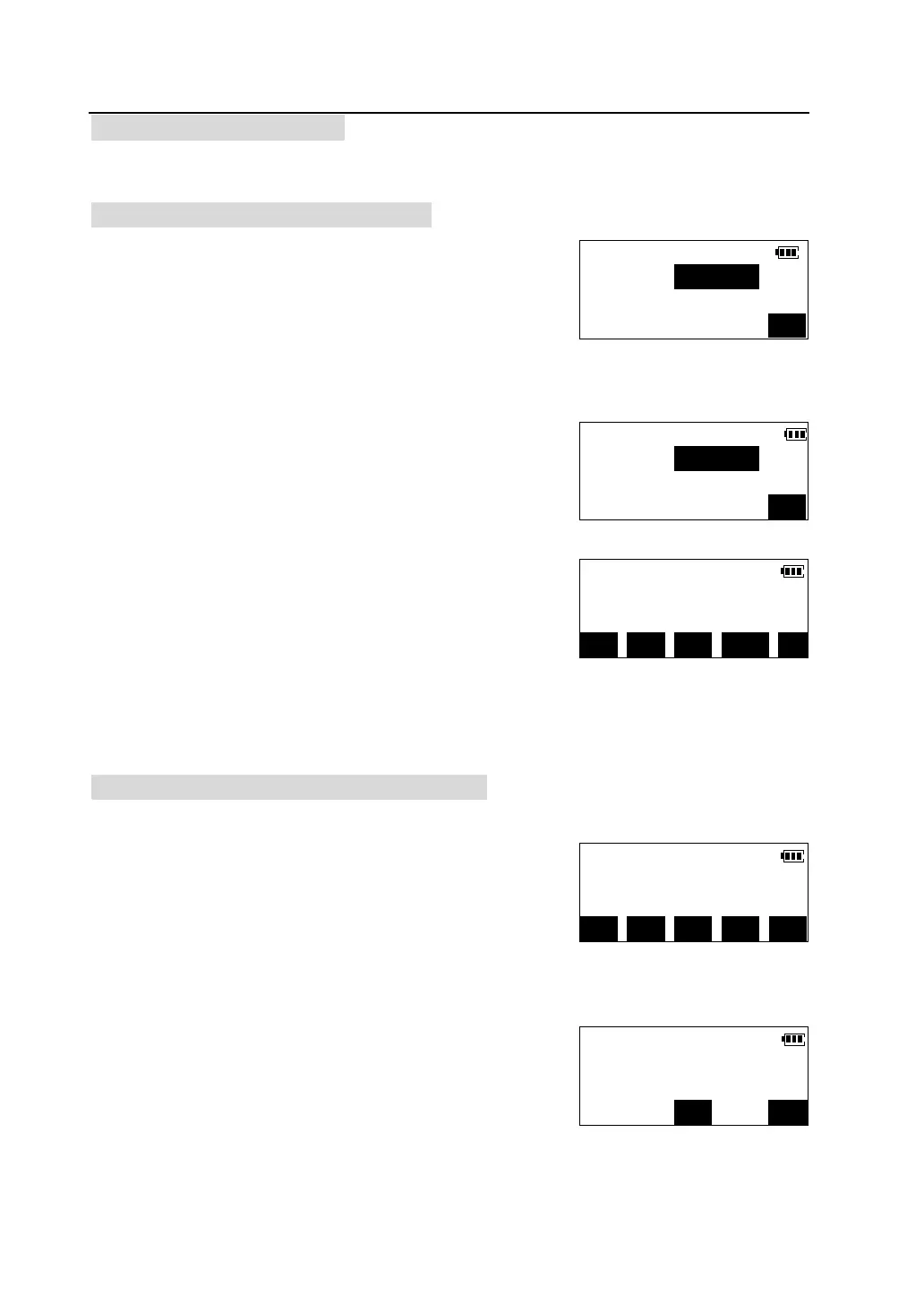
Setting a horizontal angle from the keys
①Collimate the target and press [HSET] in the first
page of the angel measurement mode.
②Enter the horizontal angle value you wish to set.
③Press [OK].
l Angle inputting rule: degree value and minute
value are separated by “.”,and minute value and second value do not need to
separate, like 45°23 ' 07 ", should input 45.2307.
Setting a horizontal angle by holding the angle
① In the first page of the angel measurement mode,
press [>>] to enter the second page . Turn the
instrument by the horizontal clamp and horizontal fine
motion screw until the horizontal angle is displayed as
the required value.
② Press [HOLD].
H.angle set
H.ang(R):
OK
H.angle set
H.ang(R):45.2307
OK
V.ang(Z) 92°55′39″
H.ang(R) 45°23′07″
P1
OSET R/L HSET A/%
V.ang(Z) 92°55′39″
H.ang(R) 90°15′00″
P2
HOLD REP TILT OUTP >>
H.angle Holding
H.ang(R)= 90°15′00″
Collimate target
CE


 To Next Page