120
Controls in detail
Locking and unlocking
If the trunk lid comes into contact with
an object while closing (e.g. luggage that
has been piled too high) in the upper
motion sequence, the closing procedure
is stopped and the trunk re-opens slight-
ly.
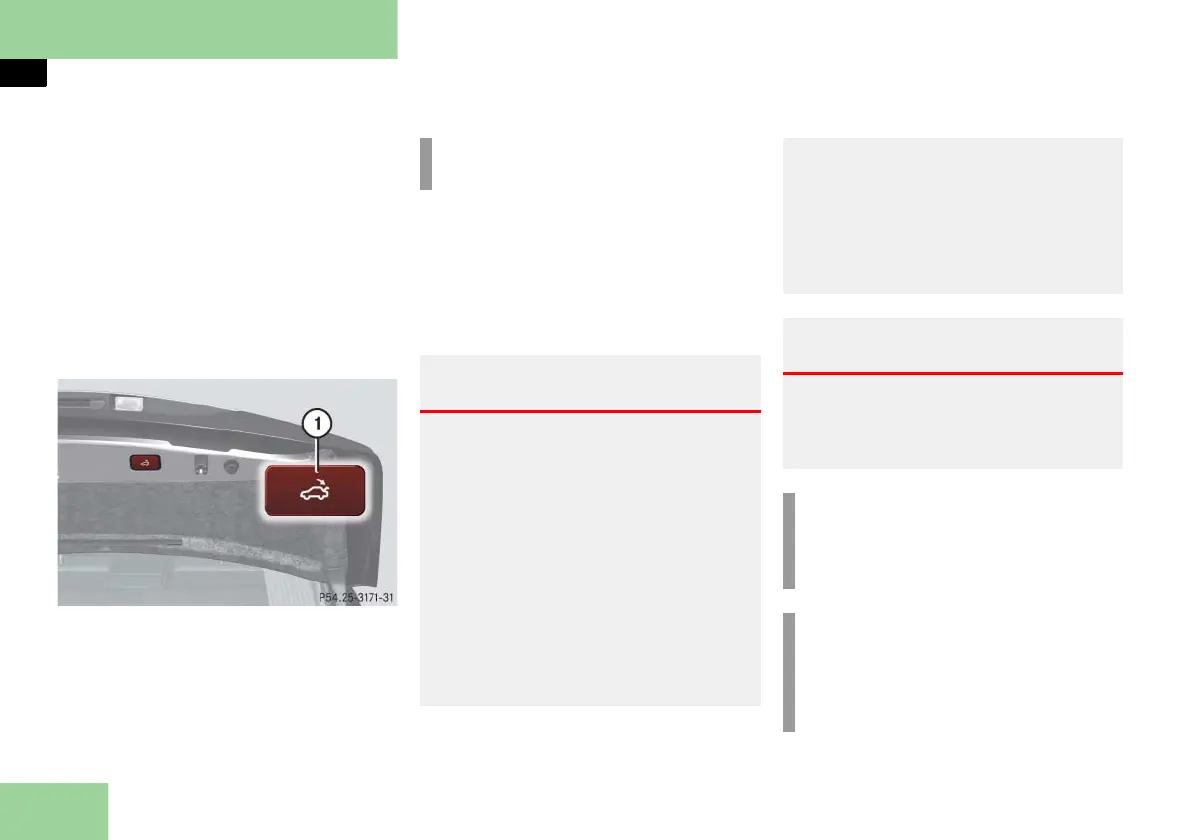
Closing the trunk from the outside
(vehicles without KEYLESS-GO**)
You can close the trunk separately.
1 Trunk lid closing switch
Press trunk lid closing switch 1 brief-
ly.
The trunk lid closes.
If the trunk lid comes into contact with
an object while closing (e.g. luggage that
has been piled too high) in the upper
motion sequence, the closing procedure
is stopped and the trunk re-opens
slightly.
i
You can also close the trunk by hand.
Warning! G
Monitor the closing procedure carefully to
make sure no one is in danger of being in-
jured. To prevent possible personal injury,
always keep hands and fingers away from
the trunk opening when closing the trunk.
Be especially careful when small children
are around. To stop the closing procedure,
do one of the following:
press the trunk lid closing switch 1
press button
Š on the SmartKey
press or pull the remote trunk lid
switch (on the dashboard to the left of
the steering wheel).
When leaving the vehicle, always remove
the SmartKey from the starter switch, take
it with you, and lock the vehicle. Do not
leave children unattended in the vehicle,
or with access to an unlocked vehicle. Un-
supervised use of equipment may cause an
accident and/or serious personal injury.
Warning! G
Only drive with the trunk closed as, among
other dangers such as visibility blockage,
exhaust fumes may enter the vehicle inte-
rior.
i
Do not place the SmartKey in the
open trunk. You may lock yourself
out.
i
If the vehicle was previously centrally
locked, the trunk will lock automati-
cally after closing it. The turn signals
flash three times to confirm locking.



 To Next Page