320
Controls in detail
Pocket PC remote control*
The following pages describe operation
of the Pocket PC using the touch-screen.
Illustrations show Pocket PC 1 except
where noted. Pocket PC 2 graphical in-
terface may vary slightly. Symbols, fea-
ture description and operating
instructions, however, also apply to
Pocket PC 2 except where noted.
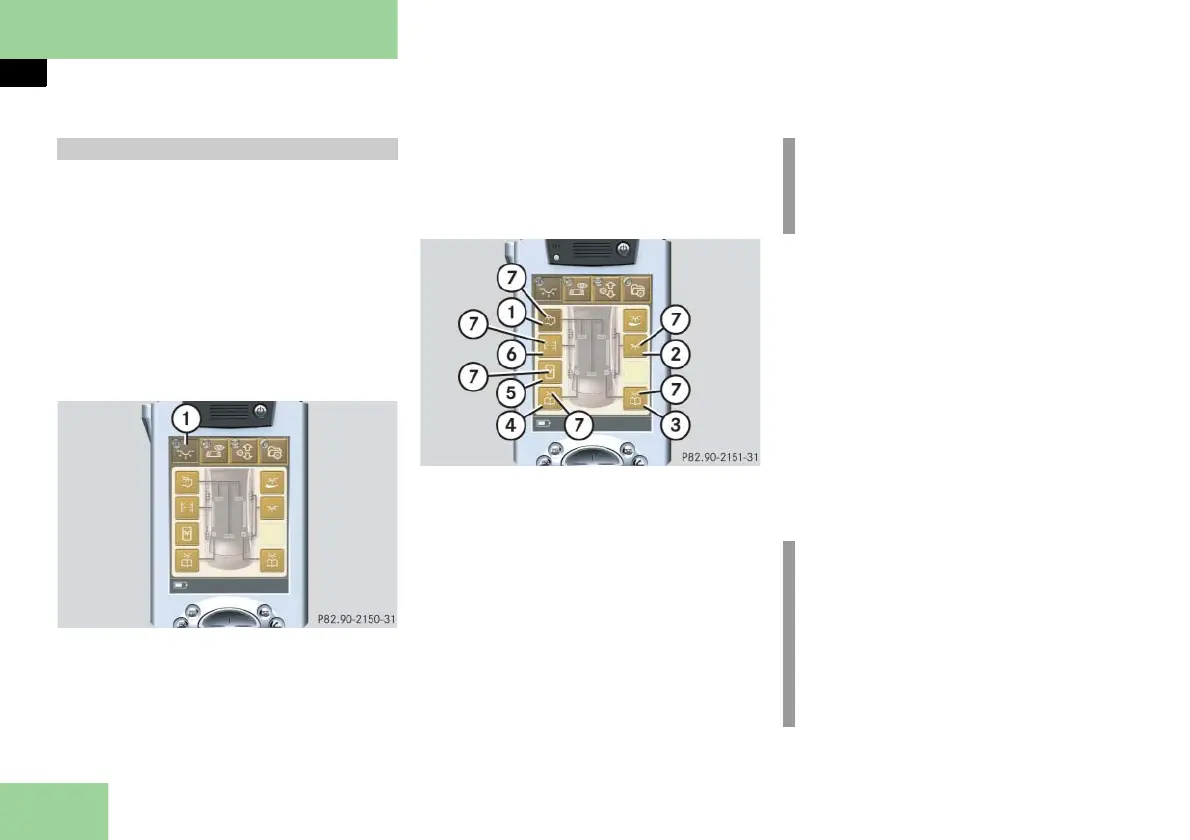
Selecting main menu: Light
1 Main menu: Light
Press main menu button: Light 1.
The selected symbol in button 1 is
highlighted in the display and you
will see the corresponding submenus.
Switching interior lighting, ambient
lighting, reading lamps, roof lighting* or
headliner lamps and pillar uplights func-
tions* on/off
1 Function button: Interior lighting
2 Function button: Ambient lighting
3 Function button: Reading lamp, right
4 Function button: Reading lamp, left
5 Function button: Roof lighting*, in
vehicles with a electrotransparent
roof*
6 Function button: Headliner lamps
and pillar uplights*, in Maybach 62
with tilt/sliding sunroof
7 Light symbol
Switching on the lights
Press the desired function button 1,
2, 3, 4, 5 or 6.
The corresponding light symbol 7
turns yellow.
Switching off the lights
Press the desired function button 1,
2, 3, 4, 5 or 6.
The corresponding light symbol 7
turns white.
Operation via touch-screen i
Depending on equipment, the ar-
rangement of function buttons may
vary.
i
If you would like to switch a selected
light on or off with the navigation
button, press the navigation button
in the center or
on the left or
on the right



 To Next Page