278
Controls in detail
Useful features
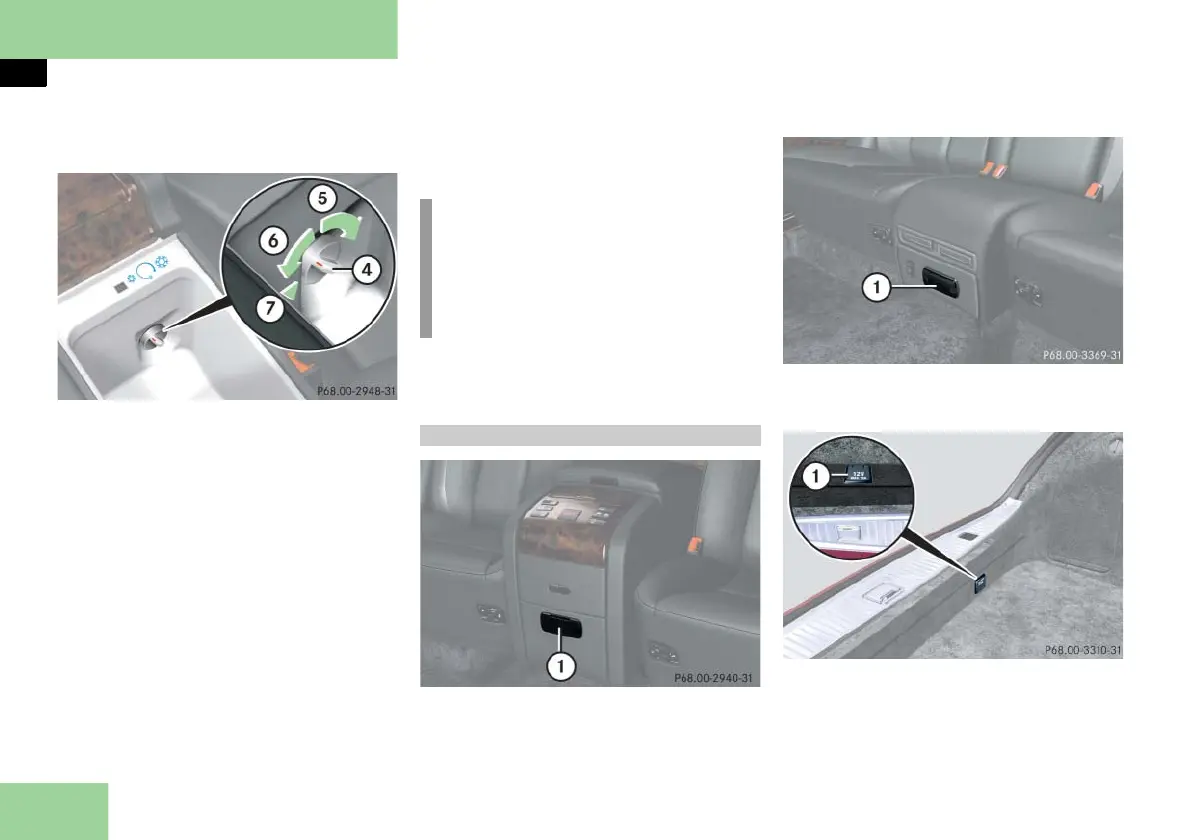
Refrigerator control
4 Control knob
5 To increase cooling
6 To decrease cooling
7 To turn off the refrigerator
Turning refrigerator on
Turn knob 4 from OFF position 7
clockwise.
The refrigerator is on.
Turning refrigerator off
Turn knob 4 counterclockwise to
OFF position 7. Make sure the rotary
control is turned fully counterclock-
wise, until an audible 'click' is heard.
Regulating the temperature
Turn knob 4 to the desired position.
Closing the refrigerator
Press the lid down until it engages.
1 Socket in the rear center console
1 Socket in the rear center console
(vehicles with a rear center seat*)
1 Socket in the trunk
Sockets 1 can accommodate electrical
accessories up to a maximum of 180 W.
!
When setting max. cooling, the tem-
perature in the refrigerator may fall
below freezing point. Objects stored
in the refrigerator such as water bot-
tles may burst.
12-V socket



 To Next Page