310
Controls in detail
Pocket PC remote control*
Maybach 57
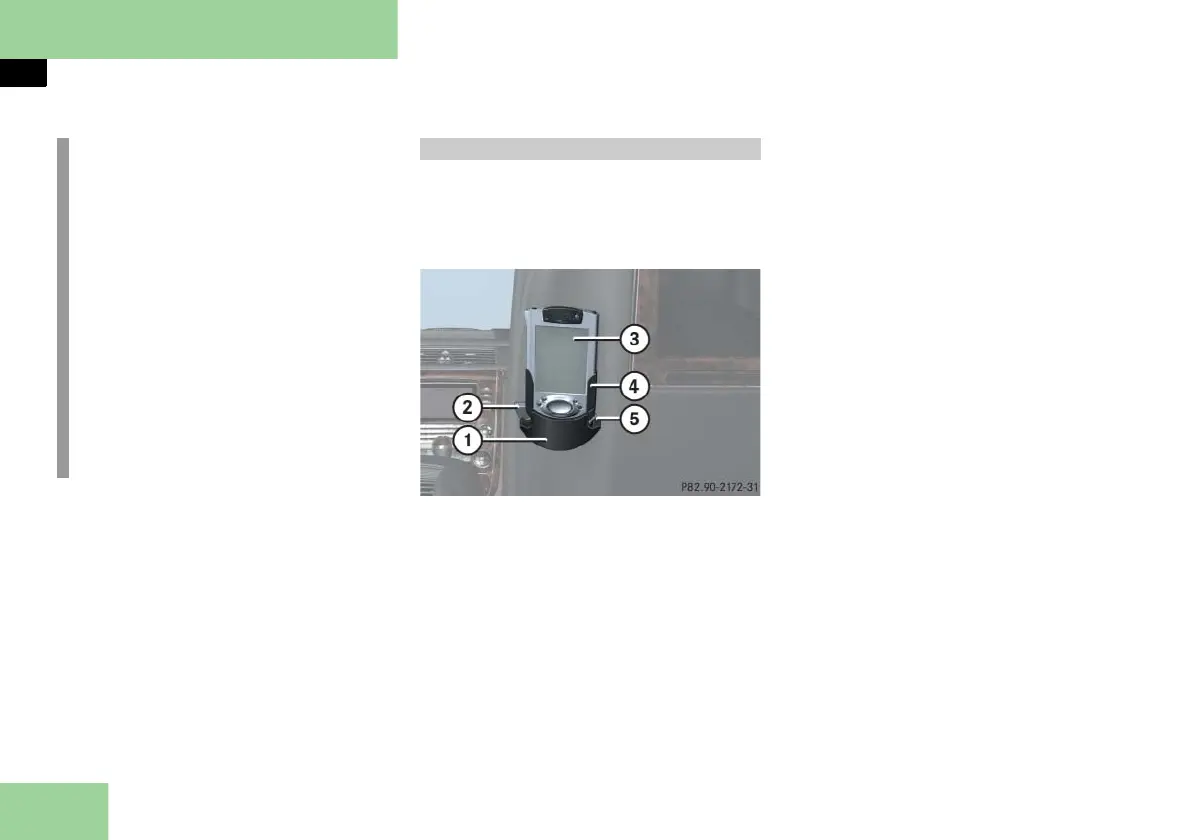
The Pocket PC holder is on the back of
the front passenger seat backrest.
Pocket PC 1 shown; Pocket PC 2 varies slightly
1 Holder
2 Release button
3 Pocket PC
4 Cradle
5 Release button
Removing the Pocket PC
Press release button 2.
The holder 1 folds forwards slightly.
Press release button 5 and pull
Pocket PC 3 upward out of
cradle 4.
Inserting the Pocket PC
Insert Pocket PC 3 into cradle 4 un-
til it engages.
Press Pocket PC 3 towards the back-
rest until holder 1 engages.
The battery is charged depending on
its charge status and the position of
the SmartKey in the starter switch.
While charging, the yellow battery
charge indicator lamp (
page 312)
or (
page 315) in the top right cor-
ner flashes. Once the battery has
been fully charged, the indicator
lamp comes on continuously as long
as Pocket PC 3 is in cradle 4.
i
For operation in the USA only: This
device complies with Part 15 of the
FCC Rules. Operation is subject to the
following two conditions:
(1) This device may not cause harmful
interference, and
(2) this device must accept any inter-
ference received, including inter-
ference that may cause undesired
operation.
Any unauthorized modification to
this device could void the user’s au-
thority to operate the equipment.
Pocket PC holder



 To Next Page