226
Controls in detail
Power tilt/sliding sunroof
Switch on ignition ( page 54).
Operating from the cockpit
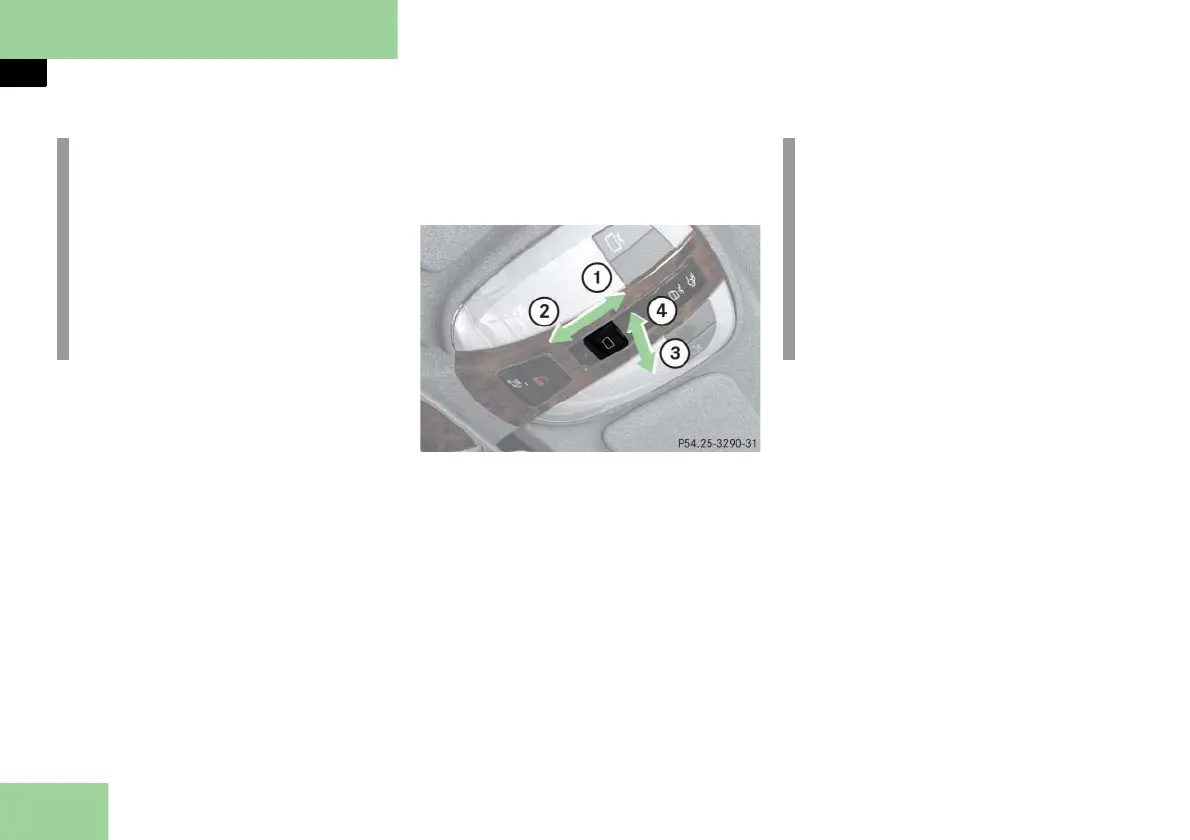
The switch for the tilt/sliding sunroof is
on the overhead control panel.
Sunroof switch, front
1 Push back to slide screen or sunroof
open
2 Push forward to slide screen or sun-
roof closed
3 Pull down to lower sunroof at rear
4 Push up to raise sunroof at rear
Opening and closing the screen
To open or close the screen, move the
sunroof switch to the resistance point
in the required direction of arrow 1
or 2.
Release the sunroof switch when the
screen has reached the desired posi-
tion.
i
With the SmartKey in starter switch
position 0 or removed from the start-
er switch, the tilt/sliding sunroof can
be operated
until you open the driver’s or pas-
senger door
for up to approximately five min-
utes
i
If the screen is closed, the screen
opens first when you push the sun-
roof switch in direction of arrow 1.
Push the sunroof switch again in di-
rection of arrow 1 to open the tilt/
sliding sunroof.
The screen only operates with the tilt/
sliding sunroof closed.



 To Next Page