259
Controls in detail
Useful features
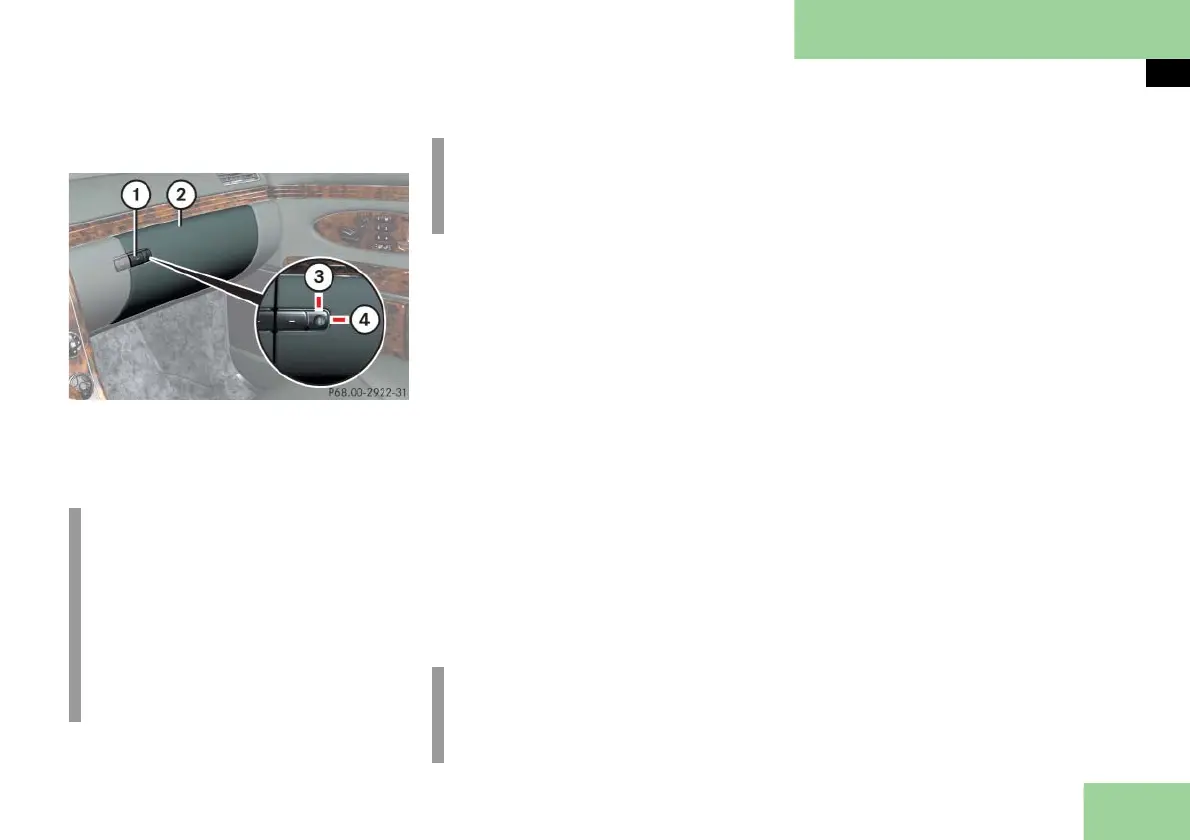
Glove box
1 Glove box lid release
2 Glove box lid
3 Unlocked position
4 Locked position
Opening
Press button 1.
The glove box lid 2 swings down.
Closing
Push lid 2 up to close.
Locking the glove box separately
You can lock the glove box separately,
e.g. when the vehicle is in the shop for
service.
Pull the mechanical key out of the
SmartKey (
page 423).
Insert the mechanical key into the
glove box lock and turn it to locked
position 4.
Unlocking the glove box separately
Pull the mechanical key out of the
SmartKey (
page 423).
Insert the mechanical key into the
glove box lock and turn it to
unlocked position 3.
You can now open the glove box.
Storage compartment in the glove box
A storage compartment for pens, a flash-
light and a coin holder is located in the
cover of the glove box.
Opening
Lightly touch cover plate.
The cover opens automatically.
Closing
Lightly push the cover plate up until
it engages in lock.
i
The glove box can be heated or
cooled.
The glove box can get very warm due
to its confined space (
page 209).
When storing heat-sensitive objects
in the glove box, close the air vent
while heating the passenger com-
partment.
i
An AUX socket is located in the glove
box. Portable audio devices can be
plugged in here.
i
The separate locking status of the
glove box can only be canceled by
means of the mechanical key.



 To Next Page