326
Controls in detail
Pocket PC remote control*
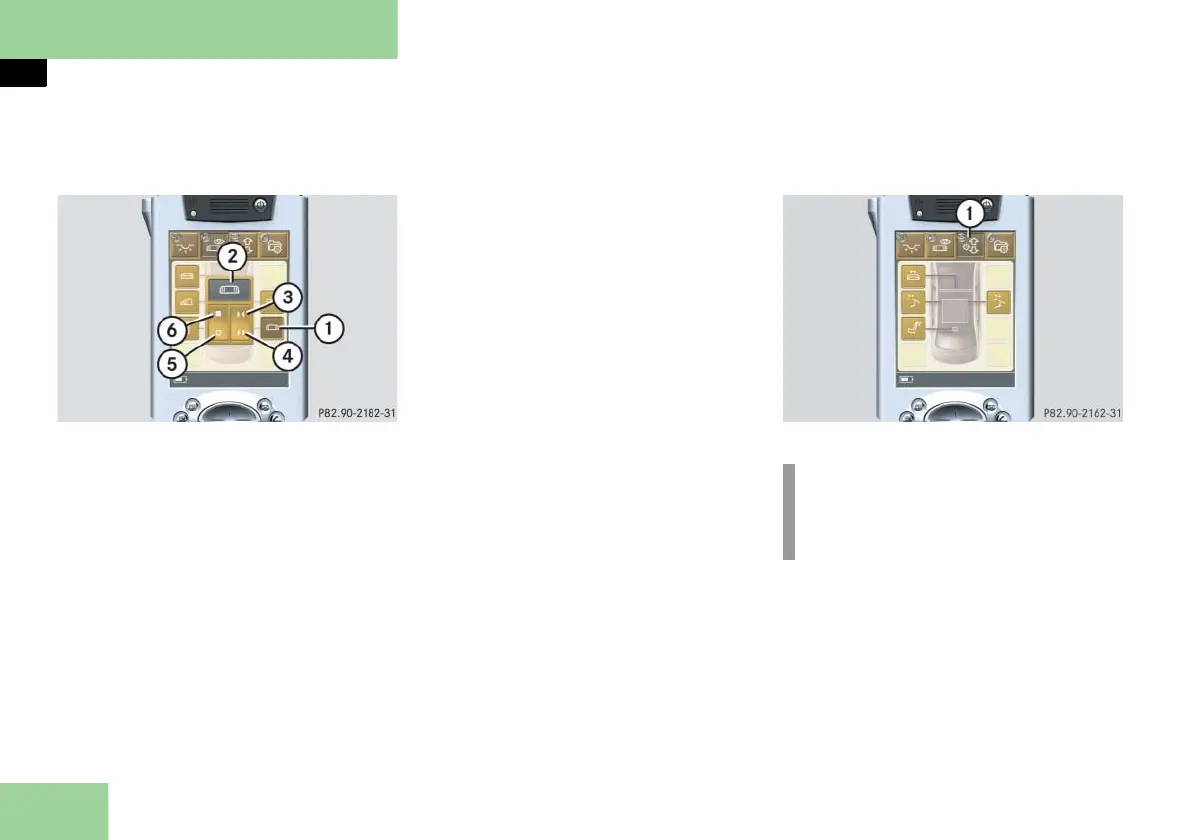
Selecting submenu: Operating the rear
window curtain
1 Submenu: Rear window curtain
2 Settings menu
3 To close curtain
4 To open curtain
5 To open curtain automatically
6 To close curtain automatically
Press submenu button: Rear window
curtain 1.
The selected symbol in button 1 is
highlighted in the display and you
will see the corresponding settings
menu 2.
Opening the curtain
Press and hold symbol 4.
The curtain opens until you release
symbol 4.
Closing the curtain
Press and hold symbol 3.
The curtain closes until you release
symbol 3.
Fully opening the curtain (Express-open)
Briefly press symbol 5.
The curtain opens completely.
To stop the procedure, press
symbol 5 again.
Fully closing the curtain (Express-close)
Briefly press symbol 6.
The curtain closes completely.
To stop the procedure, press
symbol 6 again.
Selecting main menu: Manual adjust-
ments
1 Main menu: Manual Adjustments
Press main menu button: Manual Ad-
justments 1.
The selected symbol in button 1 is
highlighted in the display and you
will see the corresponding submenus.
i
Depending on equipment, the ar-
rangement of function buttons may
vary.



 To Next Page