337
Controls in detail
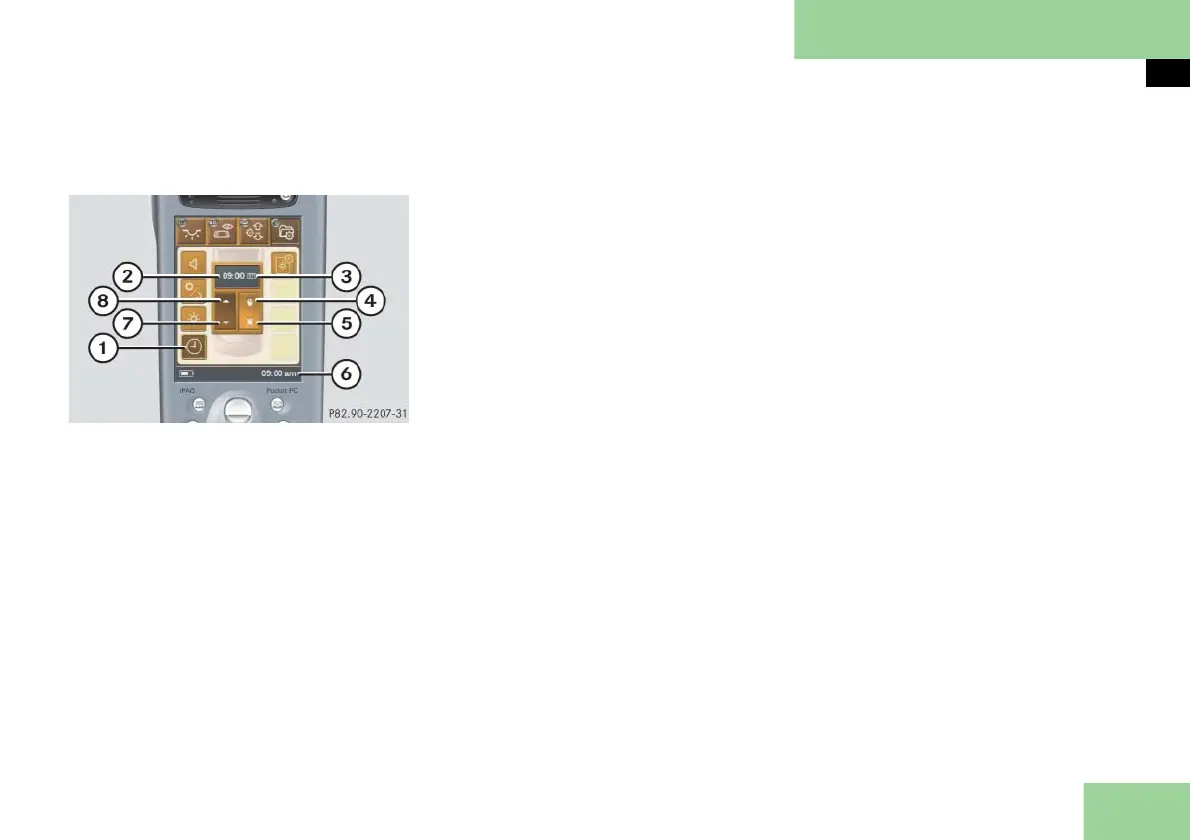
Pocket PC remote control*
Selecting submenu: Time and selecting
settings (Pocket PC 2)
1 Submenu: Time
2 Settings menu for hours and minutes
3 Settings menu for time display mode
4 To set time manually
5 To set time synchronization with
COMAND
6 Display time in the status line
7 To set hours and minutes forward
8 To set hours and minutes backward
Press submenu button: Time 1.
The selected symbol in button 1 is
highlighted in the display and you
will see the corresponding settings
menus 2 and 3.
Setting time manually
Press symbol 4.
You can set hours and minutes manu-
ally with the symbol 7 or 8.
Setting time synchronization with
COMAND
Press symbol 5.
The Pocket PC time is synchronized
with your COMAND. In the settings
menus 2 and 3 appears AUTO.
Setting hours and minutes forward or
backward
Press symbol 7 or 8 until the hours
and minutes have been set.
Setting time display mode
Press symbol 7 or 8 repeatedly until
the desired display mode is set
according to either the 24-hour mode
or the 12-hour mode.
In settings menu for time display
mode 3 the desired display appears:
24 for 24h time display mode
or
AM or PM for 12h time display
mode.
In addition, am or pm for 12h time
display mode appears in status
line 6.



 To Next Page