429
Practical hints
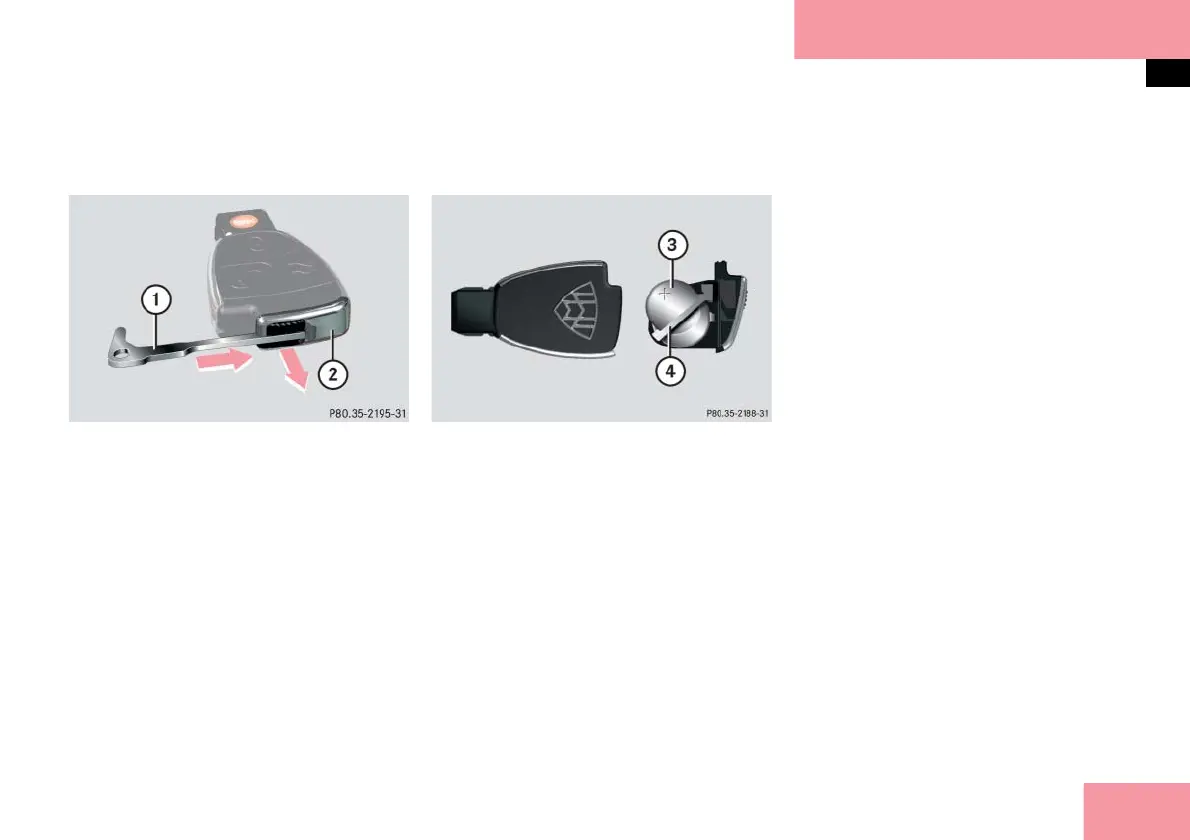
Replacing SmartKey batteries
Remove the mechanical key out of
the SmartKey (
page 423).
1 Mechanical key
2 Battery compartment
Replacement batteries: Lithium, type
CR 2025 or equivalent.
Insert mechanical key 1 inside open-
ing and push gray slide in direction of
arrow.
The battery compartment 2 is un-
latched.
Pull battery compartment 2 out of
the housing in direction of arrow.
3 Battery
4 Contact spring
Remove the batteries 3.
Using a lint-free cloth, insert new
batteries 3 under the contact
spring 4 with the plus (+) side facing
up.
Return battery compartment 2 into
the housing until it locks into place.
Slide mechanical key 1 back into the
SmartKey.
Check the operation of the SmartKey/
KEYLESS-GO**.



 To Next Page