EasyManua.ls Logo

McCulloch Mini-Mac 6 - Page 34

McCulloch Mini-Mac 6
40 pages
Print Icon
To Next Page IconTo Next Page
To Previous Page IconTo Previous Page
Loading...
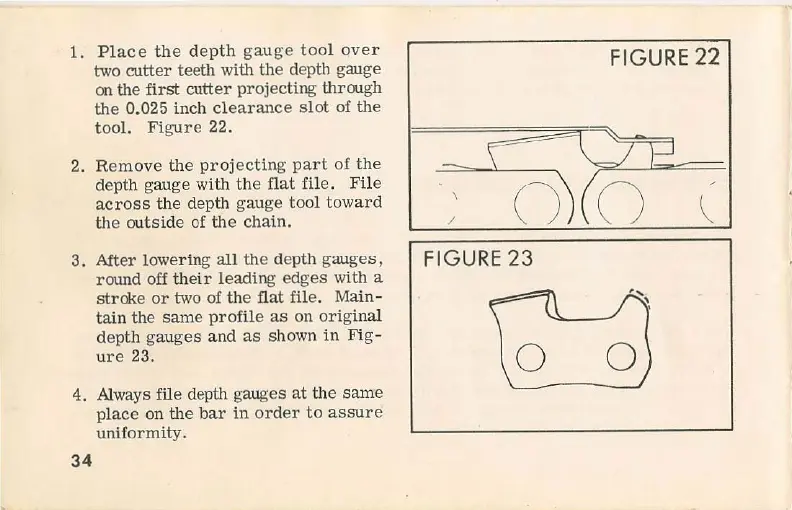
1.
Place
the
d
ep
th
gauge
too
l
ove
r
two
cutter
teeth with
the
depth gauge
on the
first
cutter
project
ing
thrrugh
the
0.025
inch
clearance
sl
ot
of
the
tool.
Figure
22.
2.
Remove
the
projecting
par
t
of
th
e
depth
ga
uge
with
the
flat
file.
Fi
le
ac
ross
the
depth
gauge
tool
toward
the
outside
of
the
cha
in.
3.
After
lowe
ri
ng
all
the
depth
gauges,
rrund
off
th
e
ir
l
eading
edges
with a
strcke
or two
of
th
e
fiat
file.
Main-
tain
the
same
profile
as
on
origi
nal
depth
gauges
and
as
shown
in
Fi
g-
ure
23.
4. Always file depth
gauges
at
th
e
same
pl
ace
on
th
e
bar
in
order
to
assu
re
uniformity.
34
FIGURE
22
Cl
~?r?
-
~
,
\
\
/
FIGURE
23
'\
l\
~.
0
OJ

Related product manuals