McHale C430/C460/C470/C490 Bale Chopper
48
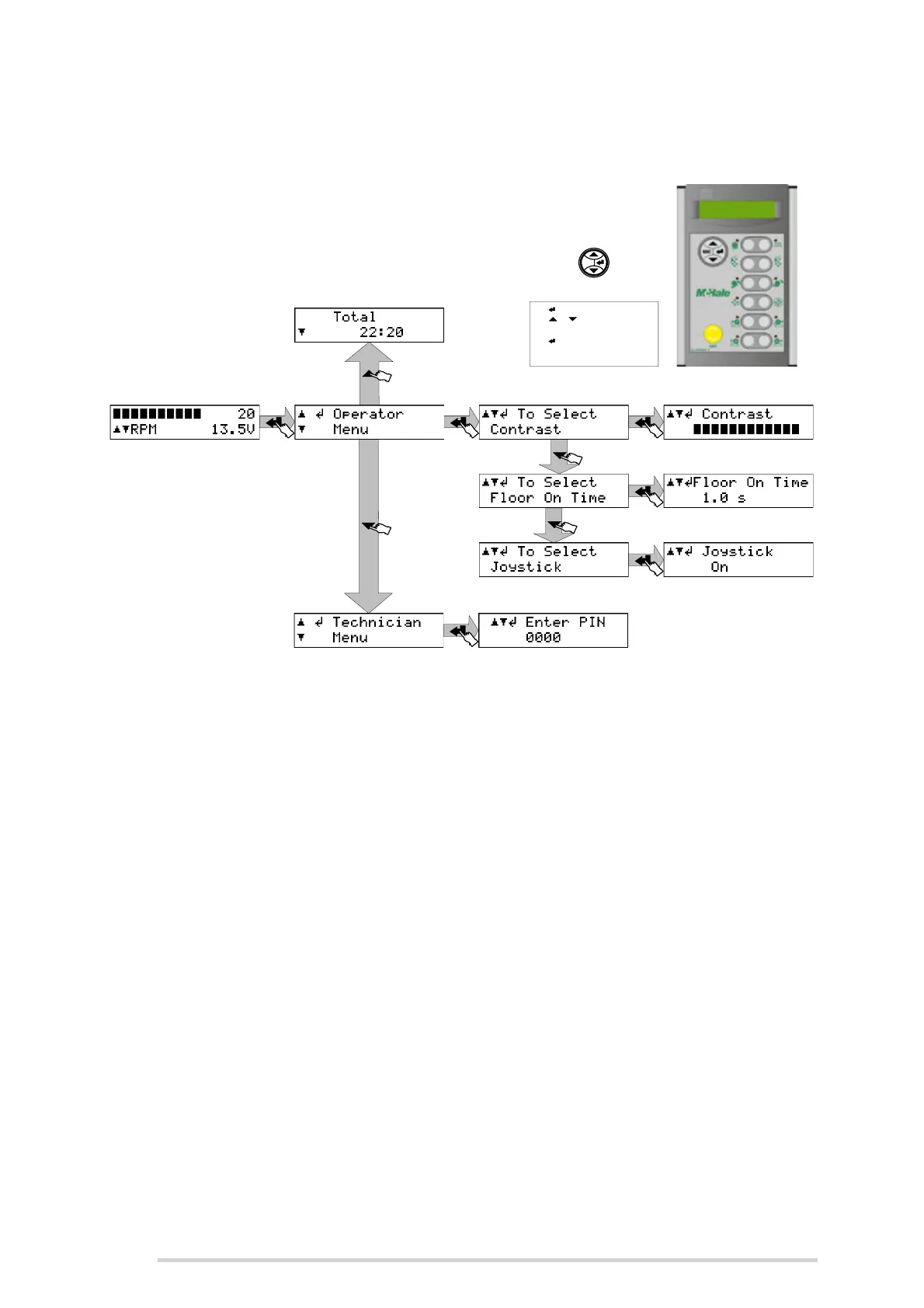
7.2 Electronic control box setup
Total
Displays the total working time in hours and minutes. The total only increases when
functions are operated. It does not include time when the machine is left idle with the
control unit switched on.
Contrast
Extremes of temperature and light may affect the contrast of the display, which is
adjustable from the contrast menu. Use the up and down arrows to adjust the setting.
Floor On Time
Sets the time that the floor stays on for, when set to ‘Pulsed Mode’. Use the up and
down arrows to adjust the setting. (See ‘Pulsed mode’)
Joystick
Sets the joystick to On or Off. Use the up and down arrows to adjust the setting. (See
‘Alternative chute control’)
Technician Menu
The technician menu is reserved for McHale engineers only. A pin code needs to be
entered to access the menu.
Use & to move up and down
through the menu o pt ions.
Use (enter) to select the option
and use ESC to return to the
previous level.
Use (enter) to access the menu.
ES C
ENTER
ESCAPE
MENU UP
MENU DOWN



 To Next Page