"2033ES / 2633ES" Service & Parts Manual - ANSI Specifications October 2008
Page 2-3
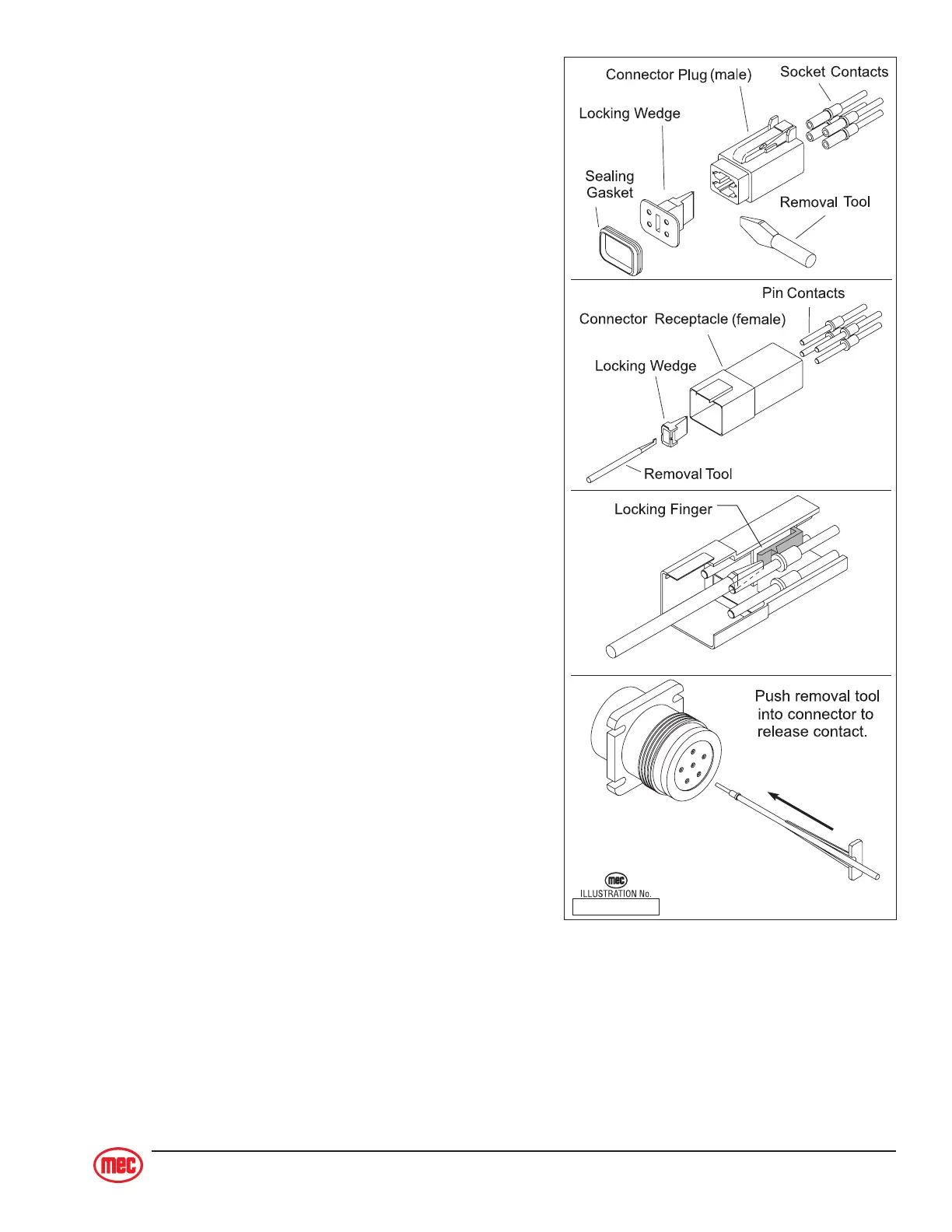
DEUTSCH CONNECTORS
Deutsch connectors used on MEC equipment is
designed so that individual parts may be replaced
without replacing the entire component. Special tools
and detailed instructions are provided in Deutsch
Connector field kits, MEC part # 84091.
Male Plug Connector
♦ Use the flat end of the Removal Tool or a flat blade
screwdriver to pry the locking wedge from the
connector, taking care not to damage the Sealing
Gasket.
♦ Inspect and replace damaged parts.
♦ Replace or re-crimp wires and contacts.
Female receptacle Connector
♦ Use the notched end of the removal tool or a wire
hook to pull the locking wedge from the connector
♦ Replace worn or damaged parts
♦ Replace or re-crimp wires and contacts.
Locking Fingers
♦ Remove the locking wedge as outlined above.
♦ Using the removal tool or a flat blade screwdriver,
push the Locking Fingers aside to release the
contact.
♦ Pull the wire and contact out of the connector.
Heavy Duty Plug
♦ Slide the removal tool along the wire to be re-
placed and push into the connector to release the
contact.
♦ Pull the wire and contact out of the plug.
Crimping
♦ Strip 1/4 in (6 mm) insulation from the wire.
♦ Insert the contact into the crimping tool and insert the stripped wire into the contact making
sure no wires are outside the contact barrel.
♦ Close the handles of the crimping tool, then release the handles to remove the crimped
contact.
ART_2041
Deutsch Connector Field Kit
MEC part # 84091



 To Next Page